
Week Commencing Grouping in reporting | Adobe Higher Education
Skip to main content
Mr_Anderson_
Level 2
February 21, 2023
Risolto

Week Commencing Grouping in reporting

  • February 21, 2023
  • 1 risposta
  • 530 visualizzazioni

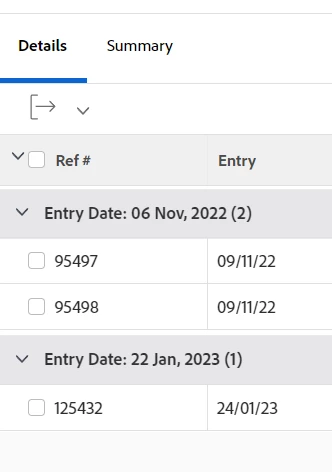
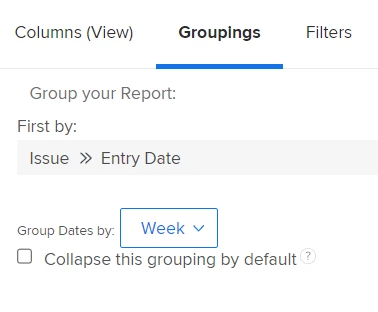
I'm trying to group an issue report on the issue entry date by week (as in, the week the issue was entered). The default way of doing this (Groupings > Issue > Entry date and group by week) is almost perfect however because in WF the starting day of the week is a Sunday by default, i'm getting the week grouping date shown in the report to be 1 day earlier than i'd like. Does anyone know of a way using text mode or otherwise to change this? Or is the easiest way to use a calculated field on the entry date and group on that?
 

Questo argomento è stato chiuso alle risposte.
Migliore risposta di Madalyn_Destafney

It's true that WF has start day set to Sunday, which isn't ideal and I've confirmed this isn't a setting you can change somewhere. Not sure how to change it with a calculated field. There is an Idea to please upvote to change this here! https://experienceleaguecommunities.adobe.com/t5/workfront-ideas/calendar-to-display-dates-from-monday-not-sunday-in-due-date/idi-p/526742

1 risposta

Madalyn_Destafney
Community Advisor
Community Advisor
March 1, 2023

It's true that WF has start day set to Sunday, which isn't ideal and I've confirmed this isn't a setting you can change somewhere. Not sure how to change it with a calculated field. There is an Idea to please upvote to change this here! https://experienceleaguecommunities.adobe.com/t5/workfront-ideas/calendar-to-display-dates-from-monday-not-sunday-in-due-date/idi-p/526742

If this helped you, please mark correct to help others : )
