Using Journal Entry data for reporting on custom status changes | Community
Skip to main content
Level 2
August 20, 2026
Question

Using Journal Entry data for reporting on custom status changes

  • August 20, 2026
  • 5 replies
  • 17 views

Hello!  Hoping someone in the community can help me come up with a solution.  Here’s what I’m trying to do…

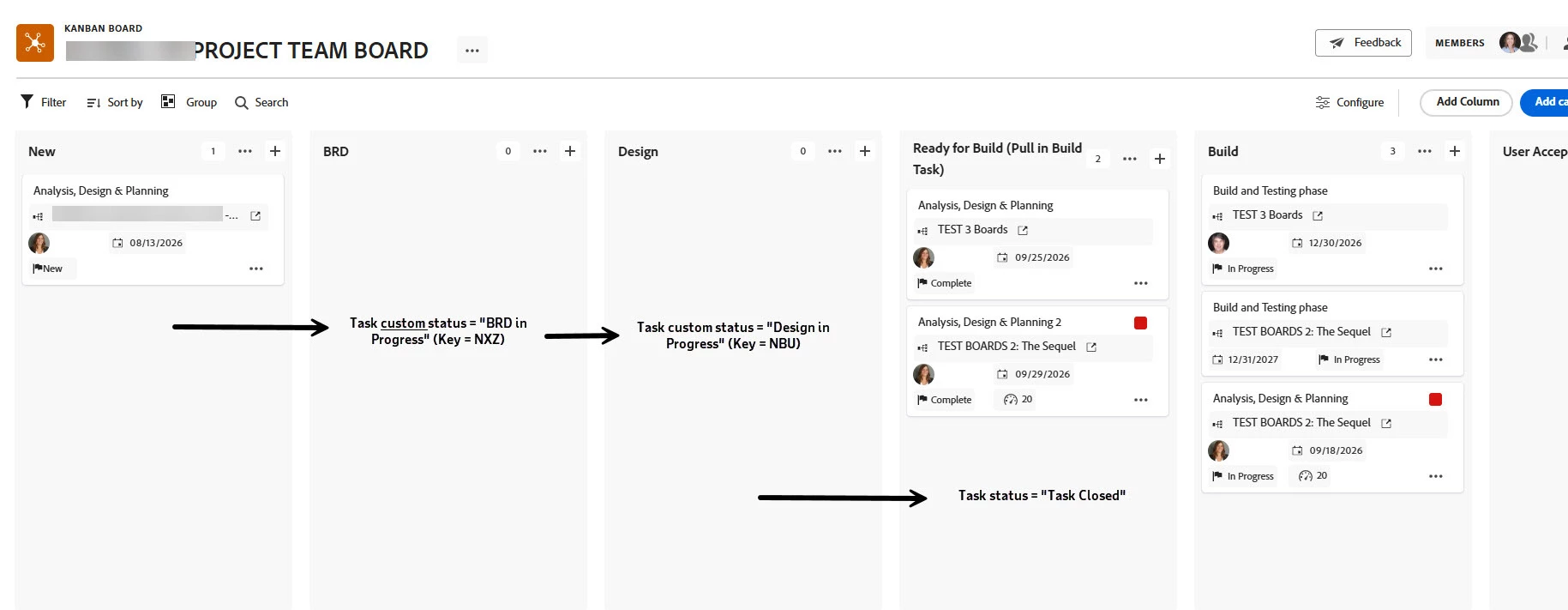
Situation:  We have a Kanban Board where we will move a Task from a project plan to the Board and then pull the same “analysis” task through multiple columns that have custom statuses that all equate to In Progress (INP).  See screen shot “Fig 1 Board.”  The change in custom statuses and their timestamps are captured in the system updates.  

What we need:  We want to be able to show in some kind of report (in Workfront or in Excel or Power BI) how many days the task was at each custom status. I can create a Journal Entry report that shows the time stamps when the card was moved from one column to the next and the custom status changed, but I cannot find a way to export that data or use that data for a calculated field, etc. See screen shot “Fig 2 Journal Entry Report.”  
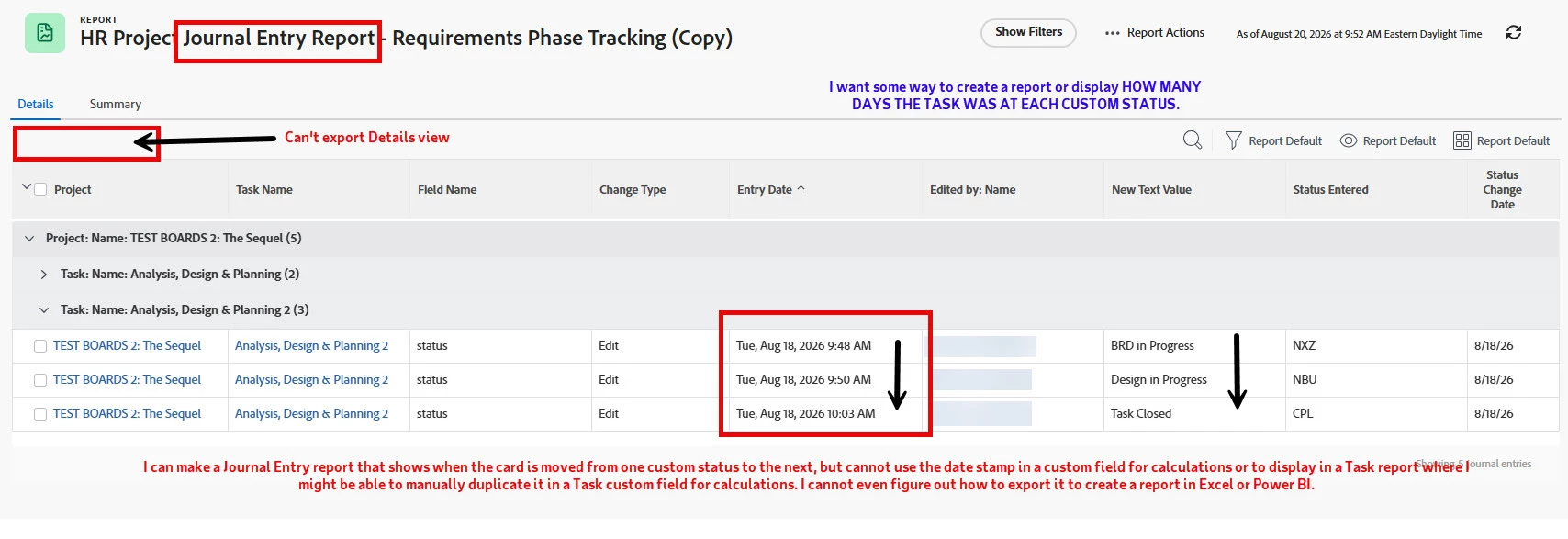

We do not have Fusion and I’ll never be able to get funding for Fusion.  I also realize I can break out the “analysis” task into separate tasks and add them to the board for just the one column and use the native date fields, which I may have to do if there is no other way for me to pull out this Journal Entry date stamp data to use in other reporting.  But before I do that, does anyone have a creative solution to help me get the result I want?  

 

5 replies

Richard_Le_
Community Advisor
Community Advisor
August 20, 2026

Hi Brenda,

Assuming that a task will only be set each status once (i.e., it won’t go from New to In Progress, then back to New, then back to In Progress), what I would do is builld calculated fields that capture a timestamp when a status is set. I would then build additional calculated fields that measure the time difference between each status timestamp.


Say you wanted to capture the timestamp of whan a task was set to On Hold, you would create a calculated field called “On Hold Date” (or whatever name you choose). Then save the form to commit the field to the database, and then enter the following calculation into the field:

IF({status}=”ONH”,IF(ISBLANK({DE:On Hold Date}),$$NOW,{DE:On Hold Date}),{DE:On Hold Date})

With this calculation, if a task is set to On Hold, and a timestamp has not previously been captured, it will return a value of NOW, else it will return the previously captured timestamp.

You would then repeat this process for each status you want to track. Let’s assume that you also track a timestamp for when a task was set to In Progress and capture this in a field called In Progress Date


Next you would build calculated fields that measure the time difference between each timestamp. If you wanted to measure days, the calculation would look something like this:

WEEKDAYDIFF({DE:On Hold Date},{DE:In Progress Date})

This calculation will return the number of weedays between when a task was set to On Hold and when it was set to In Progress. You could also use a WORKMINUTESDIFF opertation to capturing working minutes, or DATEDIFF to capture days including weekends.


Hope that helps!

BrendaVa1Author
Level 2
August 20, 2026

Thank you, Richard!  Let me very carefully follow your directions and try this.  I was working with what looks like a similar formula that I saw in the Workfront documentation but couldn’t get it to work.   I am hoping that it works with the non-native status keys.   I will let you know the results of my testing!

BrendaVa1Author
Level 2
August 20, 2026

@Richard_Le_ 
OK, so using a custom form for date tracking on Tasks that I have already out there, I added a new calculated field called “BRD in Prog Date calc field” with a Date/Time format and saved it.  Then I opened it again and put in the following formula (using the status key for the custom status): 

IF({status}=”NXZ”,IF(ISBLANK({DE:BRD in Prog Date calc field}),$$NOW,{DE:BRD in Prog Date calc field}),{DE:BRD in Progress Start Date})

But I can’t save it because I am getting a “This is an invalid custom expression, please try again” error. I did try changing “NXZ” to “INP,” in case it only likes the “equates to” statuses, but that didn’t matter.  I also made sure to populate the field names using the field picker so that I didn’t have any typos.  No luck. 

Any thoughts? 

BrendaVa1Author
Level 2
August 21, 2026

@Richard_Le_ , thank you!

Dang it, you were right about me referencing the wrong field.  I was getting sloppy, I guess. 

Anyway, I typed out the calculation (instead of cutting and pasting) and referenced all the right fields and finished setting up the rest of the calculated fields and it looks like it’s working!

You’re a genius!  Thank you!