Text Mode Help - Conditional Line Breaks | Community
Skip to main content
MLehman
User Group Leader
User Group Leader
January 22, 2025
Solved

Text Mode Help - Conditional Line Breaks

  • January 22, 2025
  • 5 replies
  • 1001 views

I'm not even sure if this is possible, but I'm hoping someone has an answer!


I have a custom form with several calculated fields which generate a link if that option is selected in a dropdown field. I have created a report with a shared column which lists each generated link. I currently have a huge field with "slots" for all potential results, even though only a few of the links are generated. I want to see if I can only display the line break if there is a value in the calculated field. Is that possible? Happy to share my (very very long) text mode if it helps.


Example: If someone selects only email and social from the dropdown list of 10 options, the column in the report would show the email link and the social link (separated by a line break), but would not include a blank line for all the other 8 options. See screenshot of current situation.


This post is no longer active and is closed to new replies. Need help? Start a new post to ask your question.
Best answer by Jeremy_Berquest

The universe is funny. I was looking for a solution to this exact thing this morning, then ran across this 3-month old thread that you bumped today. I was about to chime in that I needed a solution as well, but had an aha moment and figured it out. This isn't a solution to the original post, but hopefully the code will inform how to setup IF statements for success.


I have an issue custom form related to business interruptions, and it includes 4 paragraph fields. Generally, not all of the paragraphs will be completed, but I didn't want a bunch of blank columns in my report. I set about combining all four paragraphs into one shared column. "Before" shown below:
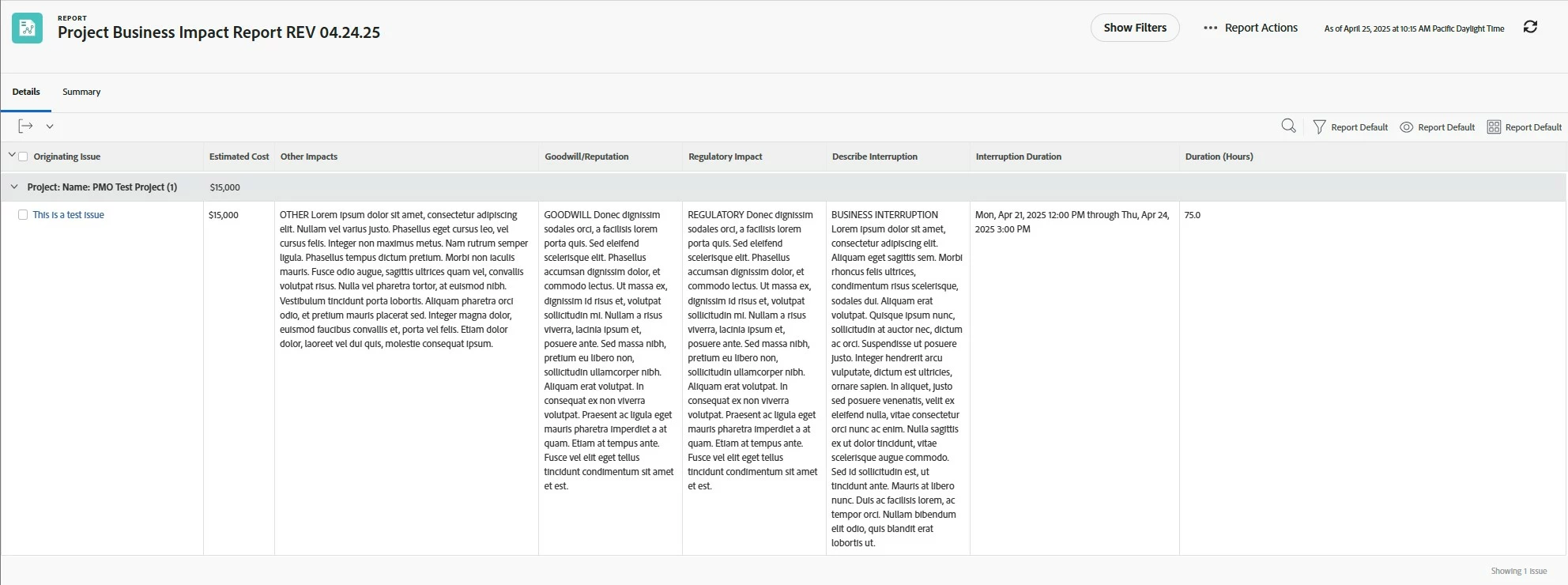


Resulting shared columns (with blank columns inserted between with IF statements):
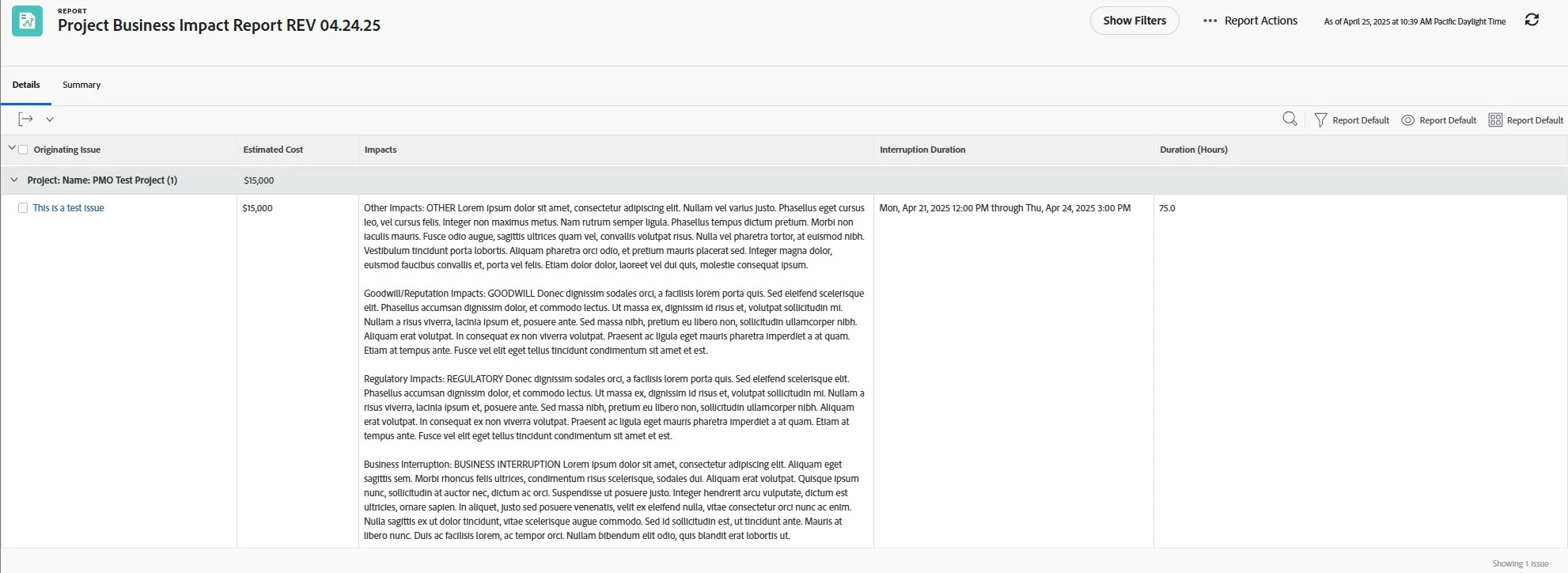
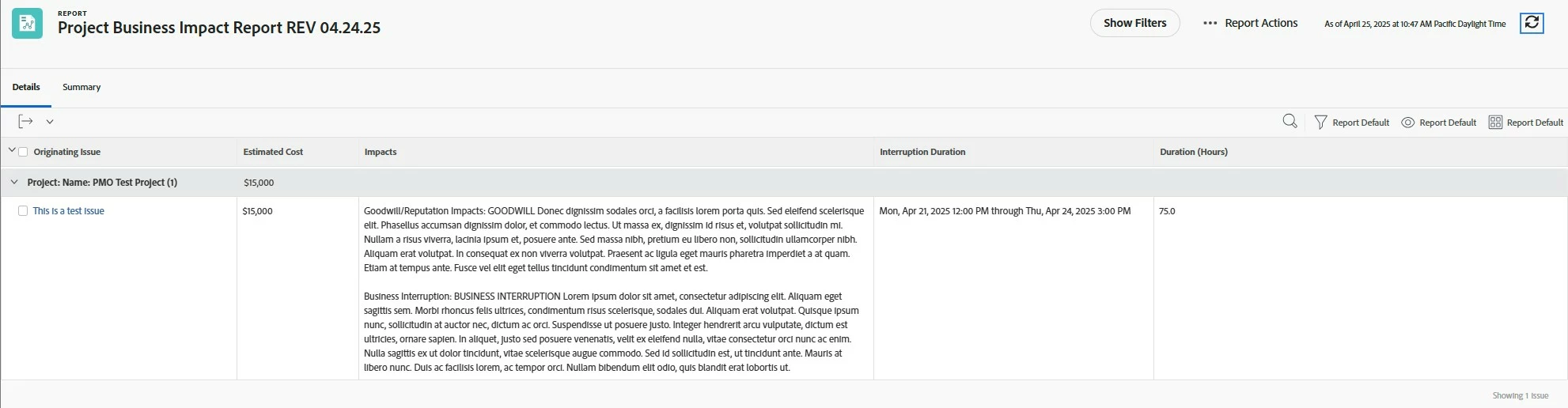
Successful conditional line breaks (in this example, Regulatory and Other Impact paragraphs are blank):
My code. (Be kind if there's wierdness, I still consider myself a text mode amateur, but hey, it works in my case):

column.2.displayname=Impacts
column.2.linkedname=direct
column.2.namekey=Other Impacts
column.2.querysort=DE:Other Impacts
column.2.sharecol=true
column.2.textmode=true
column.2.valueexpression=IF(ISBLANK({DE:Other Impacts}),"",CONCAT("Other Impacts: ",{DE:Other Impacts}))
column.2.valueformat=customDataLabelsAsString
column.3.sharecol=true
column.3.textmode=true
column.3.valueexpression=IF(ISBLANK({DE:Other Impacts}),"","<br><br>")
column.3.valueformat=HTML
column.4.linkedname=direct
column.4.namekey=Goodwill/Reputation
column.4.querysort=DE:Goodwill/Reputation
column.4.sharecol=true
column.4.textmode=true
column.4.valueexpression=IF(ISBLANK({DE:Goodwill/Reputation}),"",CONCAT("Goodwill/Reputation Impacts: ",{DE:Goodwill/Reputation}))
column.4.valueformat=customDataLabelsAsString
column.5.sharecol=true
column.5.textmode=true
column.5.valueexpression=IF(ISBLANK({DE:Goodwill/Reputation}),"","<br><br>")
column.5.valueformat=HTML
column.6.linkedname=direct
column.6.namekey=Regulatory Impact
column.6.querysort=DE:Regulatory Impact
column.6.sharecol=true
column.6.textmode=true
column.6.valueexpression=IF(ISBLANK({DE:Regulatory Impact}),"",CONCAT("Regulatory Impacts: ",{DE:Regulatory Impact}))
column.6.valueformat=customDataLabelsAsString
column.7.sharecol=true
column.7.textmode=true
column.7.valueexpression=IF(ISBLANK({DE:Regulatory Impact}),"","<br><br>")
column.7.valueformat=HTML
column.8.linkedname=direct
column.8.namekey=Describe Interruption
column.8.querysort=DE:Describe Interruption
column.8.textmode=true
column.8.valueexpression=IF(ISBLANK({DE:Describe Interruption}),"",CONCAT("Business Interruption: ",{DE:Describe Interruption}))
column.8.valueformat=customDataLabelsAsString


I hope that is helpful, good luck!

5 replies

RandyRoberts
Community Advisor
Community Advisor
January 25, 2025

This sounds like a fun puzzle. If you could post your code, I'd be interested in noodling with it.

MLehman
User Group Leader
MLehmanUser Group LeaderAuthor
User Group Leader
January 27, 2025

Ok, Randy...you asked for this! I realize there are a couple wonky things going on with the code (I don't know what column 4 is doing there at all and the Bing column is formatted differently because I was trying some things), but it's working for now and I want to figure out how to fix the line break thing before I go in and update all the columns. I really appreciate any help or insight you have. Thank you!


column.2.displayname=UTMs
column.2.sharecol=true
column.2.shortview=false
column.2.textmode=true
column.2.value=<hr><font color=000000><b>UTMs </b></font>
column.2.valueformat=HTML
column.2.width=350
column.3.displayname=
column.3.sharecol=true
column.3.shortview=false
column.3.textmode=true
column.3.valueformat=HTML
column.4.displayname=Instagram Ads
column.4.linkedname=DE:UTM Source instagramads
column.4.namekey=view.relatedcolumn
column.4.namekeyargkey.0=DE:UTM Source instagramads
column.4.querysort=DE:UTM Source instagramads
column.4.sharecol=true
column.4.textmode=true
column.4.valuefield=CONCAT("Instagram Ads:",DE:UTM Source instagramads)
column.4.valueformat=HTML
column.4.width=100
column.5.displayname=Bing:
column.5.sharecol=true
column.5.shortview=false
column.5.textmode=true
column.5.value=<br>
column.5.valueformat=HTML
column.6.displayname=Bing
column.6.linkedname=DE:UTM Source bing
column.6.namekey=view.relatedcolumn
column.6.namekeyargkey.0=DE:UTM Source bing
column.6.querysort=DE:UTM Source bing
column.6.sharecol=true
column.6.textmode=true
column.6.valueexpression=CONCAT("Bing: ",{DE:UTM Source bing})
column.6.valueformat=HTML
column.6.width=100
column.7.displayname=Facebook
column.7.sharecol=true
column.7.shortview=false
column.7.textmode=true
column.7.value=<br><font color=9C9C9C><b>Facebook: </b></font>
column.7.valueformat=HTML
column.8.displayname=Facebook
column.8.linkedname=DE:UTM Source facebook
column.8.namekey=DE:UTM Source facebook
column.8.namekeyargkey.0=DE:UTM Source facebook
column.8.querysort=DE:UTM Source facebook
column.8.sharecol=true
column.8.textmode=true
column.8.valuefield=DE:UTM Source facebook
column.8.valueformat=HTML
column.9.displayname=Facebook Ads
column.9.sharecol=true
column.9.shortview=false
column.9.textmode=true
column.9.value=<br><font color=9C9C9C><b>Facebook Ads: </b></font>
column.9.valueformat=HTML
column.10.displayname=Facebook Ads
column.10.linkedname=DE:UTM Source facebookads
column.10.namekey=DE:UTM Source facebookads
column.10.namekeyargkey.0=DE:UTM Source facebookads
column.10.querysort=DE:UTM Source facebookads
column.10.sharecol=true
column.10.textmode=true
column.10.valuefield=DE:UTM Source facebookads
column.10.valueformat=HTML
column.11.displayname=Global-custodian
column.11.sharecol=true
column.11.shortview=false
column.11.textmode=true
column.11.value=<br><font color=9C9C9C><b>Global-Custodian: </b></font>
column.11.valueformat=HTML
column.12.displayname=Global-Custodian
column.12.linkedname=DE:UTM Source global-custodian
column.12.namekey=DE:UTM Source global-custodian
column.12.namekeyargkey.0=DE:UTM Source global-custodian
column.12.querysort=DE:UTM Source global-custodian
column.12.sharecol=true
column.12.textmode=true
column.12.valuefield=DE:UTM Source global-custodian
column.12.valueformat=HTML
column.13.displayname=Google
column.13.sharecol=true
column.13.shortview=false
column.13.textmode=true
column.13.value=<br><font color=9C9C9C><b>Google: </b></font>
column.13.valueformat=HTML
column.14.displayname=Google
column.14.linkedname=DE:UTM Source google
column.14.namekey=DE:UTM Source google
column.14.namekeyargkey.0=DE:UTM Source google
column.14.querysort=DE:UTM Source google
column.14.sharecol=true
column.14.textmode=true
column.14.valuefield=DE:UTM Source google
column.14.valueformat=HTML
column.15.sharecol=true
column.15.textmode=true
column.15.valueformat=
column.16.displayname=Hedgeweek
column.16.sharecol=true
column.16.shortview=false
column.16.textmode=true
column.16.value=<br><font color=9C9C9C><b> Hedgeweek: </b></font>
column.16.valueformat=HTML
column.17.displayname=Hedgeweek
column.17.linkedname=DE:UTM Source hedgeweek
column.17.namekey=DE:UTM Source hedgeweek
column.17.namekeyargkey.0=DE:UTM Source hedgeweek
column.17.querysort=DE:UTM Source hedgeweek
column.17.sharecol=true
column.17.textmode=true
column.17.valuefield=DE:UTM Source hedgeweek
column.17.valueformat=HTML
column.18.displayname=Hubspot
column.18.sharecol=true
column.18.shortview=false
column.18.textmode=true
column.18.value=<br><font color=9C9C9C><b>Hubspot: </b></font>
column.18.valueformat=HTML
column.19.displayname=Facebook
column.19.linkedname=DE:UTM Source hubspot
column.19.namekey=DE:UTM Source hubspot
column.19.namekeyargkey.0=DE:UTM Source hubspot
column.19.querysort=DE:UTM Source hubspot
column.19.sharcol=true
column.19.sharecol=true
column.19.textmode=true
column.19.valuefield=DE:UTM Source hubspot
column.19.valueformat=HTML
column.20.displayname=Instagram
column.20.sharecol=true
column.20.shortview=false
column.20.textmode=true
column.20.value=<br><font color=9C9C9C><b>Instagram: </b></font>
column.20.valueformat=HTML
column.21.displayname=Facebook
column.21.linkedname=DE:UTM Source instagram
column.21.namekey=DE:UTM Source instagram
column.21.namekeyargkey.0=DE:UTM Source instagram
column.21.querysort=DE:UTM Source instagram
column.21.sharcol=true
column.21.sharecol=true
column.21.textmode=true
column.21.valuefield=DE:UTM Source instagram
column.21.valueformat=HTML
column.22.displayname=Instagram Ads
column.22.sharecol=true
column.22.shortview=false
column.22.textmode=true
column.22.value=<br><font color=9C9C9C><b>Instagram Ads: </b></font>
column.22.valueformat=HTML
column.23.displayname=Instagram Ads
column.23.linkedname=DE:UTM Source instagramads
column.23.namekey=DE:UTM Source instagramads
column.23.namekeyargkey.0=UTM Source instagramads
column.23.querysort=DE:UTM Source instagramads
column.23.sharcol=true
column.23.sharecol=true
column.23.textmode=true
column.23.valuefield=CONCAT("Instagram Ads:",DE:UTM Source instagramads)
column.23.valueformat=HTML
column.24.displayname=LinkedIn
column.24.sharecol=true
column.24.shortview=false
column.24.textmode=true
column.24.value=<br><font color=9C9C9C><b>LinkedIn: </b></font>
column.24.valueformat=HTML
column.25.displayname=LinkedIn
column.25.linkedname=DE: UTM Source linkedIn
column.25.namekey=DE:UTM Source linkedIn
column.25.namekeyargkey.0=DE:UTM Source linkedIn
column.25.querysort=DE:UTM Source linkedIn
column.25.sharecol=true
column.25.textmode=true
column.25.valuefield=DE:UTM Source linkedIn
column.25.valueformat=HTML
column.26.displayname=LinkedInAds
column.26.sharecol=true
column.26.shortview=false
column.26.textmode=true
column.26.value=<br><font color=9C9C9C><b>LinkedInAds: </b></font>
column.26.valueformat=HTML
column.27.displayname=LinkedInAds
column.27.linkedname=DE:UTM Source linkedinads
column.27.namekey=DE: UTM Source linkedinads
column.27.namekeyargkey.0=DE:UTM Source linkedinads
column.27.querysort=DE:UTM Source linkedinads
column.27.sharecol=true
column.27.textmode=true
column.27.valuefield=DE:UTM Source linkedinads
column.27.valueformat=HTML
column.28.displayname=Outlook
column.28.sharecol=true
column.28.shortview=false
column.28.textmode=true
column.28.value=<br><font color=9C9C9C><b>Outlook: </b></font>
column.28.valueformat=HTML
column.29.displayname=Outlook
column.29.linkedname=DE:UTM Source outlook
column.29.namekey=DE:UTM Source outlook
column.29.namekeyargkey.0=DE:UTM Source outlook
column.29.querysort=DE:UTM Source outlook
column.29.sharecol=true
column.29.textmode=true
column.29.valuefield=DE:UTM Source outlook
column.29.valueformat=HTML
column.30.displayname=pdi
column.30.sharecol=true
column.30.shortview=false
column.30.textmode=true
column.30.value=<br><font color=9C9C9C><b>pdi: </b></font>
column.30.valueformat=HTML
column.31.displayname=pdi
column.31.linkedname=DE:UTM Source pdi
column.31.namekey=DE:UTM Source pdi
column.31.namekeyargkey.0=DE:UTM Source pdi
column.31.querysort=DE:UTM Source pdi
column.31.sharecol=true
column.31.textmode=true
column.31.valuefield=DE:UTM Source pdi
column.31.valueformat=HTML
column.32.displayname=pei
column.32.sharecol=true
column.32.shortview=false
column.32.textmode=true
column.32.value=<br><font color=9C9C9C><b> pei: </b></font>
column.32.valueformat=HTML
column.33.displayname=pei
column.33.linkedname=DE:UTM Source pei
column.33.namekey=DE:UTM Source pei
column.33.namekeyargkey.0=DE:UTM Source pei
column.33.querysort=DE:UTM Source pei
column.33.sharecol=true
column.33.textmode=true
column.33.valuefield=DE:UTM Source pei
column.33.valueformat=HTML
column.34.displayname=pew
column.34.sharecol=true
column.34.shortview=false
column.34.textmode=true
column.34.value=<br><font color=9C9C9C><b> pew: </b></font>
column.34.valueformat=HTML
column.35.displayname=pew
column.35.linkedname=DE:UTM Source pew
column.35.namekey=DE:UTM Source pew
column.35.namekeyargkey.0=DE:UTM Source pew
column.35.querysort=DE:UTM Source pew
column.35.sharecol=true
column.35.textmode=true
column.35.valuefield=DE:UTM Source pew
column.35.valueformat=HTML
column.36.displayname=pewire
column.36.sharecol=true
column.36.shortview=false
column.36.textmode=true
column.36.value=<br><font color=9C9C9C><b> pewire: </b></font>
column.36.valueformat=HTML
column.37.displayname=pewire
column.37.linkedname=DE:UTM Source pewire
column.37.namekey=DE:UTM Source pewire
column.37.namekeyargkey.0=DE:UTM Source pewire
column.37.querysort=DE:UTM Source pewire
column.37.sharecol=true
column.37.textmode=true
column.37.valuefield=DE:UTM Source pewire
column.37.valueformat=HTML
column.38.displayname=podcast
column.38.sharecol=true
column.38.shortview=false
column.38.textmode=true
column.38.value=<br><font color=9C9C9C><b> Podcast: </b></font>
column.38.valueformat=HTML
column.39.displayname=podcast
column.39.linkedname=DE:UTM Source podcast
column.39.namekey=DE:UTM Source podcast
column.39.namekeyargkey.0=DE:UTM Source podcast
column.39.querysort=DE:UTM Source podcast
column.39.sharecol=true
column.39.textmode=true
column.39.valuefield=DE:UTM Source podcast
column.39.valueformat=HTML
column.40.displayname=qr
column.40.sharecol=true
column.40.shortview=false
column.40.textmode=true
column.40.value=<br><font color=9C9C9C><b>qr: </b></font>
column.40.valueformat=HTML
column.41.displayname=qr
column.41.linkedname=DE:UTM Source qr
column.41.namekey=DE:UTM Source qr
column.41.namekeyargkey.0=DE:UTM Source qr
column.41.querysort=DE:UTM Source qr
column.41.sharecol=true
column.41.textmode=true
column.41.valuefield=DE:UTM Source qr
column.41.valueformat=HTML
column.42.displayname=reuters
column.42.sharecol=true
column.42.shortview=false
column.42.textmode=true
column.42.value=<br><font color=9C9C9C><b> Reuters: </b></font>
column.42.valueformat=HTML
column.43.displayname=reuters
column.43.linkedname=DE:UTM Source reuters
column.43.namekey=DE:UTM Source reuters
column.43.namekeyargkey.0=DE:UTM Source reuters
column.43.querysort=DE:UTM Source reuters
column.43.sharecol=true
column.43.textmode=true
column.43.valuefield=DE:UTM Source reuters
column.43.valueformat=HTML
column.44.displayname=video
column.44.sharecol=true
column.44.shortview=false
column.44.textmode=true
column.44.value=<br><font color=9C9C9C><b> Video: </b></font>
column.44.valueformat=HTML
column.45.displayname=video
column.45.linkedname=DE:UTM Source video
column.45.namekey=DE:UTM Source video
column.45.namekeyargkey.0=DE:UTM Source video
column.45.querysort=DE:UTM Source video
column.45.sharecol=true
column.45.textmode=true
column.45.valuefield=DE:UTM Source video
column.45.valueformat=HTML
column.46.displayname=x
column.46.sharecol=true
column.46.shortview=false
column.46.textmode=true
column.46.value=<br><font color=9C9C9C><b> X: </b></font>
column.46.valueformat=HTML
column.47.displayname=x
column.47.linkedname=DE:UTM Source x
column.47.namekey=DE:UTM Source x
column.47.namekeyargkey.0=DE:UTM Source x
column.47.querysort=DE:UTM Source x
column.47.sharecol=true
column.47.textmode=true
column.47.valuefield=DE:UTM Source x
column.47.valueformat=HTML
column.48.displayname=xads
column.48.sharecol=true
column.48.shortview=false
column.48.textmode=true
column.48.value=<br><font color=9C9C9C><b> XAds: </b></font>
column.48.valueformat=HTML
column.49.displayname=xads
column.49.linkedname=DE:UTM Source xads
column.49.namekey=DE:UTM Source xads
column.49.namekeyargkey.0=DE:UTM Source xads
column.49.querysort=DE:UTM Source xads
column.49.sharecol=true
column.49.textmode=true
column.49.valuefield=DE:UTM Source xads
column.49.valueformat=HTML
column.50.displayname=youtube
column.50.sharecol=true
column.50.shortview=false
column.50.textmode=true
column.50.value=<br><font color=9C9C9C><b> Youtube: </b></font>
column.50.valueformat=HTML
column.51.displayname=youtube
column.51.linkedname=DE:UTM Source youtube
column.51.namekey=DE:UTM Source youtube
column.51.namekeyargkey.0=DE:UTM Source youtube
column.51.querysort=DE:UTM Source youtube
column.51.sharecol=true
column.51.textmode=true
column.51.valuefield=DE:UTM Source youtube
column.51.valueformat=HTML
column.52.displayname=youtubeads
column.52.sharecol=true
column.52.shortview=false
column.52.textmode=true
column.52.value=<br><font color=9C9C9C><b> YoutubeAds: </b></font>
column.52.valueformat=HTML
column.53.displayname=youtube
column.53.linkedname=DE:UTM Source youtubeads
column.53.namekey=DE:UTM Source youtubeads
column.53.namekeyargkey.0=DE:UTM Source youtubeads
column.53.querysort=DE:UTM Source youtubeads
column.53.textmode=true
column.53.valuefield=DE:UTM Source youtubeads
column.53.valueformat=HTML

Level 2
April 25, 2025

If you found a solution to this problem I'd love to know what it was. I have a similar issue with shared columns and blank lines. Thanks!

Jeremy_BerquestAccepted solution
Level 2
April 25, 2025

The universe is funny. I was looking for a solution to this exact thing this morning, then ran across this 3-month old thread that you bumped today. I was about to chime in that I needed a solution as well, but had an aha moment and figured it out. This isn't a solution to the original post, but hopefully the code will inform how to setup IF statements for success.


I have an issue custom form related to business interruptions, and it includes 4 paragraph fields. Generally, not all of the paragraphs will be completed, but I didn't want a bunch of blank columns in my report. I set about combining all four paragraphs into one shared column. "Before" shown below:


Resulting shared columns (with blank columns inserted between with IF statements):

Successful conditional line breaks (in this example, Regulatory and Other Impact paragraphs are blank):

My code. (Be kind if there's wierdness, I still consider myself a text mode amateur, but hey, it works in my case):

column.2.displayname=Impacts
column.2.linkedname=direct
column.2.namekey=Other Impacts
column.2.querysort=DE:Other Impacts
column.2.sharecol=true
column.2.textmode=true
column.2.valueexpression=IF(ISBLANK({DE:Other Impacts}),"",CONCAT("Other Impacts: ",{DE:Other Impacts}))
column.2.valueformat=customDataLabelsAsString
column.3.sharecol=true
column.3.textmode=true
column.3.valueexpression=IF(ISBLANK({DE:Other Impacts}),"","<br><br>")
column.3.valueformat=HTML
column.4.linkedname=direct
column.4.namekey=Goodwill/Reputation
column.4.querysort=DE:Goodwill/Reputation
column.4.sharecol=true
column.4.textmode=true
column.4.valueexpression=IF(ISBLANK({DE:Goodwill/Reputation}),"",CONCAT("Goodwill/Reputation Impacts: ",{DE:Goodwill/Reputation}))
column.4.valueformat=customDataLabelsAsString
column.5.sharecol=true
column.5.textmode=true
column.5.valueexpression=IF(ISBLANK({DE:Goodwill/Reputation}),"","<br><br>")
column.5.valueformat=HTML
column.6.linkedname=direct
column.6.namekey=Regulatory Impact
column.6.querysort=DE:Regulatory Impact
column.6.sharecol=true
column.6.textmode=true
column.6.valueexpression=IF(ISBLANK({DE:Regulatory Impact}),"",CONCAT("Regulatory Impacts: ",{DE:Regulatory Impact}))
column.6.valueformat=customDataLabelsAsString
column.7.sharecol=true
column.7.textmode=true
column.7.valueexpression=IF(ISBLANK({DE:Regulatory Impact}),"","<br><br>")
column.7.valueformat=HTML
column.8.linkedname=direct
column.8.namekey=Describe Interruption
column.8.querysort=DE:Describe Interruption
column.8.textmode=true
column.8.valueexpression=IF(ISBLANK({DE:Describe Interruption}),"",CONCAT("Business Interruption: ",{DE:Describe Interruption}))
column.8.valueformat=customDataLabelsAsString


I hope that is helpful, good luck!

MLehman
User Group Leader
MLehmanUser Group LeaderAuthor
User Group Leader
April 28, 2025

So glad you found a solution! What's extra weird is that I also came up with a solution just last week to this issue, using calculated fields. I couldn't figure out how to make it work in the report setting, but did end up making it work with a calculated field and a very cool copy/paste line break found here: https://symbl.cc/en/000A/ It shows up as nothing in the text mode, but does create a line break everywhere you paste it. Below is a sample of the calculated field that worked for me!


Field Name X= Your Field Name

Line Label= Whatever you want to show before your field contents (ex: Facebook: facebook.com where Facebook: is the Line Label and facebook.com is the field contents)

INSERT-LINE-BREAK-HERE= Where you paste the line break character you copied from the link above.


CONCAT(IF(!ISBLANK({Field Name 1}),CONCAT("Line Label",{Field Name 1},"INSERT-PAGE-BREAK-HERE

"),""),IF(!ISBLANK({Field Name 2}),CONCAT("Line Label ",{Field Name 2},"INSERT-PAGE-BREAK-HERE

"),""),IF(!ISBLANK({Field Name 3}),CONCAT("Line Label ",{Field Name 3}),""))


Hope this makes sense! Happy to answer any questions. I'm going to go back and try your solution as well when I get a chance. Thanks for your response!