Text Mode Display Name Help | Community
Skip to main content
NicoleM1
Level 2
May 19, 2026
Solved

Text Mode Display Name Help

  • May 19, 2026
  • 4 replies
  • 69 views

Hello! Still new to text mode so kinda feel dumb asking but here goes. 

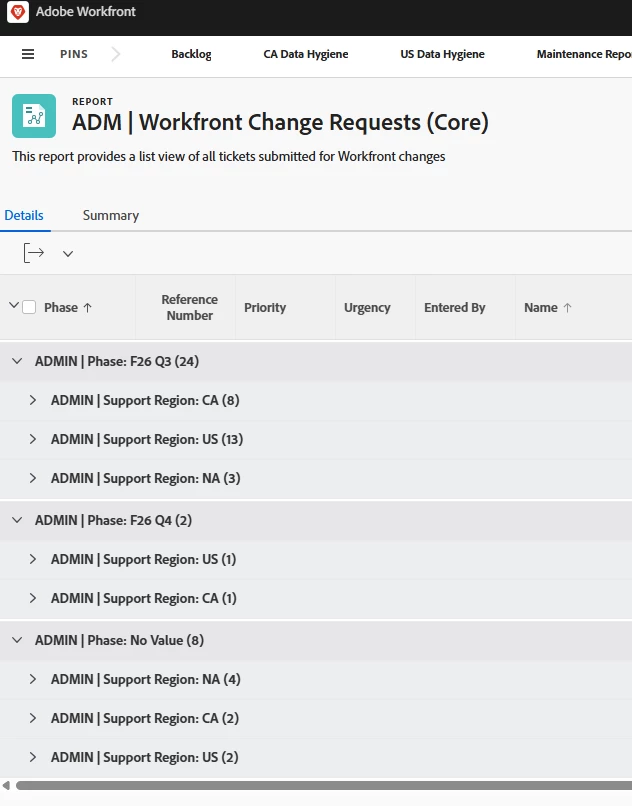
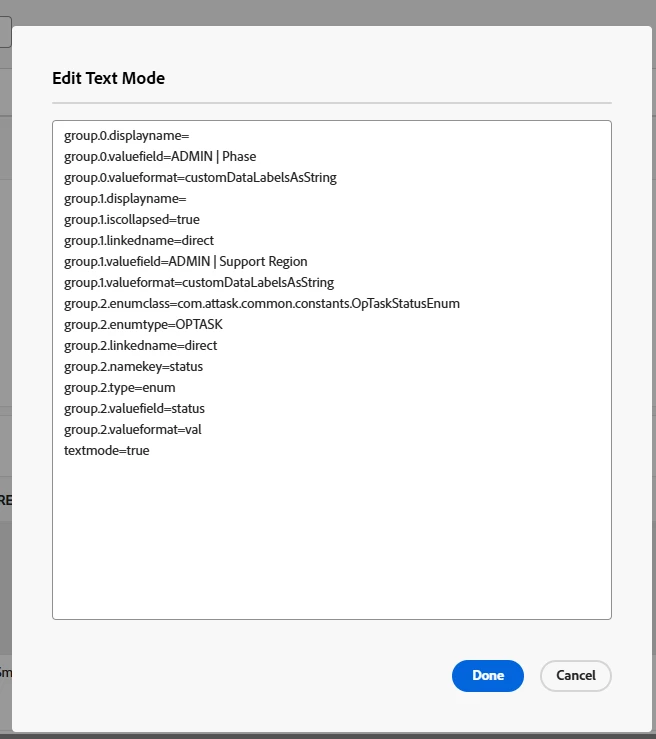
I don’t want my grouping to have display names. When I remove the displayname line completely, it defaults to be grouped by the field name. If I leave it blank at the end like - “group.0.displayname=” it’s still pulling the field name. According to the tip in this article (¾ way down the page), if I leave it “blank”, it should just be grouped by the value but it seems to not be working so I must be doing something wrong. Thanks in advance :) 
https://experienceleague.adobe.com/en/docs/workfront/using/reporting/reports/custom-view-samples/grouping-rename-grouping


Best answer by skyehansen

instead of the “group.0.displayname” line can you do “group.0.name=” and see how that turns out? (just try on the first grouping for now, without addressing the others)

4 replies

skyehansen
Adobe Champion and Community Advisor
skyehansenAdobe Champion and Community AdvisorAccepted solution
May 19, 2026

instead of the “group.0.displayname” line can you do “group.0.name=” and see how that turns out? (just try on the first grouping for now, without addressing the others)

NicoleM1
NicoleM1Author
Level 2
May 20, 2026

Thank you!! That worked!

Srinija_N
Level 7
May 20, 2026

Try replacing the ‘group.0.displayname=’ with ‘group.0.name=’ and leave it blank. This should work.

Thanks & Regards
NicoleM1
NicoleM1Author
Level 2
May 20, 2026

Thank you, that worked!