Level 2
December 12, 2023
Risolto

Template Duration: Day and Hours

  • December 12, 2023
  • 2 risposte
  • 721 visualizzazioni

For template task to have day and hours together for duration, how would I solve for this? Fo example, one task takes 3 days, 4 hours to complete. 


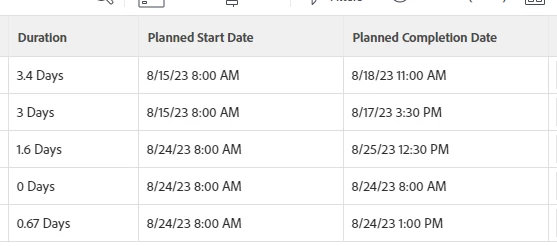
- If I put 3.4 days, how would Workfront read this? or is it best to keep it as 76 hours? My issue with this is my client prefers to see it in days over hours. 


Thanks in advance for the inputs!

Questo argomento è stato chiuso alle risposte.
Migliore risposta di KellieGardner

Workfront will convert the decimal to hours in the day using the schedule (dependent on your setup for schedules) and if you display dates with time it will show you the planned hour of completion. 


2 risposte

KellieGardner
Community Advisor
Community Advisor
December 12, 2023

Workfront will convert the decimal to hours in the day using the schedule (dependent on your setup for schedules) and if you display dates with time it will show you the planned hour of completion. 


skyehansen
Adobe Champion and Community Advisor
December 12, 2023

I'm not clear on this but it seem like from the documentation, Workfront duration should take into account time off. I work an 8 hour day, so for me 3 days and 4 hours would mean 3 eight-hour days and another 4 hours, and I would expect to code it into a task as 3.5d. Is your experience different (or is your work schedule different?)?


There is also a thing called elapsed days according to the documentation:

https://experienceleague.adobe.com/docs/workfront/using/manage-work/tasks/task-duration-and-duration-types/task-duration-and-duration-type.html?lang=en