Level 1
Nov 3, 2026 3:39 PM UTC
Question

Report summing parent task with child values

I have a report that gets all tasks for this month. Grouped by Owner and Project name. For each task I am getting a “Amount” field we have on the task, and I have the column set to sum. The Report shows both Parent and Child tasks, but the summing only works for child tasks. 

Tasks in the project.
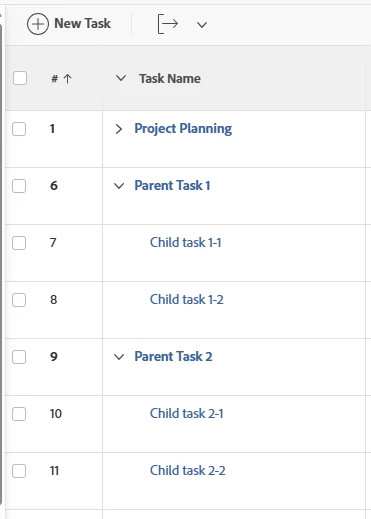
Parent and child task on report, but only child task is summed 
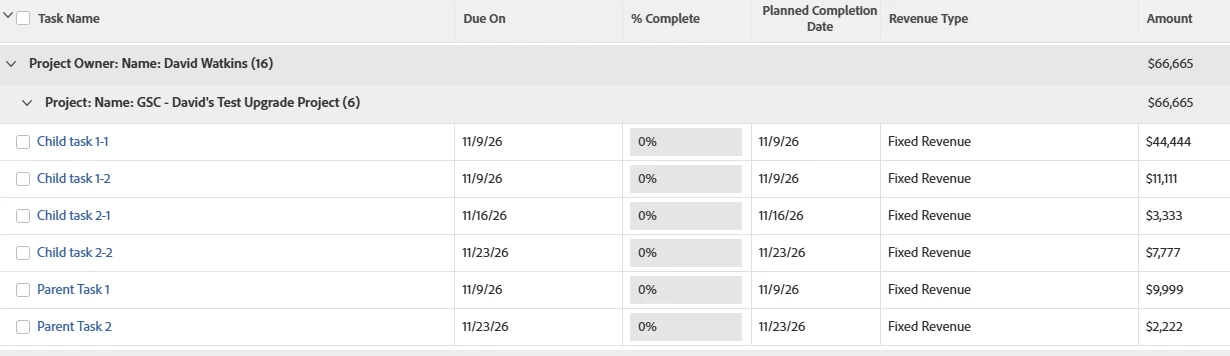
how do I get all Amounts to be summed together? 

3 replies

HeatherRo13
Adobe Champion
Adobe Champion
Nov 3, 2026 7:50 PM UTC

Hi! Couple of questions:

  1. Is "Amount" here is a standard revenue field or a custom field?
    2. Are the parent task amounts values you entered directly or rollups from children?
Translate
DavidWa30Author
Level 1
Nov 3, 2026 9:55 PM UTC

Hi,

  1. I am not sure; under the task details>Finance>Revenue the field name is “billingAmount”. I don’t know how to tell if this is standard or custom.
  2. Entered directly on the task. Most of the time the children don’t have a value, only the parent. I am showing that it works on the children the way I want it to work for the parents. 

Thanks!

Translate
HeatherRo13
Adobe Champion
Adobe Champion
Nov 3, 2026 10:41 PM UTC

Ah, Ok. So “billingAmount” is a standard currency field.
When Workfront aggregates standard number/currency fields in a grouping, it only sums child and standalone tasks and deliberately excludes parent tasks.

The good news is that custom currency fields ARE able to be summed and group no matter the level.
So you would need to create a task object calculated custom currency field that mirrors the “billing Amount” . In your report's View (columns), add this custom field as the column instead of (or next to) the standard Amount column. Set the column's grouping summary to Sum..

Because it's now a custom currency field, the Project grouping will roll up the parent-entered values (and any child values that are surfaced).

Translate