
kynabaker16
Adobe Employee
Adobe Employee
Nov 10, 2020 4:46 PM UTC
Question

Quick Tip: Plan Mode

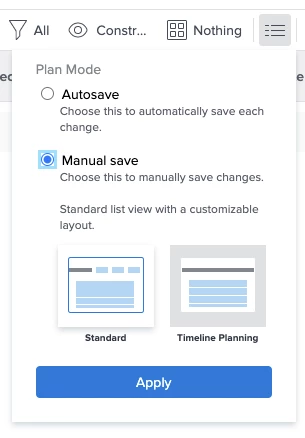
Use the plan mode which allows you to change from "Auto Save" to "Manual Save" which lets you adjust your project plan, timelines and dates, and then save when you're ready. Take it one step further and use Manual Save > Timeline Planning to save loading times on projects that have lots of tasks as you're planning your projects and shifting plans/dates.
This post is no longer active and is closed to new replies. Need help? Start a new post to ask your question.

3 replies

Level 4
Jul 19, 2023 9:41 PM UTC

I don't see this button in Workfront anymore.  Has this functionality been moved or removed?

Translate
Heather_Kulbacki
Community Advisor
Community Advisor
Jul 20, 2023 6:36 PM UTC

I can still see it

Translate
Level 4
Jul 20, 2023 7:06 PM UTC

My mistake, it's still there! I was looking at a template and not an actual project.

Thank you!

Translate