Level 2
Oct 15, 2026 2:08 PM UTC
Solved

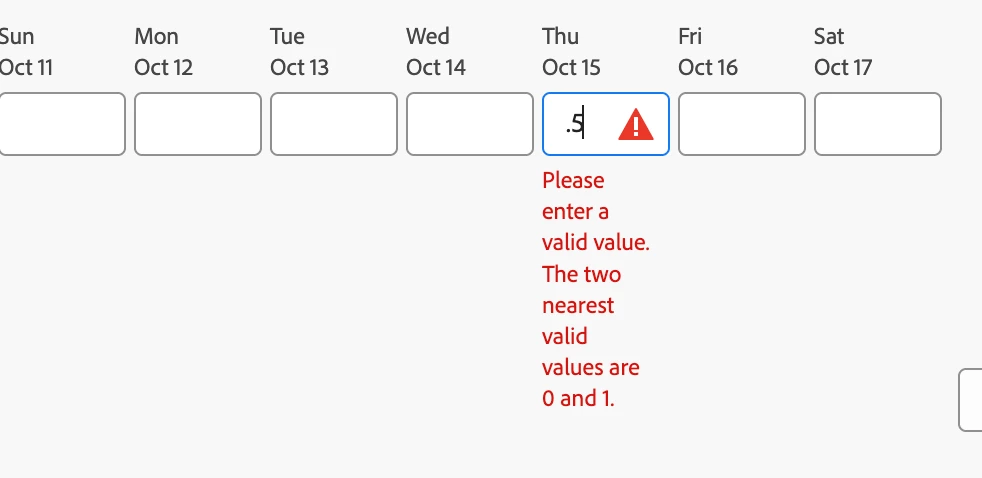
No longer able to enter partial hours on timesheet

Hello - are any other organizations getting a error starting today (10/15/26) when trying to enter a partial hour on a timesheet? If so, is there a fix?
 

trish_7210Accepted solution
Level 2
Oct 22, 2026 1:38 PM UTC

This has been resolved on our end. We are no longer getting this error.

13 replies

Level 1
Oct 15, 2026 2:10 PM UTC

Yes I came here looking to ask this question, too! We’re seeing this today and have not found a solution yet.

Translate
Level 1
Oct 15, 2026 2:45 PM UTC

Yes I came here looking to ask this question, too! We’re seeing this today and have not found a solution yet.

Update: It looks like you can log partial hours by clicking “log time”. The error says you can’t, but you totally can. Not confusing at all!

Translate
Angie_S
Level 3
Oct 15, 2026 4:01 PM UTC

Thanks for sharing the workaround.

Translate
Level 3
Oct 15, 2026 2:21 PM UTC

Yep, this just started this morning for us.

Translate
JROatGeisinger
Level 2
Oct 15, 2026 2:45 PM UTC

There were updates in Billable Hours in today’s Quarterly Release notes, but that Release was delayed.  This detail is not in the notes, but it could be related.

Translate
Level 4
Oct 15, 2026 2:59 PM UTC

Yes, this is happening to us as well. I’m going to submit a ticket.

Also, I just want to publicly say how unacceptable it is that they move the Unified shell update release up 24 hours (from 10/15 to 10/14) with only a few hours notice. We’ve spent a lot of time communicating this change internally, only for them to change the release window at the last minute. 

Translate
IvanCyber64
Level 3
Oct 15, 2026 3:20 PM UTC

Hi everyone,


Here is also one more ticket 

 where this is happening so maybe Adobe changed something. I would try the proposal I wrote if you already didn't.


Best regards,
Ivan Bebek

Practice Lead Work Management

CYBER64
Adobe Gold Solution Partner

Translate
ChrisFrancis93
Level 2
Oct 15, 2026 4:58 PM UTC

Yes,  this is my ticket.  And we can log time but the message is causing confusion.

Translate
Angie_S
Level 3
Oct 15, 2026 4:00 PM UTC

Chiming in to say yes, we have the same error, and we have confirmed the “workaround” of pushing the Log Time button regardless of the error still allows you to log time.


We are submitting a ticket to keep the help desk’s eyes on the customer impact and to get updates.

Translate
Level 2
Oct 15, 2026 5:44 PM UTC

Thanks all! We also put in an Adobe support ticket.

Translate
Level 1
Oct 15, 2026 7:50 PM UTC

We started seeing this today too. Thanks for submitting the ticket and for sharing the workaround WF Community!

Translate
_Manish_Singh
Level 9
Oct 16, 2026 4:42 AM UTC

Temporary fix is to open the timesheet and make the entries there. It is accepting the decimals less than 1.

Translate
trish_7210AuthorAccepted solution
Level 2
Oct 22, 2026 1:38 PM UTC

This has been resolved on our end. We are no longer getting this error.

Translate