Level 3
Jan 12, 2023 12:42 AM UTC
Solved

Need column calc to filter out results of another custom column calc

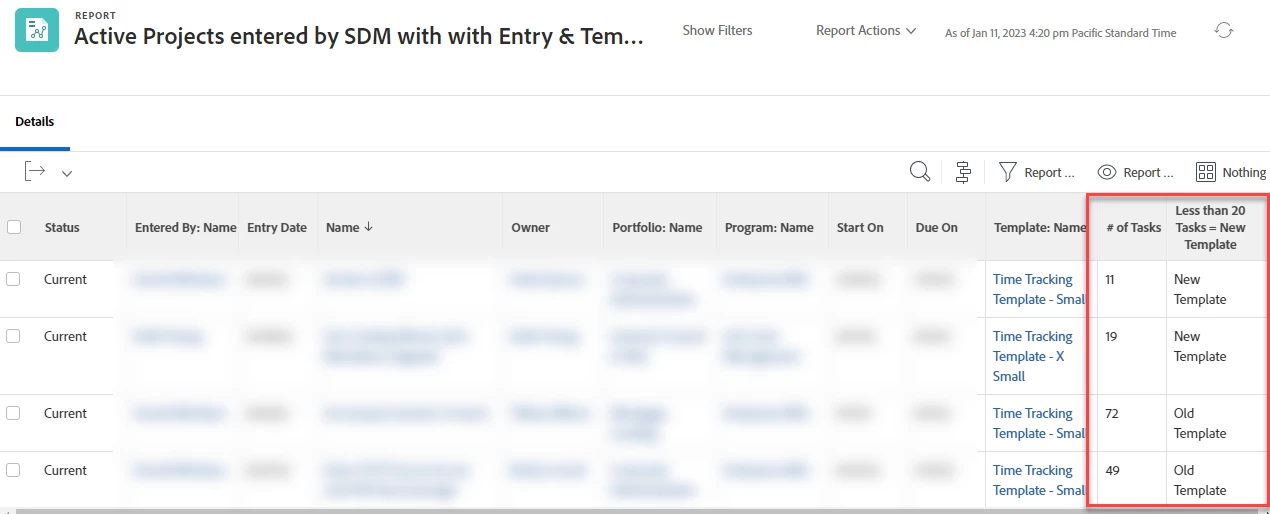
I created a new column to determine if projects were created with a new project template, or an old project template (if statement).  Our new project template has 19 tasks on it, but the old one had a lot more. 


This is the calculation I'm using::

displayname=Less than 20 Tasks = New Template
sortType=desc
textmode=true
totalTaskCount_Mod=lt
valueexpression=IF({totalTaskCount}>20,"Old Template","New Template")
valuefield=totalTaskCount
valueformat=HTML


This works great.  However now I need to filter out anything that is classified as "Old Template".  Since this is setup as a custom column calc, I can't format on it.  I also can't group it. 


How do I filter out all the items that are classified as created with the "old template"?
 

This post is no longer active and is closed to new replies. Need help? Start a new post to ask your question.
Madalyn_Destafney
Madalyn_DestafneyAccepted solution
Community Advisor
Jan 26, 2023 4:02 PM UTC

Question, is the new and old template the same template just revised? If they are two different templates, even if one is now deactivated, you could use a project report and group by template?

If this helped you, please mark correct to help others : )

1 reply

Madalyn_Destafney
Community Advisor
Madalyn_DestafneyCommunity AdvisorAccepted solution
Community Advisor
Jan 26, 2023 4:02 PM UTC

Question, is the new and old template the same template just revised? If they are two different templates, even if one is now deactivated, you could use a project report and group by template?

Translate
If this helped you, please mark correct to help others : )