Level 2
Mar 7, 2023 9:20 AM UTC
Solved

I have a report of projects grouped by owners first name. How do I sort the grouping alphabetically?

No text available
This post is no longer active and is closed to new replies. Need help? Start a new post to ask your question.
Kundanism
KundanismAccepted solution
Level 10
Mar 7, 2023 9:45 AM UTC

HI @joachimfh 

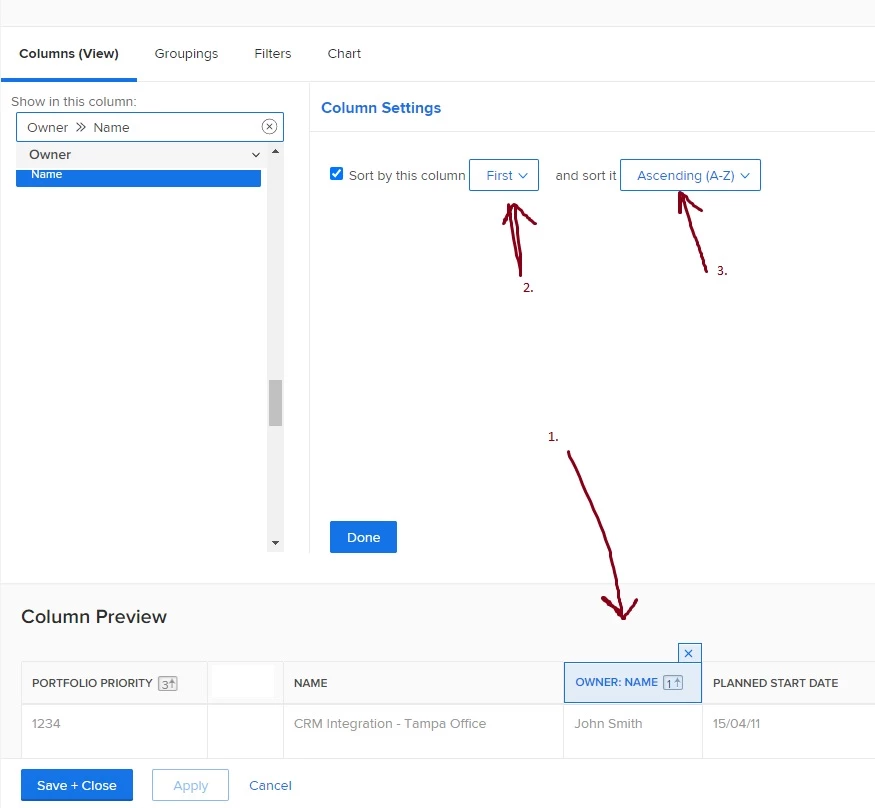
In column by clicking select Owner Name coluumn, then column settings > sort by this column > and sort it "Ascending A-Z". Check image for reference.

I believe this should work.

Mvh

Kundan.

5 replies

Kundanism
KundanismAccepted solution
Level 10
Mar 7, 2023 9:45 AM UTC

HI @joachimfh 

In column by clicking select Owner Name coluumn, then column settings > sort by this column > and sort it "Ascending A-Z". Check image for reference.

I believe this should work.

Mvh

Kundan.

Translate
JoachimFHAuthor
Level 2
Mar 7, 2023 10:02 AM UTC

Hi Kundan, thank you for your response. Unfortunately it is not the content within each group I want to sort. I want to sort the groups themselves alphabetically.


Translate
Richard_Le_
Community Advisor
Community Advisor
Mar 7, 2023 12:00 PM UTC

Hi,


Sorting your columns alphabetically as Kundan has outlined, will automatically make your groupings follow suit and sort alphabetically too.


Best Regards,

Rich. 

Translate
Richard_Le_
Community Advisor
Community Advisor
Mar 7, 2023 9:50 AM UTC

Hi,


You need to apply alphabetical sorting in your report view. Follow these steps:


1) In the report view editor, ensure that Owner>>Name is a column in your report and click on that column

2) Click on "Sort by this column"

3) Click to sort it " Ascending (A-Z)


You can then save+close your report and you will find that your projects will be sorted alphabetically by owner name


Best Regards,

Rich. 


Translate