Level 6
February 2, 2022
Solved

How to report when form is not attached to task?

I need a report that shows tasks from a business unit's projects that do not have a custom form attached. Any suggestions on the best way to tackle this?

This post is no longer active and is closed to new replies. Need help? Start a new post to ask your question.
Ali_Pentico
Ali_PenticoAccepted solution
Level 2
February 2, 2022

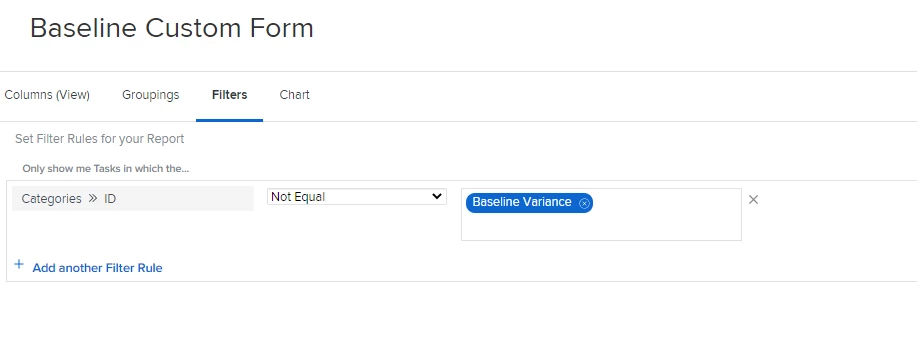
Hi Catherine. If you are looking to see tasks that are missing a particular custom form, you can create a task report/filter and use Categories > ID and then Not Equal to "Form Name". Using the Categories (plural) will search all custom forms attached - rather than just the first. If you are wanting to see tasks without any custom forms attached, you can use Categories > ID Is Blank. Hope this helps!

3 replies

Ali_Pentico
Ali_PenticoAccepted solution
Level 2
February 2, 2022

Hi Catherine. If you are looking to see tasks that are missing a particular custom form, you can create a task report/filter and use Categories > ID and then Not Equal to "Form Name". Using the Categories (plural) will search all custom forms attached - rather than just the first. If you are wanting to see tasks without any custom forms attached, you can use Categories > ID Is Blank. Hope this helps!

Translate
Level 6
February 3, 2022

Thanks so much @Ali Pentico‚ this is exactly what I needed - to isolate specific tasks that were missing a specific form.

Greatly appreciate the help!

Translate
Level 10
February 3, 2022

What Al said, or change the grouping to categories and those with no form will be “no value”

Translate