
Christina_Jarosz
Level 9
April 3, 2020
Risolto

How to display empty values on a time report?

  • April 3, 2020
  • 4 risposte
  • 754 visualizzazioni

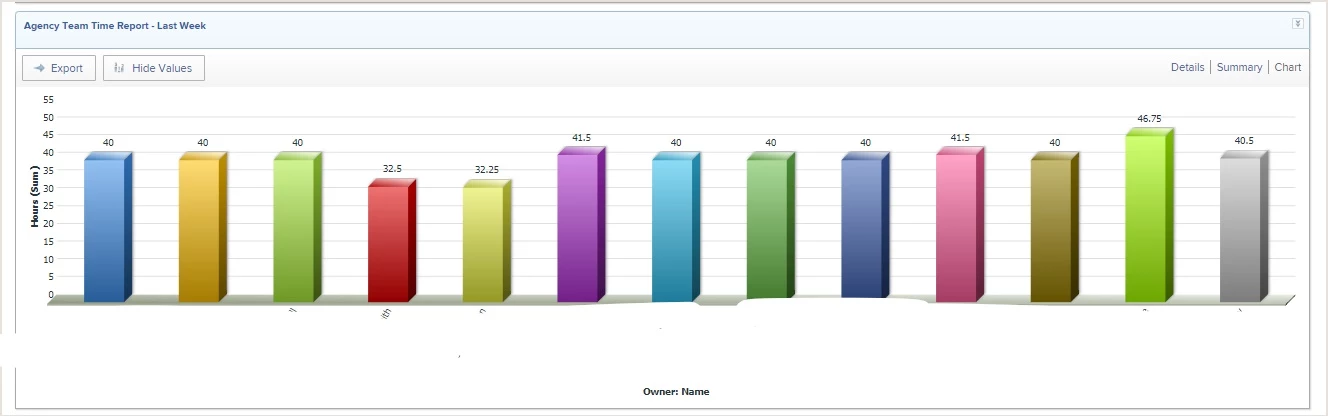
Our director really likes the visual aspect of seeing how their time has been utilized the past week. However, since not everyone is up to date on their timesheets we are missing people from that view. We'd like to still display that person's name in the chart (even if empty) so we can clearly see who is not completing their timesheet.

Right now the only way to do that is to try and figure out who is missing from the displayed hours.
I was successful in getting a report showing no hours - but it does not break it down by week - this only works YTD.
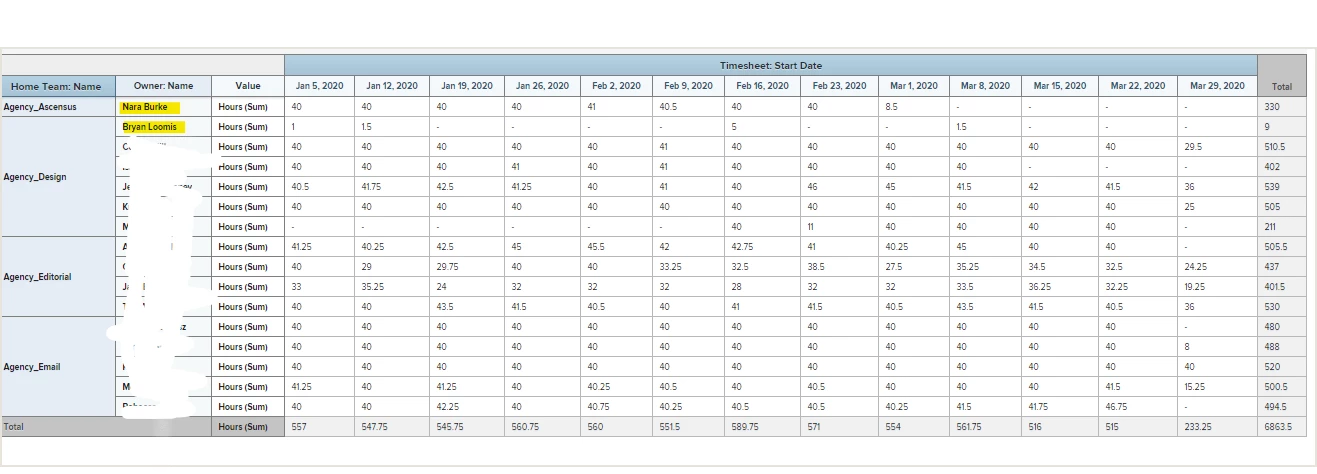
Has anyone come up with a solution to this? I found some old threads, but, it didn't look like it solved it. I want

Questo argomento è stato chiuso alle risposte.
Migliore risposta di Doug_Den_Hoed_AtAppStore

I have a cheat for this one Christina,

For each user of interest, go back in time and enter one minute of time on a particular date (e.g. Dec 31, 1999), and then in your report's filter, add an OR that picks up every Hour (and therefore User) that was entered on that particular Entry Date.

The OR ensures that every end user has a row, every time, whether they've entered time for the current period or not. "Yah busted" -- Jake Peralta.

Regards,

Doug

4 risposte

Christina_Jarosz
Level 9
April 3, 2020
Doug_Den_Hoed_AtAppStore
Community Advisor
Community Advisor
April 3, 2020

I have a cheat for this one Christina,

For each user of interest, go back in time and enter one minute of time on a particular date (e.g. Dec 31, 1999), and then in your report's filter, add an OR that picks up every Hour (and therefore User) that was entered on that particular Entry Date.

The OR ensures that every end user has a row, every time, whether they've entered time for the current period or not. "Yah busted" -- Jake Peralta.

Regards,

Doug

Learn more at www.atappstore.com, email doug.denhoed@atappstore.com, or tag me here @Doug_Den_Hoed_AtAppStore.
Christina_Jarosz
Level 9
April 3, 2020

Oh my goodness Doug....I could kiss you right now! You are awesome!!!!! If we ever make it to conference, I'm so buying you a drink as a huge THANK YOU!!!!

Doug_Den_Hoed_AtAppStore
Community Advisor
Community Advisor
April 3, 2020

A beer and a kiss? Thanks Christina: it's a date!

Regards,

Doug

Learn more at www.atappstore.com, email doug.denhoed@atappstore.com, or tag me here @Doug_Den_Hoed_AtAppStore.