Level 2
May 20, 2026
Solved

how to add task name to document report

Hi! I am trying to create a view on a project’s document screen that shows the task name that the document is stored in (stored at the task level).
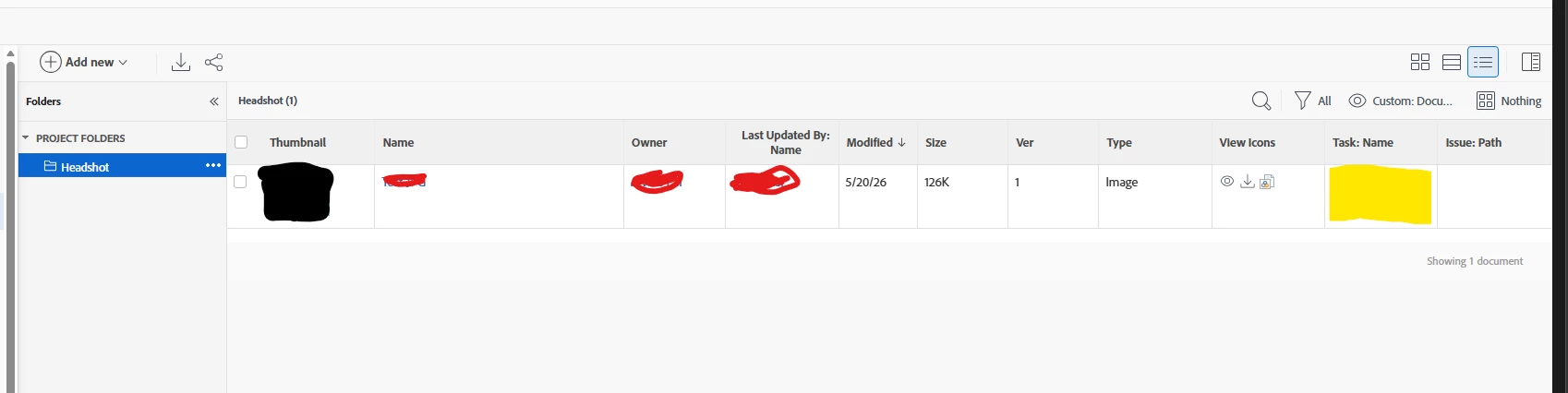
Currently the column is showing the Task Name and was a column offered when editing the view, but it pulls empty.

linkedname=tasknamekey=view.relatedcolumnnamekeyargkey.0=tasknamekeyargkey.1=namequerysort=task:namevaluefield=task:namevalueformat=HTML


Does anyone have this use, or know how to pull the task name?

ninoskuflic
ninoskuflicAccepted solution
Level 6
May 20, 2026

Hi,

using Task Name when editing the view will give you what you need: 


If it’s empty, it’s possible that the document is not uploaded on task, rather on project. Can you check if that might be the case? 😃

If this solved your issue, please mark it as solved so others can find the solution faster.

1 reply

ninoskuflic
ninoskuflicAccepted solution
Level 6
May 20, 2026

Hi,

using Task Name when editing the view will give you what you need: 


If it’s empty, it’s possible that the document is not uploaded on task, rather on project. Can you check if that might be the case? 😃

Translate
If this solved your issue, please mark it as solved so others can find the solution faster.
