
_Manish_Singh
Level 9
Jan 9, 2024 12:22 PM UTC
New

Enhance Resource Planner Views

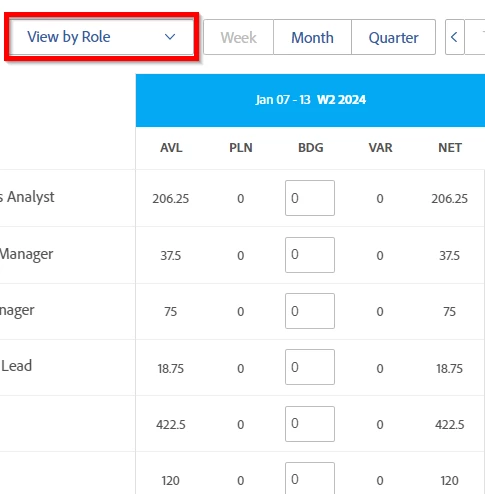
Include 'Actual Hours' column in both the 'View by Role' and 'View by Project' views of the Resource Planner. This would show how much time was actually spent on each role or project, in addition to the other metrics like Available, Planned, Budgets, etc (as shown below). At least gives this as an option in the settings.
 

3 replies

KellieGardner
Community Advisor
Community Advisor
Jan 9, 2024 2:38 PM UTC

Planner needs a lot of work and I'm really hoping they start to focus on it soon.

Translate
Level 9
May 23, 2024 2:59 PM UTC

^ What Kellie said

Also, it's challenging to have the Planner focus the data you want to see, because it includes so much data and is not sortable.  For example, if I have a filter applied to show data for a specific role, and I want to see the planned hours assigned to this role during a given timeframe, I have to sift through loads of results that have 0 planned hours to get to the projects that have tasks assigned to this role during the timeframe I'm looking it.  We abort the Planner because it's too time consuming.

Translate
SarahWilkersonCA
Level 7
May 29, 2024 3:55 PM UTC

Agree with all the above. 

We are starting to use Planner by "role" to understand which roles are overallocated in certain time frames.  We have to scroll down to open more and more to see everything.  It should shift the projects that have hours planned for that role to the top.

Translate