
Document "View Icon" as column in Issue / Task / Project type report? Any Text mode? | Adobe Higher Education
Skip to main content
Kundanism
Level 10
January 19, 2023
Risolto

Document "View Icon" as column in Issue / Task / Project type report? Any Text mode?

  • January 19, 2023
  • 7 risposte
  • 1370 visualizzazioni

Hi

Is it possible to add a field "View Icon" as column in Issue / Task / Project type report?

Any idea or Text mode possibility? This column makes easy to download the file.
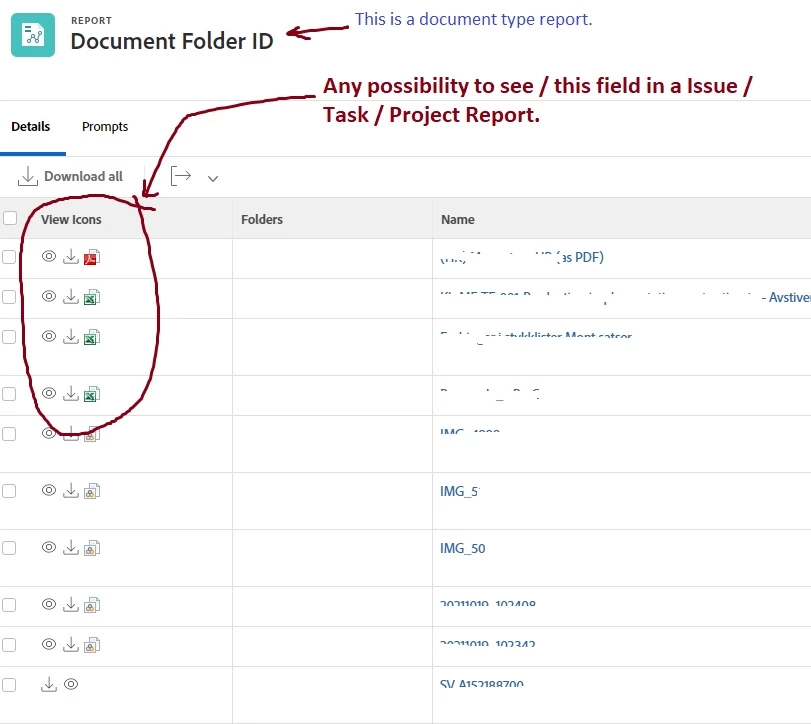
 

The "View Icon" i reffer from Document type report, and do not see in other types, Please refer attached image.

Appreciate any info in this regard.


Best regards,

Kundan.



Questo argomento è stato chiuso alle risposte.
Migliore risposta di Rafal_Bainie

I use following text mode to display download URL in task report. I guess to have an icon instead, the download URL would have to be saved first into a field. I'm not sure if that's an option. 
I think that the fact that document to task relation is many to one is a complication here. That's why below you have list of URLs.

displayname=Supporting Documents listdelimiter=<br> listmethod=nested(documents).lists textmode=true type=iterate valueexpression=CONCAT({name}," - https://bain.my.workfront.com/internal/document/download?versionID=",{currentVersionID},"&ID=",{ID}) valueformat=HTML

7 risposte

Rafal_Bainie
Community Advisor
Rafal_BainieCommunity AdvisorRisposta
Community Advisor
January 20, 2023

I use following text mode to display download URL in task report. I guess to have an icon instead, the download URL would have to be saved first into a field. I'm not sure if that's an option. 
I think that the fact that document to task relation is many to one is a complication here. That's why below you have list of URLs.

displayname=Supporting Documents listdelimiter=<br> listmethod=nested(documents).lists textmode=true type=iterate valueexpression=CONCAT({name}," - https://bain.my.workfront.com/internal/document/download?versionID=",{currentVersionID},"&ID=",{ID}) valueformat=HTML
Kundanism
KundanismAutore
Level 10
January 22, 2023

Thank you @rafal_bainie , it works as creating of link. Besides looking any idea of text mode, to make visible of icons as attachment.

I appreciate your sharing and worthy too.


Have a nice day!

Mvh

Kundan.

Rafal_Bainie
Community Advisor
Community Advisor
January 23, 2023

no problem, Kudos should go to someone from the community from whom I did pick this up. Sadly I don't remember where I did found that.
Due to above mentioned relation problem I don't think that modifying list to set of icons will be possible. I don't know how to do that, I did try couple of times, but I failed

Madalyn_Destafney
Community Advisor
Community Advisor
January 25, 2023

Hi, I'm curious what you're wanting to pull in as task/issue icons? Wouldn't they just be URLs? Or are you wanting to just see any documents associated with the task/issue? If the latter is the case, you can add a column to your report with this text mode:

displayname=Documents
listdelimiter=<br>
listmethod=nested(documents).lists
textmode=true
type=iterate
valueexpression=CONCAT({name},".",{currentVersion}.{ext})
valueformat=HTML
If this helped you, please mark correct to help others : )
MeganLe1
Level 2
February 17, 2023

Sorry to hop in on this thread with more questions, but you all have ALMOST exactly what I've been trying to figure out.


Between you ( @madalyn_destafney )and @rafal_bainie  I've got the two components of what I'm looking for. I just want to put them together. I wonder if there is a way to only display the name of the file (or list of names in a project report column), but it's hyperlinked to either download or open the document, rather than the whole URL. That gets to taking up a lot of real estate when there are multiple documents on a project. This would by my ideal world but I'm not having luck with it. Any ideas?

Madalyn_Destafney
Community Advisor
Community Advisor
February 21, 2023

Hi Megan, so you have columns you want and want to see the info in 1 column, correct? You can share columns in text mode of your report columns to combine columns. 
Here is documentation on how to do this (I prefer sharing columns with a line break, that is in this article too). It is simple to do and a game changer for reports : ) 
https://experienceleague.adobe.com/docs/workfront/using/reporting/reports/custom-view-samples/view-merge-columns.html

If this helped you, please mark correct to help others : )