
MorganHatcher
Level 4
September 29, 2026
Solved

Document ID in New Unified Approval/Adobe Storage

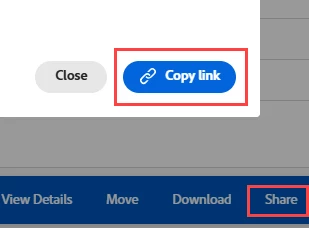
It might be that I am just missing something, but I want to see if there is an easier way to view the Document ID in the new Unified Approval setup. When I click on the file it gives me a menu, but the Details area does not provide the ID. The only way I have found to get the ID is to click on Share and then look at the link that is provided. Is there another way that does not involve creating a report? Or a way to customize the document table to add the ID column? Thanks!
 

skyehansen
skyehansenAccepted solution
October 6, 2026

I don’t think you’re missing anything. At a guess, I feel as though this area is playing by canvas dashboard reporting rules, which currently doesn’t report on any of the “id” fields.  I think experimenting with a report would be the way to go. ​

4 replies

skyehansen
Adobe Champion and Community Advisor
skyehansenAdobe Champion and Community AdvisorAccepted solution
October 6, 2026

I don’t think you’re missing anything. At a guess, I feel as though this area is playing by canvas dashboard reporting rules, which currently doesn’t report on any of the “id” fields.  I think experimenting with a report would be the way to go. ​

Translate
MorganHatcher
Level 4
October 6, 2026

Thank you!

Translate
AlyssaMorin
Level 2
October 15, 2026

Hey ​@skyehansen Do you think this is why $$USER.ID wildcard has “broken” in our instance? We have been using this wildcard successfully on WIP reports for 10 years without and issue. Last week it ceased working across multiple reports.

In testing, I updated a broken WIP with only the wildcard and it pulls nothing back. Without $$USER.ID the report pulls data as expected, adding the wildcard breaks the report. See comparison reports in screenshot

Tried both Assigned to and Assignment Users = no success

assignedToID=$$USER.ID
assignedToID_Mod=in
isComplete=false
isComplete_Mod=eq
OR:1:assignmentsUsersMM:ID=$$USER.ID
OR:1:assignmentsUsersMM:ID_Mod=in
OR:1:isComplete=false
OR:1:isComplete_Mod=eq


Translate
skyehansen
Adobe Champion and Community Advisor
October 15, 2026

no, you look like you’re in the regular dashboard and reporting areas, so I would just assume there’s some other issue going on, and submit a case to workfront support.

Translate
