Level 2
Jan 25, 2023 1:13 AM UTC
Solved

Custom Form for Tasks - how do I see the information?

Hi - I am fairly new to Workfront.  I created a custom form and attached it to a task.  It has a text field in it that the owner will fill in, and I want that text to be seen in the project view, where all the tasks are visible.  I added that custom text field to the project view, but it just shows as blank, even though the text is in the field when I go look at the task itself.  Any help??  Thank you!!

This post is no longer active and is closed to new replies. Need help? Start a new post to ask your question.
Madalyn_Destafney
Madalyn_DestafneyAccepted solution
Community Advisor
Jan 25, 2023 4:41 PM UTC

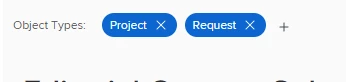
Hi there, not sure I'm fully understanding your issue you can have a custom form be applicable to multiple project types. When in your custom form, at the top you'll see object type the form is for. You can add other types, no need to create a separate custom form for task vs project.


You may be mixing up your object types and where you will/will not see your form.


If this helped you, please mark correct to help others : )

7 replies

Level 3
Jan 25, 2023 2:21 PM UTC

Hey Jason - do you have a project form attached to the project? Every time you have a custom request form, you have to have an identical project form on / attached to the project to ensure that the information ports over correctly. If you have that existing request form, i suggest copying it and making it a PROJECT form instead. Once you do this and you can make sure that every request form has an identical project form, and that the project form is on the template or project you're using, you should have no issues.

Translate
JasonTa1Author
Level 2
Jan 25, 2023 3:16 PM UTC

Thanks for the reply....I'll try that!

Translate
Madalyn_Destafney
Community Advisor
Community Advisor
Feb 1, 2023 6:12 PM UTC

You don't need to copy the request form, you can simply add Project as an object type of the custom form at the top of the custom form screen, where my screenshot shows. Each form you have the option to select what kind of object it can be applied to (project, request, task).

Translate
If this helped you, please mark correct to help others : )
Madalyn_Destafney
Community Advisor
Madalyn_DestafneyCommunity AdvisorAccepted solution
Community Advisor
Jan 25, 2023 4:41 PM UTC

Hi there, not sure I'm fully understanding your issue you can have a custom form be applicable to multiple project types. When in your custom form, at the top you'll see object type the form is for. You can add other types, no need to create a separate custom form for task vs project.


You may be mixing up your object types and where you will/will not see your form.


Translate
If this helped you, please mark correct to help others : )