Jun 7, 2023 9:04 AM UTC
Solved

Converting a proof to a Task removes the proof leaving only the document. Is this expected?

Hi all,


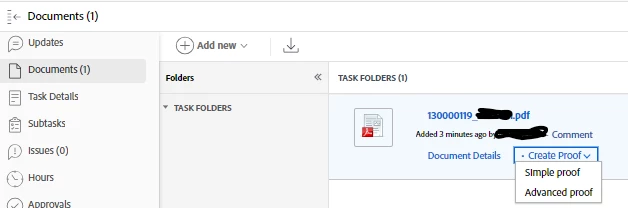
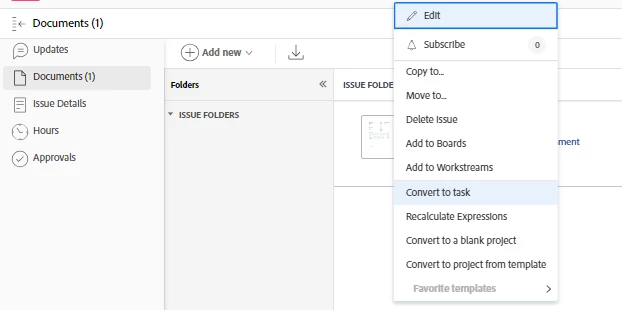
I have a process where I load a .pdf as a proof and then convert that to a task against the correct project. After I do this the proof options seem to be removed and I have to create a simple proof from the the document again. Is this expected? Ideally, I want the proof to remain a proof in the created task. Steps below: -

Thanks

Matt

This post is no longer active and is closed to new replies. Need help? Start a new post to ask your question.
skyehansen
skyehansenAccepted solution
Jun 8, 2023 3:54 PM UTC

What I see is that you have uploaded a file into an issue. When you convert the issue to a task and opt to keep the original issue, the way Workfront handles this, is to copy the file. It doesn't copy the proof -- but it's fair to have that expectation.


If you convert the issue to a task and do not keep the original issue, it will keep the proof. (see step 7 here: https://experienceleague.adobe.com/docs/workfront/using/manage-work/issues/convert-issues/convert-issue-to-task.html?lang=en )

1 reply

skyehansen
Adobe Champion and Community Advisor
skyehansenAdobe Champion and Community AdvisorAccepted solution
Jun 8, 2023 3:54 PM UTC

What I see is that you have uploaded a file into an issue. When you convert the issue to a task and opt to keep the original issue, the way Workfront handles this, is to copy the file. It doesn't copy the proof -- but it's fair to have that expectation.


If you convert the issue to a task and do not keep the original issue, it will keep the proof. (see step 7 here: https://experienceleague.adobe.com/docs/workfront/using/manage-work/issues/convert-issues/convert-issue-to-task.html?lang=en )

Translate