
LauraCr
Mar 21, 2024 10:31 PM UTC
Solved

Change to predecessor 'hover bubble' information?

Hi all,

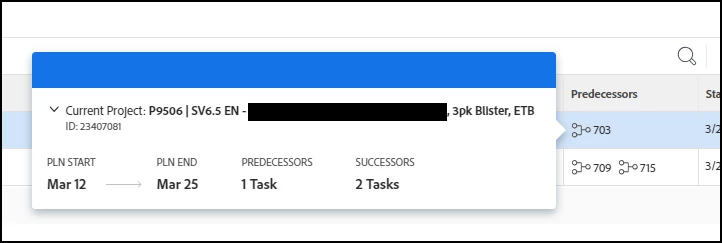
A couple of my project managers noted that the information they see when hovering over a predecessor seems to have changed, and I want to check if its just us, or a UI change by WF we hadn't noted.


Currently, when hovering over a predecessor, we see this popup:
 

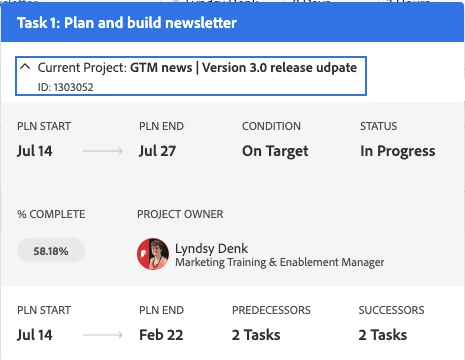
In the past, the 'hover bubble' (sorry, I'm enjoying calling it that), it had a bit more information. Here's a screenshot from a community question posted back in 7/23 that has the view we're expecting:
 

https://experienceleaguecommunities.adobe.com/t5/workfront-questions/help-deciphering-predecessor-hover-popup/m-p/605704#M54682


Did we miss a memo, or do I need to contact support?

Thanks much for any responses! 

-Laura

This post is no longer active and is closed to new replies. Need help? Start a new post to ask your question.
LauraCr
LauraCrAccepted solution
Mar 22, 2024 2:12 PM UTC

Oh boy, do I feel silly for not noticing the drop arrow! Thanks a ton, Scott!

-Laura "hoverbubble" C.

3 replies

Scott_Goodwin
Level 3
Mar 22, 2024 2:09 PM UTC

Hello @lauracr 

I get the same as you in terms of that first screenshot. 

However if your project managers click the dropdown arrow they should get all the information from screenshot 2. 

Here is what im getting. 

Hopefully Adobe take on the term "Hover Bubble" 


If your happy with the above can you mark it as the accepted solution so others can find it 

Translate
LauraCr
LauraCrAuthorAccepted solution
Mar 22, 2024 2:12 PM UTC

Oh boy, do I feel silly for not noticing the drop arrow! Thanks a ton, Scott!

-Laura "hoverbubble" C.

Translate
Scott_Goodwin
Level 3
Mar 23, 2024 3:28 PM UTC

No worries at all.. the amount of of stuff I miss like that I would be here all day. 


If your happy could you please set it as the accepted solution to helps others if they are looking for the same thing. 


Thank you 

Translate