Kundanism
Level 10
Sep 6, 2023 7:27 AM UTC
Solved

Change of Company ID to Company Name in Document Report ?

Hi

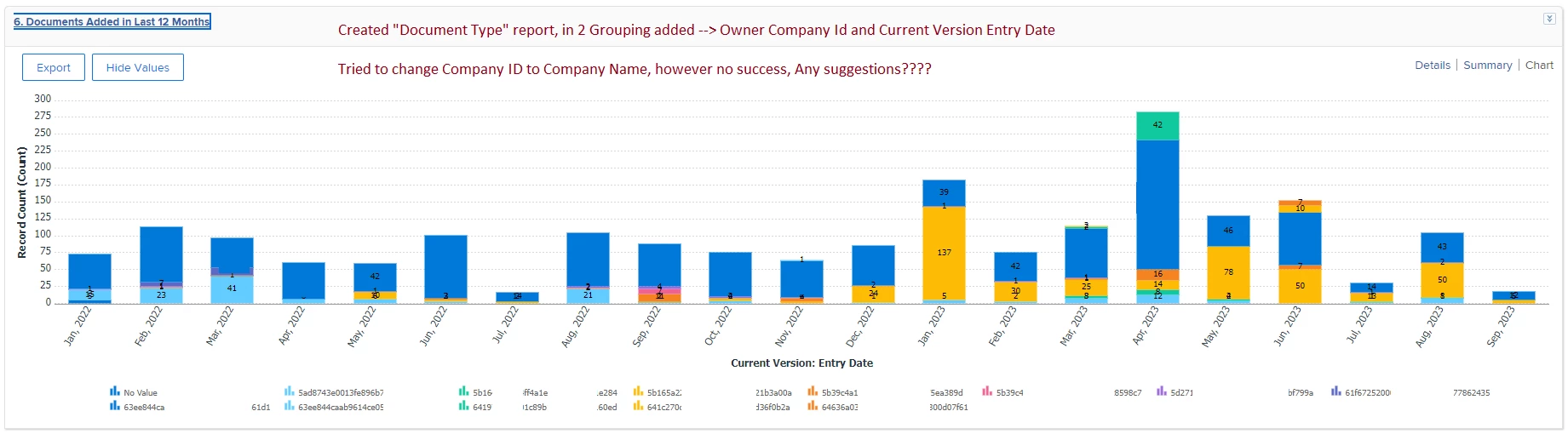
Created "Document Type" report, in 2 Grouping added --> Owner Company Id and Current Version Entry Date

Tried to change Company ID to Company Name, however no success, Any suggestions????

Even I tried to change in text mode under grouping from companyid to company name, but no success.

Adding here for your kind reference;


Best regards,

 

This post is no longer active and is closed to new replies. Need help? Start a new post to ask your question.
Rafal_Bainie
Rafal_BainieAccepted solution
Community Advisor
Sep 6, 2023 12:43 PM UTC

as a workaround:

add calculated custom field on user object:

{company}.{name}

use this newly created field for grouping.


To make this answer more complete, while text mode groupings are available, they won't work in charts (I'm 99% sure I've asked support about this).

If you don't want or cannot use custom field you can try this text mode grouping:

group.0.groupdatesby=WY group.0.linkedname=direct group.0.namekey=entryDate group.0.notime=false group.0.valuefield=entryDate group.0.valueformat=atDateAsWeekString group.1.name= group.1.valueexpression={owner}.{company}.{name} group.1.valueformat=string textmode=true

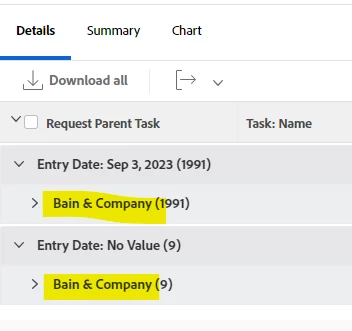
with this as a result:

in chart you will still see company ID unfortunately.


2 replies

Rafal_Bainie
Community Advisor
Rafal_BainieCommunity AdvisorAccepted solution
Community Advisor
Sep 6, 2023 12:43 PM UTC

as a workaround:

add calculated custom field on user object:

{company}.{name}

use this newly created field for grouping.


To make this answer more complete, while text mode groupings are available, they won't work in charts (I'm 99% sure I've asked support about this).

If you don't want or cannot use custom field you can try this text mode grouping:

group.0.groupdatesby=WY group.0.linkedname=direct group.0.namekey=entryDate group.0.notime=false group.0.valuefield=entryDate group.0.valueformat=atDateAsWeekString group.1.name= group.1.valueexpression={owner}.{company}.{name} group.1.valueformat=string textmode=true

with this as a result:

in chart you will still see company ID unfortunately.


Translate
Kundanism
KundanismAuthor
Level 10
Sep 6, 2023 9:34 PM UTC

Thanks Rafal

It works in detail, as you mentioned it does not work in chart. Still trying to figure out this one. Thanks again for sharing this text mode. 🙂

Translate