Level 2
Oct 5, 2026 5:54 PM UTC
Solved

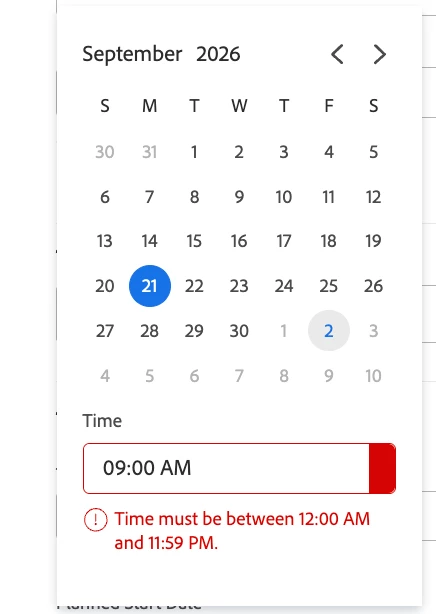
Can't seem to edit a task start date without getting an error

Hoping someone can help me understand why I am not able to set a start time on a particular task to 9:00am. The setting automatically defaults to the time that I am entering the task and the error message says I need to enter a time between 12:00am and 11:59 PM which I am doing.
 

DianaLe1Accepted solution
Level 2
Oct 13, 2026 12:44 PM UTC

Actually just tried restarting my browser and that seems to have solved it for now!

6 replies

Srinija_N
Adobe Champion
Adobe Champion
Oct 6, 2026 6:33 PM UTC

Hi ​@DianaLe1 If you are copy-pasting the time, hidden formatting or spacing issues may be triggering the error. Try typing the time 09:00 AM directly into the field instead. If the issue persists, clearing your browser cache might help.

Translate
Srinija N
IvanCyber64
Level 3
Oct 12, 2026 9:08 AM UTC

Hi ​@DianaLe1,


just checking if you were able to solve the issue? If yes, it would be great to close the ticket out.

Best regards,
Ivan

Translate
DianaLe1Author
Level 2
Oct 13, 2026 1:06 PM UTC

Can you tell me how to close the ticket?

Translate
IvanCyber64
Level 3
Oct 13, 2026 3:10 PM UTC

Hi ​@DianaLe1 ,


Mark an answer as correct and that should do it.


Best regards,
Ivan

Translate
DianaLe1Author
Level 2
Oct 13, 2026 12:38 PM UTC

Its not solved, the suggestion provided above unfortunately did not resolve the issue and I am still getting the error.

Translate
DianaLe1AuthorAccepted solution
Level 2
Oct 13, 2026 12:44 PM UTC

Actually just tried restarting my browser and that seems to have solved it for now!

Translate