Workfront project report
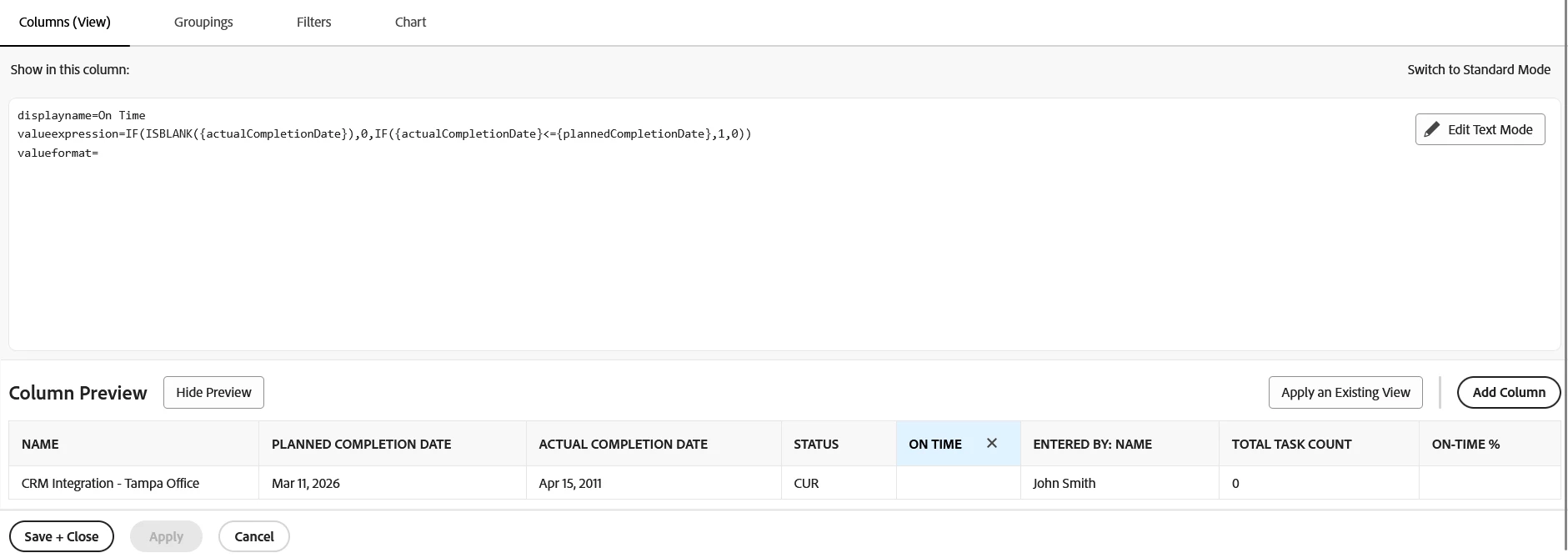
I am trying to calculate On-Time Delivery % in Adobe Workfront using a Project report, but the percentage column is not returning any values.
What I have done so far:
-
Created a row-level calculated column to flag on-time completion:
IF(ISBLANK({actualCompletionDate}),NULL, IF({actualCompletionDate}<={plannedCompletionDate},1,0))
This column correctly returns 1 for on-time and 0 for late items.
-
Added a second column to calculate the percentage using text mode:
valueexpression=SUM({DE:On Time Flag}) / COUNT valueformat=percent
-
Added filters:
-
Status = Complete
-
Actual Completion Date is not blank
-
Planned Completion Date is not blank
-
Added grouping (Project Type / Team / Status).
Issue:
-
The On-Time Flag column shows values correctly.
-
The On-Time % column shows no values (blank) even after grouping.
My question:
-
Is there a supported calculated formula in Workfront to calculate On-Time Delivery %?
-
Are
COUNTor aggregation functions not supported invalueexpressionfor Project reports? -
Is there a recommended or standard approach to calculate On-Time Delivery % for dashboards in Workfront?