
NicoleM1
Level 2
May 20, 2026
Solved

Text mode - changing ID to name

  • May 20, 2026
  • 2 replies
  • 51 views

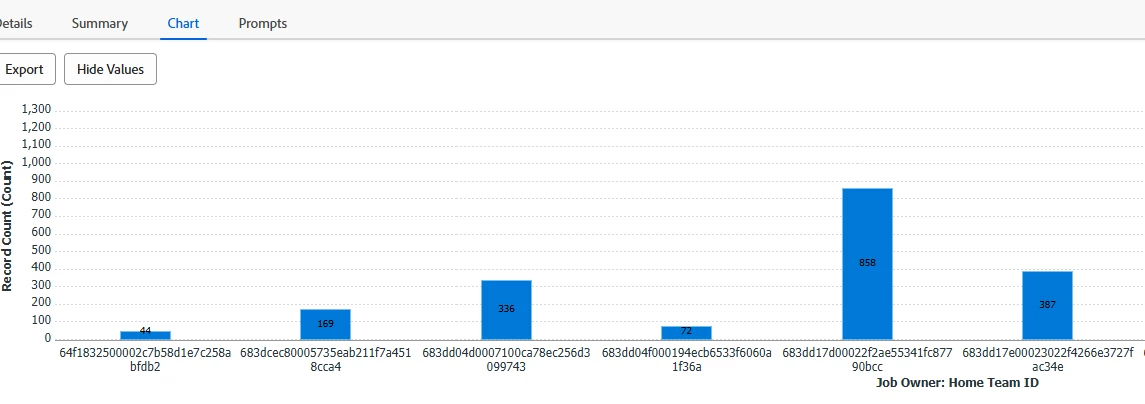
How do I get this grouping to show the name of the home team instead of the ID #?

Also - what does MM mean?


group.0.linkedname=projectOwnerMM
group.0.namekey=view.relatedcolumn
group.0.valuefield=projectOwnerMM:homeTeamID
group.0.namekeyargkey.0=projectOwnerMM
group.0.namekeyargkey.1=homeTeamID
group.0.valueformat=string
textmode=true


Best answer by ninoskuflic

Hi, this is still not possible at the moment, however sharing the answer from another user here:

“The way to overcome this is to create a custom form and attach it to each of your users. Within that form, create a calculated field that will pull in their Home Team Name using the calculation "{homeTeam}.{name}". This field will then be available when building reports and you can use it for groupings/charts etc.”


Source: 


Hope this helps! 🙂

2 replies

Level 2
May 20, 2026

Replace “ID” with “:name”...that should do the trick.


group.0.linkedname=projectOwnerMM
group.0.namekey=view.relatedcolumn
group.0.valuefield=projectOwnerMM:homeTeam:name
group.0.namekeyargkey.0=projectOwnerMM
group.0.namekeyargkey.1=homeTeam:name
group.0.valueformat=string
textmode=true

NicoleM1
NicoleM1Author
Level 2
May 20, 2026

Sorry. Should have noted that I did that and it’s not working. Also, it’s a task report -not sure if that matters.


Level 2
May 20, 2026

Are you wanting the Grouping to be by Project Owner or Home Team?  What is the report you are trying to build?

ninoskuflic
ninoskuflicAccepted solution
Level 5
May 20, 2026

Hi, this is still not possible at the moment, however sharing the answer from another user here:

“The way to overcome this is to create a custom form and attach it to each of your users. Within that form, create a calculated field that will pull in their Home Team Name using the calculation "{homeTeam}.{name}". This field will then be available when building reports and you can use it for groupings/charts etc.”


Source: 


Hope this helps! 🙂

If this solved your issue, please mark it as solved so others can find the solution faster.
NicoleM1
NicoleM1Author
Level 2
May 20, 2026

ohh! So it’s not possible to pull home team into a report because it’s not a custom field? then why is home team ID an option in standard mode grouping and filtering?

ninoskuflic
Level 5
May 20, 2026

You can pull it into a report in both column and grouping but unfortunately not into charts. Charts are quite limited when it comes to stuff like this so I also always had to opt-in with these workarounds with calculated fields.


I am not sure why there is out-of-the-box option for Home Team ID but not Home Team Name.. 😅 It would make sense that it’s the other way around but it is what it is. 😃

If this solved your issue, please mark it as solved so others can find the solution faster.