Re: Validation Logic in custom forms | Community
Skip to main content
Level 2
August 14, 2025
Solved

Re: Validation Logic in custom forms

  • August 14, 2025
  • 1 reply
  • 345 views

Hello! I'm trying to set up a validation logic where a different message will appear depending on the selection made on a single-select dropdown field, DE:Series. 


For example, if I select value "Option 1" in the Series field, I see the following text: Select Brief for content type. However if I select "Option 2", I want to see the following text: Select Podcast for content type.


I'm hitting a wall as I try to program the logic. This is what I have so far, but it's not working as expected:

IF({DE:Series}=="Option 1","Select Brief for content type."||{DE:Series}=="Suite Talk", "Select Podcast for content type.")


Is it possible to have multiple messages for each value in the logic? TIA!
Best answer by Kurt_Jones

Lyndsy,

I tried the below example and it seemed to work for me.   This is the code I put together:

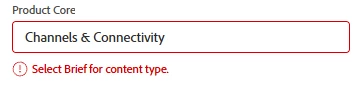
IF({DE:Product Core}="Channels & Connectivity","Select Brief for content type.",IF({DE:Product Core}="Cross-Currency Payments","Select Podcast for content type"))


This is what the users sees on the form when they are filling it out and make their selection:


Basically chaining together IF statements of all your options and what message you'd like to show the user.

1 reply

Kurt_Jones
Community Advisor
Community Advisor
August 14, 2025

ZaidaGr1 -

Oops, I provided a response to Lyndsy by mistake, up above that was meant for you, see if that is a potential solution for you

ZaidaGr1Author
Level 2
August 14, 2025

@kurt_jones This worked, thank you!

Kurt_Jones
Community Advisor
Kurt_JonesCommunity AdvisorAccepted solution
Community Advisor
August 14, 2025

Lyndsy,

I tried the below example and it seemed to work for me.   This is the code I put together:

IF({DE:Product Core}="Channels & Connectivity","Select Brief for content type.",IF({DE:Product Core}="Cross-Currency Payments","Select Podcast for content type"))


This is what the users sees on the form when they are filling it out and make their selection:


Basically chaining together IF statements of all your options and what message you'd like to show the user.