
KristenS_WF
Level 7
May 18, 2026
Solved

Planner--international user availability by month

  • May 18, 2026
  • 2 replies
  • 14 views

Does anyone happen to know exactly how monthly user availability is calculated in Planner?


I’m working on a utilization project with WF data pulled via API call.  Three different schedules are in play for my user group--US, UK, and Malaysia.  I’ve taken schedule weekdays, schedule holidays, and individual user PTO into account to calculate availability.  When looking at monthly totals, my calculations for US and UK users match what’s shown in Planner.  However, the totals for users in Malaysia are slightly off.


For example, here’s the November 2025 availability in Planner for one of users in Malaysia.  The Malaysia schedule had no holiday exceptions that month, and this user had no PTO.  November had 20 weekdays, so with a schedule of M-F 9-5, the available hours for the month should be 160, not 164:
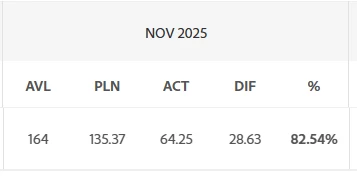


If I switch the planner view from Month to Week, all the weeks in November (either fully in November or partially) correctly show an availability of 40.



I’m guessing differing time zones may factor into the discrepancy,  but does anyone know exactly how the monthly totals are being calculated in Planner?

    Best answer by StutiTi

    Hi ​@KristenS_WF , the Planner calculates monthly user availability using this formula (when configured to use "The User's Schedule"): User Available Hours = (User Schedule Hours – Schedule Exceptions – Time Off) × Work Time Or, if your system is set to use "The Default Schedule": User Available Hours = ((Default Schedule Hours – Exceptions) × FTE – Time Off) × Work Time

    A few things to check that could explain the 164 vs. 160 discrepancy for your Malaysia user-

    1. Work Time setting- Make sure the user’s Work Time is set to 1 (100%). If it’s different, it will scale availability, although in your case this alone likely isn’t the cause since the variance is small.
    2. FTE (if using Default Schedule)- If the system is set to use the Default Schedule instead of the user’s schedule, FTE can impact the final calculation depending on how it’s configured.
    3. Timezone / month boundary behavior- This is the most likely reason. The monthly view is calculated based on a system reference (often UTC), so for Malaysia (UTC+8), the start/end of the month can shift slightly. This can cause a partial workday to spill into or out of the monthly calculation window, which often shows up as a small difference like the 4-hour gap you’re seeing.

    Hope this helps, let me know what you find.

    2 replies

    StutiTiAdobe SupportAccepted solution
    Adobe Support
    May 19, 2026

    Hi ​@KristenS_WF , the Planner calculates monthly user availability using this formula (when configured to use "The User's Schedule"): User Available Hours = (User Schedule Hours – Schedule Exceptions – Time Off) × Work Time Or, if your system is set to use "The Default Schedule": User Available Hours = ((Default Schedule Hours – Exceptions) × FTE – Time Off) × Work Time

    A few things to check that could explain the 164 vs. 160 discrepancy for your Malaysia user-

    1. Work Time setting- Make sure the user’s Work Time is set to 1 (100%). If it’s different, it will scale availability, although in your case this alone likely isn’t the cause since the variance is small.
    2. FTE (if using Default Schedule)- If the system is set to use the Default Schedule instead of the user’s schedule, FTE can impact the final calculation depending on how it’s configured.
    3. Timezone / month boundary behavior- This is the most likely reason. The monthly view is calculated based on a system reference (often UTC), so for Malaysia (UTC+8), the start/end of the month can shift slightly. This can cause a partial workday to spill into or out of the monthly calculation window, which often shows up as a small difference like the 4-hour gap you’re seeing.

    Hope this helps, let me know what you find.

    KristenS_WF
    Level 7
    May 19, 2026

    Thanks for confirming.  It looks like it’s definitely #3, as I’m seeing discrepancies with all the Malaysia users (and their profiles don’t indicate anything odd with Work Time or FTE).


    I manually computed availability for these users, and the figures match the calculations I did in Power BI with the Workfront data, so I think my calculations are correct.


    Thanks again.