Need help to Add name of person who made the last update | Community
Skip to main content
Level 2
January 22, 2025
Solved

Need help to Add name of person who made the last update

  • January 22, 2025
  • 1 reply
  • 580 views

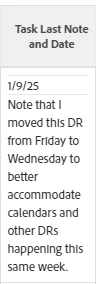
I created a custom view with a column for the last update and date on a task. I also want to include the name of the person who made the last comment. Thank you!


column.14.displayname=Task Last Note and Date
column.14.sharecol=true
column.14.textmode=true
column.14.usewidths=true
column.14.value=</b></font><hr><font color=000000><b> </b></font>
column.14.valueformat=HTML
column.14.width=150
column.15.linkedname=lastNote
column.15.namekey=view.relatedcolumn
column.15.namekeyargkey.0=lastNote
column.15.namekeyargkey.1=entryDate
column.15.querysort=lastNote:entryDate
column.15.sharecol=true
column.15.textmode=true
column.15.usewidths=true
column.15.valuefield=lastNote:entryDate
column.15.valueformat=atDate
column.15.width=150
column.16.sharecol=true
column.16.textmode=true
column.16.usewidths=true
column.16.value=</b></font><hr><font color=000000><b> </b></font>
column.16.valueformat=HTML
column.16.width=150
column.17.displayname=
column.17.linkedname=lastNote
column.17.namekey=view.relatedcolumn
column.17.namekeyargkey.0=lastNote
column.17.namekeyargkey.1=noteText
column.17.querysort=lastNote:noteText
column.17.textmode=true
column.17.usewidths=true
column.17.valuefield=lastNote:noteText
column.17.valueformat=HTML
column.17.width=150
 

This post is no longer active and is closed to new replies. Need help? Start a new post to ask your question.
Best answer by monicacardoso

Hi @isadi


Thank you for your question! To include the name of the person who made the last comment in your task custom view, you need to retrieve the lastNote:owner:name field. Try this: 


column.14.displayname=Task Last Note and Date column.14.sharecol=true column.14.textmode=true column.14.usewidths=true column.14.value=</b></font><hr><font color=000000><b> </b></font> column.14.valueformat=HTML column.14.width=150 column.15.linkedname=lastNote column.15.namekey=view.relatedcolumn column.15.namekeyargkey.0=lastNote column.15.namekeyargkey.1=entryDate column.15.querysort=lastNote:entryDate column.15.sharecol=true column.15.textmode=true column.15.usewidths=true column.15.valuefield=lastNote:entryDate column.15.valueformat=atDate column.15.width=150 column.16.sharecol=true column.16.textmode=true column.16.usewidths=true column.16.value=</b></font><hr><font color=000000><b> </b></font> column.16.valueformat=HTML column.16.width=150 column.17.displayname=Last Comment column.17.linkedname=lastNote column.17.namekey=view.relatedcolumn column.17.namekeyargkey.0=lastNote column.17.namekeyargkey.1=noteText column.17.querysort=lastNote:noteText column.17.textmode=true column.17.usewidths=true column.17.valuefield=lastNote:noteText column.17.valueformat=HTML column.17.width=250 column.18.displayname=Last Comment By column.18.linkedname=lastNote column.18.namekey=view.relatedcolumn column.18.namekeyargkey.0=lastNote column.18.namekeyargkey.1=owner:name column.18.querysort=lastNote:owner:name column.18.textmode=true column.18.usewidths=true column.18.valuefield=lastNote:owner:name column.18.valueformat=HTML column.18.width=150


- Monica 

1 reply

monicacardosoAdobe EmployeeAccepted solution
Adobe Employee
January 28, 2025

Hi @isadi


Thank you for your question! To include the name of the person who made the last comment in your task custom view, you need to retrieve the lastNote:owner:name field. Try this: 


column.14.displayname=Task Last Note and Date column.14.sharecol=true column.14.textmode=true column.14.usewidths=true column.14.value=</b></font><hr><font color=000000><b> </b></font> column.14.valueformat=HTML column.14.width=150 column.15.linkedname=lastNote column.15.namekey=view.relatedcolumn column.15.namekeyargkey.0=lastNote column.15.namekeyargkey.1=entryDate column.15.querysort=lastNote:entryDate column.15.sharecol=true column.15.textmode=true column.15.usewidths=true column.15.valuefield=lastNote:entryDate column.15.valueformat=atDate column.15.width=150 column.16.sharecol=true column.16.textmode=true column.16.usewidths=true column.16.value=</b></font><hr><font color=000000><b> </b></font> column.16.valueformat=HTML column.16.width=150 column.17.displayname=Last Comment column.17.linkedname=lastNote column.17.namekey=view.relatedcolumn column.17.namekeyargkey.0=lastNote column.17.namekeyargkey.1=noteText column.17.querysort=lastNote:noteText column.17.textmode=true column.17.usewidths=true column.17.valuefield=lastNote:noteText column.17.valueformat=HTML column.17.width=250 column.18.displayname=Last Comment By column.18.linkedname=lastNote column.18.namekey=view.relatedcolumn column.18.namekeyargkey.0=lastNote column.18.namekeyargkey.1=owner:name column.18.querysort=lastNote:owner:name column.18.textmode=true column.18.usewidths=true column.18.valuefield=lastNote:owner:name column.18.valueformat=HTML column.18.width=150


- Monica 

IsaDiAuthor
Level 2
January 30, 2025

Thank you!  This is exactly what I needed.