
How to create a Text Box for Issue Reference Number in Report Prompt for "Issue Type Report"? | Community
Skip to main content
Kundanism
Level 10
November 4, 2020
Question

How to create a Text Box for Issue Reference Number in Report Prompt for "Issue Type Report"?

  • November 4, 2020
  • 1 reply
  • 745 views

Hello to All,

Tried to create a text box for asking user to enter Issue Reference No., so it shows a text box as required input in Custom Prompt. But it does not shows as Text box which asks about reference number as input input . Looking for your guidance and expertise in this regard.
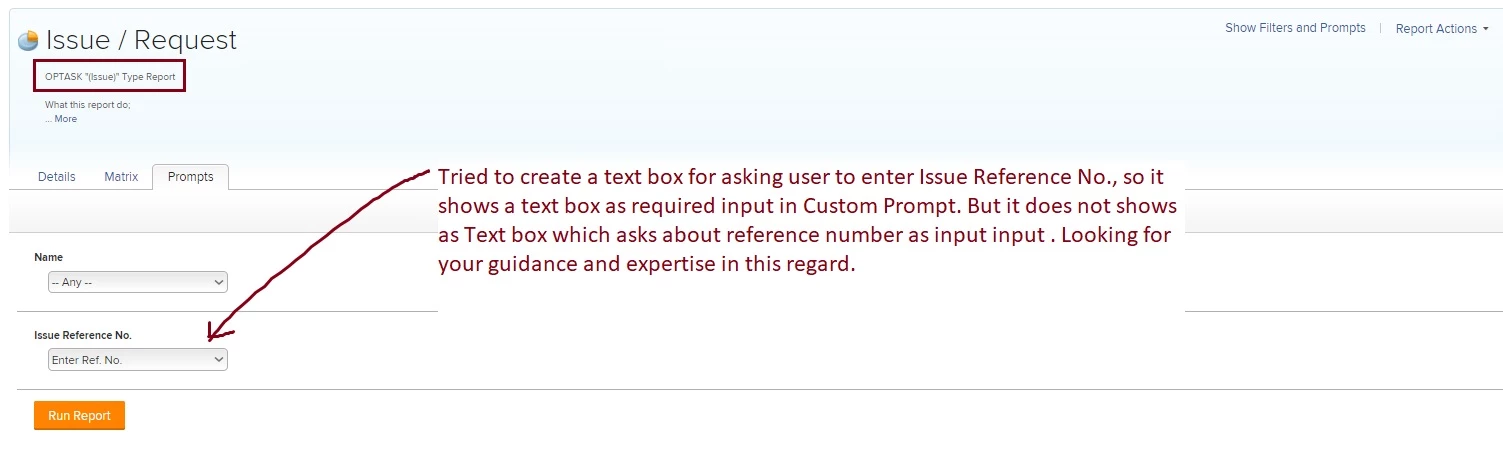
Please refer the attachment for a quick reference.

Best regards,

Kundan

This post is no longer active and is closed to new replies. Need help? Start a new post to ask your question.

1 reply

Community Advisor
November 4, 2020

Hi Kundan,

The way that custom prompts work is by predefining the filter criteria (using text mode) that users can choose from. You are effectively hardcoding a list of options for the user to choose. For this reason you are not able to have a text box in a custom prompt as this would mean that the user is not using a predefined list.

The way to output a text box for Issue reference number is to use a standard prompt using the below option:

When I use this option, I am presented the below prompt options on the report where I am able to say that the Reference number equals - Whatever is entered within the text box next to it:

Best Regards,

Rich

Kundanism
KundanismAuthor
Level 10
November 5, 2020

Thanks for your help @Richard Leek‚

Would you thing this can be possible by using some sort of custom form? Just an idea.

Mvh (Best regards)

Kundan.

Community Advisor
November 5, 2020

Hi Kundan,

The prompt functionality will work the same regardless of whether you use a custom field or not.

You could create a custom field for users to populate a reference number, but this wont change how the prompts work within your report.

Best Regards,

Rich.