
Character Limits for Text Fields | Community
Skip to main content
DeborahLeigh123
Level 4
February 21, 2024
Solved

Character Limits for Text Fields

  • February 21, 2024
  • 4 replies
  • 2627 views

We need to limit the # of characters a requestor submits into a text field. Is that possible to do? Can Fusion help with that? TY

This post is no longer active and is closed to new replies. Need help? Start a new post to ask your question.
Best answer by KellieGardner

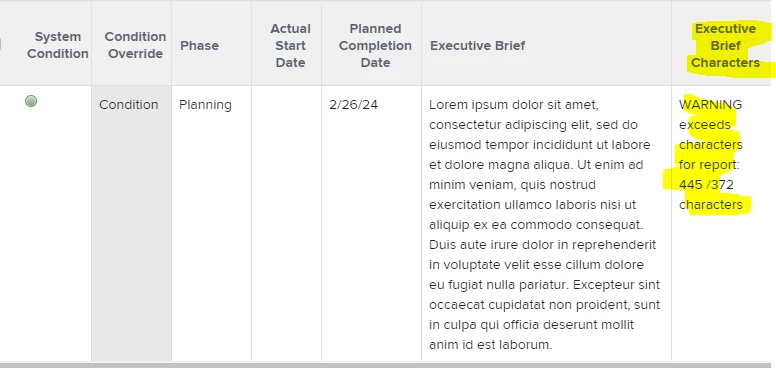
I use a report to display the character counts where we need it limited for reporting purposes.


4 replies

KellieGardner
Community Advisor
KellieGardnerCommunity AdvisorAccepted solution
Community Advisor
February 21, 2024

I use a report to display the character counts where we need it limited for reporting purposes.


DeborahLeigh123
Level 4
February 21, 2024

That's really neat! How did you set that up?

KellieGardner
Community Advisor
Community Advisor
February 21, 2024

displayname=Executive Brief Characters
textmode=true
valueexpression=IF(LEN({name of your field})>#,CONCAT("message you wan to display if it's over count: ",LEN({name of your field})," /# characters"),CONCAT(LEN({name of your field}),"/#"))
valueformat=HTML


Here is the code for the column I use. Enter the name of the field you want it to read and set your character count limit where the # sign is. If it's over the count I have it display a message, if it's not over the count it just displays the count with the number it can't go over (example: 200/372).


Level 3
February 21, 2024

Hey Deborah - yes, Fusion could help with this. You could create a scenario that reviews requests as they are submitted and identifies fields that exceed your desired character limit. You could then do a couple of things with Fusion:

  • Tag the requestor in a status update asking them to refine their inputs and change issue status to something like "Requires Changes" so folks know to avoid working on that request
  • Remove any text beyond the character limit so you can continue working with the request


I think it depends on why you need the character limit. Is it for reporting or integration/ingestion purposes?

RandyRoberts
Community Advisor
Community Advisor
February 23, 2024

The above suggestions are all good ones. The hard answer to your question is no, you cannot limit how many characters the user types in. You can only affect the field after they've typed it in.

I believe the max character count is 4,000 for built-in fields and 2,000 for custom fields.

ewanh
Adobe Employee
Adobe Employee
December 5, 2024

You can add a calculated field that will do the trick:


IF( ISBLANK({DE:customFieldName}) || {DE:customFieldName} = "" || {DE:customFieldName} = "N/A", "Character Limit is 100 Characters", IF( LEN({DE:customFieldName}) > 100, " Exceeding Limit of 100 Characters", IF( LEN({DE:customFieldName}) <= 100, CONCAT(" ", LEN({DE:customFieldName}), " Characters"), "Character Limit is 100 Characters" ) ) )


Level 3
May 9, 2025

I used this for a form field:
IF(

    LEN({DE:NAMEOFFIELD}) > 65,
    "Error: Text exceeds 65 characters")