


At Last! A Project View that tracks Percent Complete by Phase
As below, noting (spoiler alert) that this post does require some textmode dark magic, I'd like to share this Project View I invented today, which -- along with being well suited to Projects with a key target date in the middle of the workplan -- automatically tracks Percent Complete by Phase, which is a Sasquatch I've been searching for quite some time now. The screenshot below shows what it looks like, and after that (as examples), I've included the text mode for a key date column and its related Milestone Task's Percent Complete.
Using these same components, I also have devised a way to monitor the variance of the Planned Dates on the Milestone Tasks against their Project Level targets in a graphical fashion. If anyone's interested in learning more about that concept (which is also pretty advanced), please drop me a note here, or at doug.denhoed@atappstore.com.
Regards,
Doug
The Sasquatch: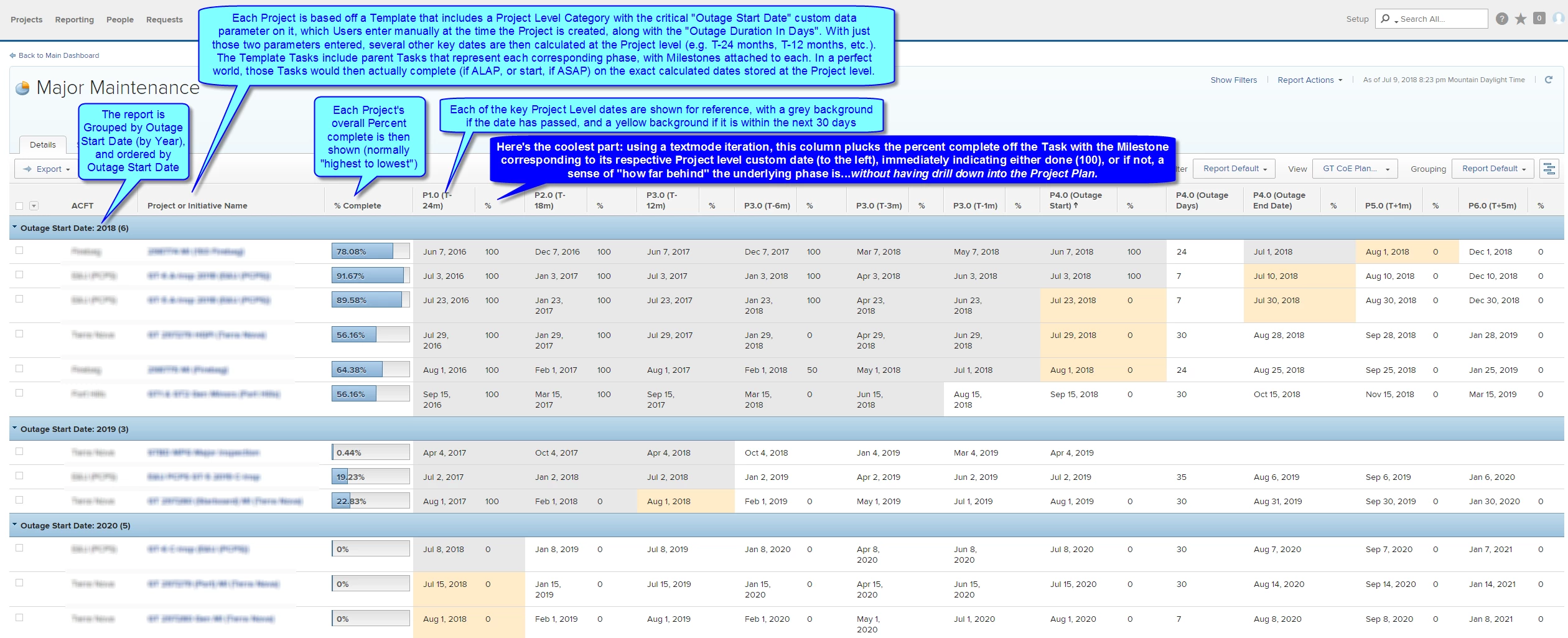
Key Date Column:
displayname=P1.0 (T-24m)
linkedname=direct
namekey=Phase 1.0 Initiation T-24 Months
querysort=DE:Phase 1.0 Initiation T-24 Months
styledef.case.0.comparison.icon=false
styledef.case.0.comparison.leftmethod=DE:Phase 1.0 Initiation T-24 Months
styledef.case.0.comparison.lefttext=DE:Phase 1.0 Initiation T-24 Months
styledef.case.0.comparison.operator=lt
styledef.case.0.comparison.operatortype=date
styledef.case.0.comparison.righttext=$$TODAY
styledef.case.0.comparison.trueproperty.0.name=bgcolor
styledef.case.0.comparison.trueproperty.0.value=e8e8e8
styledef.case.0.comparison.truetext=
styledef.case.1.comparison.icon=false
styledef.case.1.comparison.leftmethod=DE:Phase 1.0 Initiation T-24 Months
styledef.case.1.comparison.lefttext=DE:Phase 1.0 Initiation T-24 Months
styledef.case.1.comparison.operator=between
styledef.case.1.comparison.operatortype=date
styledef.case.1.comparison.righttext=$$TODAY
styledef.case.1.comparison.righttextrange=$$TODAY+30d
styledef.case.1.comparison.trueproperty.0.name=bgcolor
styledef.case.1.comparison.trueproperty.0.value=feecc8
styledef.case.1.comparison.truetext=
valuefield=Phase 1.0 Initiation T-24 Months
valueformat=customDateAsMediumDateString
Milestone Task's Percent Complete:
displayname=%
listdelimiter=‍
listmethod=nested(tasks).lists
listsort=nested(tasks).string(name)
querysort=tasks.name
styledef.case.0.comparison.icon=false
styledef.case.0.comparison.leftmethod=DE:Phase 1.0 Initiation T-24 Months
styledef.case.0.comparison.lefttext=DE:Phase 1.0 Initiation T-24 Months
styledef.case.0.comparison.operator=lt
styledef.case.0.comparison.operatortype=date
styledef.case.0.comparison.righttext=$$TODAY
styledef.case.0.comparison.trueproperty.0.name=bgcolor
styledef.case.0.comparison.trueproperty.0.value=e8e8e8
styledef.case.0.comparison.truetext=
styledef.case.1.comparison.icon=false
styledef.case.1.comparison.leftmethod=DE:Phase 1.0 Initiation T-24 Months
styledef.case.1.comparison.lefttext=DE:Phase 1.0 Initiation T-24 Months
styledef.case.1.comparison.operator=between
styledef.case.1.comparison.operatortype=date
styledef.case.1.comparison.righttext=$$TODAY
styledef.case.1.comparison.righttextrange=$$TODAY+30d
styledef.case.1.comparison.trueproperty.0.name=bgcolor
styledef.case.1.comparison.trueproperty.0.value=feecc8
styledef.case.1.comparison.truetext=
textmode=true
type=iterate
valueexpression=IF({milestone}.{name}="1.0 T-24 Months Phase 1.0 Initiation",{percentComplete},'')
valueformat=HTML