
what is wrong with my feed? | Community
Skip to main content
Michael_Soprano
Level 10
April 6, 2025
Question

what is wrong with my feed?

  • April 6, 2025
  • 2 replies
  • 418 views

I use feed in the form of CSV. Particular product in my Catalog search looks like this:
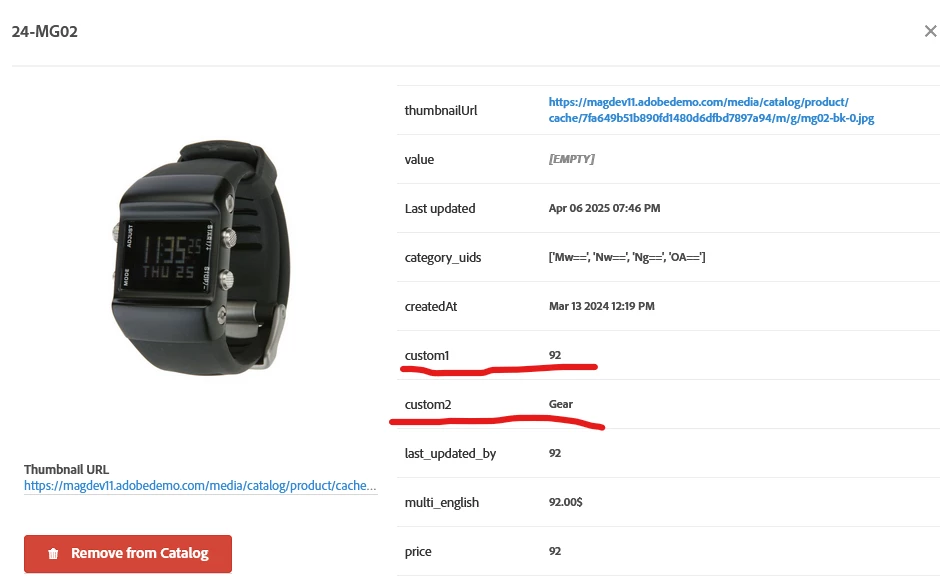


Sample row with values looks like this:

## RECSentity.id,entity.sku,entity.pageUrl,entity.name,entity.thumbnailUrl,entity.categoryId,entity.message,entity.value,entity.inventory,entity.margin,entity.last_updated_by,entity.multi_english,entity.availability,entity.tax_country,entity.tax_region,entity.tax_rate,entity.product_type,entity.item_group_id,entity.color,entity.size,entity.brand,entity.gtin,entity.price,entity.category,entity.category_uids,entity.custom1,entity.custom2
MH13,MH13, ,Marco Lightweight Active Hoodie,https://magdev11.adobedemo.com/media/catalog/product/cache/7fa649b51b890fd1480d6dfbd7897a94/m/h/mh13-blue_main_2.jpg,[12, 15], , , , , , , , , , , , , , , , ,74,Men / Tops,['MTI=', 'MTU='],https://dsn.adobe.com/web/experiencelab/product?productId=MH13,74.00$


What my be wrong?

This post is no longer active and is closed to new replies. Need help? Start a new post to ask your question.

2 replies

GigiCotruta
Level 4
April 7, 2025

You have to escape the comma inside entity.message:

We had a similar problem. I would use a different delimitator like ~ or |

Also, consider changing the position of entity.message as the last column, this way, it is less likely to mess with the previous columns. 

sriharshanaladala98
Level 2
April 7, 2025

You can access my sample products in a CSV file. I hope it will be helpful.
If there are more fields than the default ones, simply change the custom field name to entity.<your_custom_name>.
There’s no need to change the order of the fields—just make sure all names and values are correctly mapped.
If a field has no value, leave it empty, add a comma, and continue with the rest of the fields in the same order.