Tracking CTA Click with Form Composer Build | Community
Skip to main content
Level 2
March 19, 2024
Solved

Tracking CTA Click with Form Composer Build

  • March 19, 2024
  • 1 reply
  • 874 views

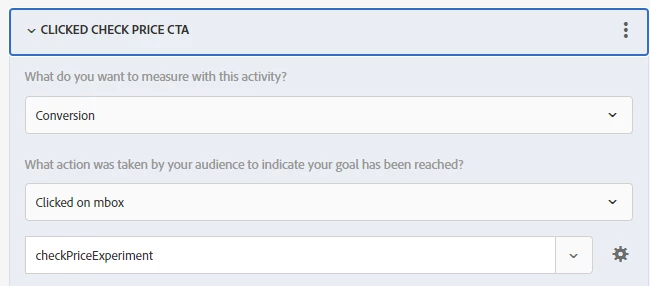
On one of our sites, the visual editor is still being fixed so I need to use the Form Composer to build out A/B tests. I have one running now but am having trouble getting a CTA click to track in the reporting. I have added mbox-name-checkPriceExperiment to the CTA as a class name. Then in the reporting, I added a goal metric of Conversion > Clicked on mbox > mbox name: checkPriceExperiment. This isn't working for me though. Nothing is coming through. We have Google Analytics and I can see that there have been clicks on the CTAs. Am I missing a step or doing something wrong in Adobe Target to get it to track?


Code:

<button type="button" class="btn btn-secondary btn-lg btn-block mbox-name-checkPriceExperiment">See Local Price</button>

Reporting:


This post is no longer active and is closed to new replies. Need help? Start a new post to ask your question.
Best answer by alexbishop

Yes, you would need to add a trackEvent request when the button is clicked, based on the same triggering logic as your GA event. So based on your Goals & Settings configuration, your trackEvent should look something like

adobe.target.trackEvent({'mbox':'checkPriceExperiment'})

1 reply

alexbishop
Adobe Employee
alexbishopAdobe EmployeeAccepted solution
Adobe Employee
April 5, 2024

Yes, you would need to add a trackEvent request when the button is clicked, based on the same triggering logic as your GA event. So based on your Goals & Settings configuration, your trackEvent should look something like

adobe.target.trackEvent({'mbox':'checkPriceExperiment'})
Level 2
April 8, 2024

Thank you! I am new to target so figured I was missing something. This worked great.