Level 3
Apr 18, 2023 7:58 AM UTC
Solved

Target using the wrong selector

I have an Adobe Target instance that is not selecting the correct element.

Whenever I select an element inside this form, it always grab the selector for the input of id `#optionamountdonation-5e445e51222`. That input, even though also part of the form, cannot even be selected as it is absolute left positioned out of the page view (for accessibility reason).
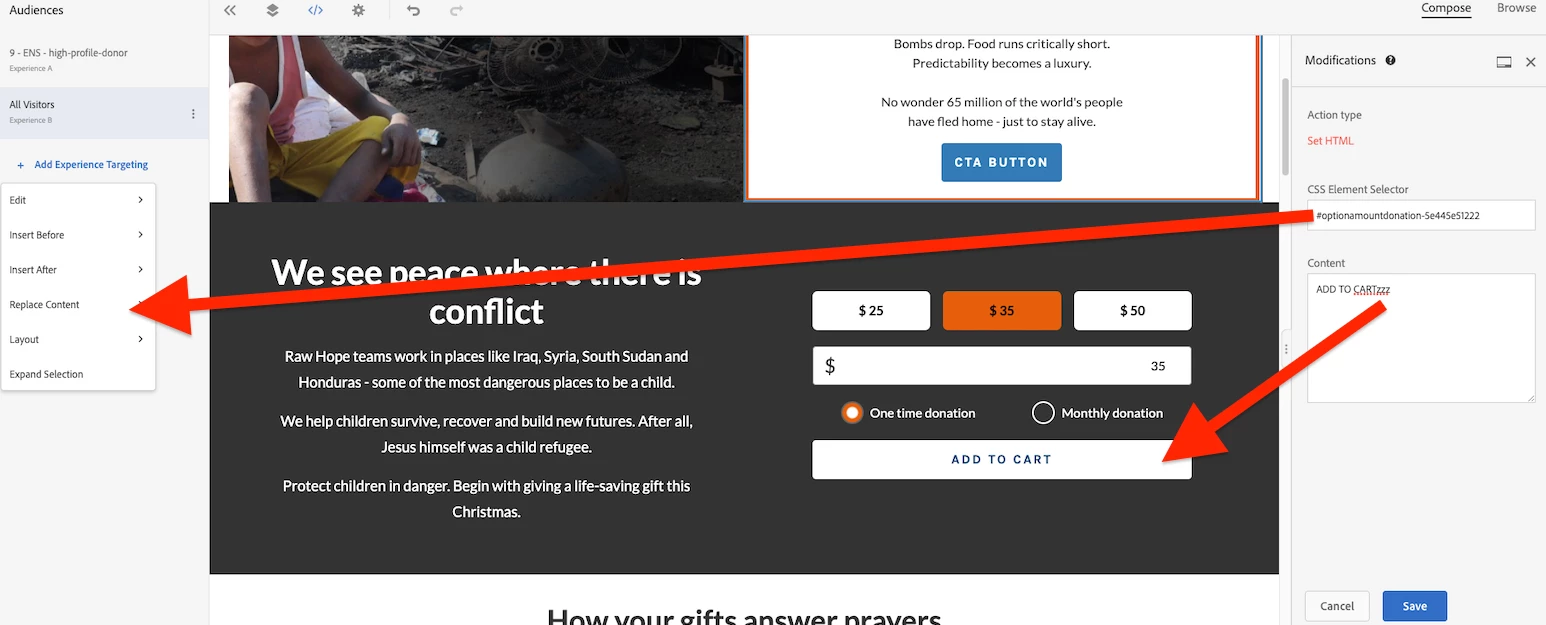


Since we are not getting the selector for "ADD TO CART" button, the changes I applied won't work. This same issue for all the elements inside the form (toggle, amount input, the three amount labels).
 
But if I select something outside of the form (like the text on the left), it works. I suspect it may be some Javascript acting on the form element that conflict with Target?

I have also recorded a Youtube video here for more detail.

Any advice or suggestions? I am fairly new to Target.

Thanks and much appreciated,

This post is no longer active and is closed to new replies. Need help? Start a new post to ask your question.
Gaureshk_Kodag
Gaureshk_KodagAccepted solution
Adobe Employee
Apr 28, 2023 6:13 AM UTC

Hi @sean12341 ,

You can also select a required selector, from a breadcrumb kind of thing that appears at bottom of the VEC composer, else you can directly replace the selector in modifications as well.

3 replies

nnakirikanti
Community Advisor
Community Advisor
Apr 24, 2023 5:28 PM UTC

Provide your site/page details to troubleshoot more... 

Translate
cristinel
Adobe Employee
Adobe Employee
Apr 25, 2023 11:19 AM UTC

Hello,


Is that form directly defined in the page or is it a custom web component? Have you tried manually entering the selector in the Modifications area?


Thank you,


/Cristinel

Translate
Gaureshk_Kodag
Adobe Employee
Gaureshk_KodagAdobe EmployeeAccepted solution
Adobe Employee
Apr 28, 2023 6:13 AM UTC

Hi @sean12341 ,

You can also select a required selector, from a breadcrumb kind of thing that appears at bottom of the VEC composer, else you can directly replace the selector in modifications as well.

Translate