Level 2
Nov 15, 2019 11:08 PM UTC
Solved

Target Activity Showing Default Content on local AEM

Hello all,

I am currently trying to set-up an Adobe Target demo on a local AEM 6.4 instance. I integrated AEM with Target using Adobe Launch and currently have it set-up with the following rules:
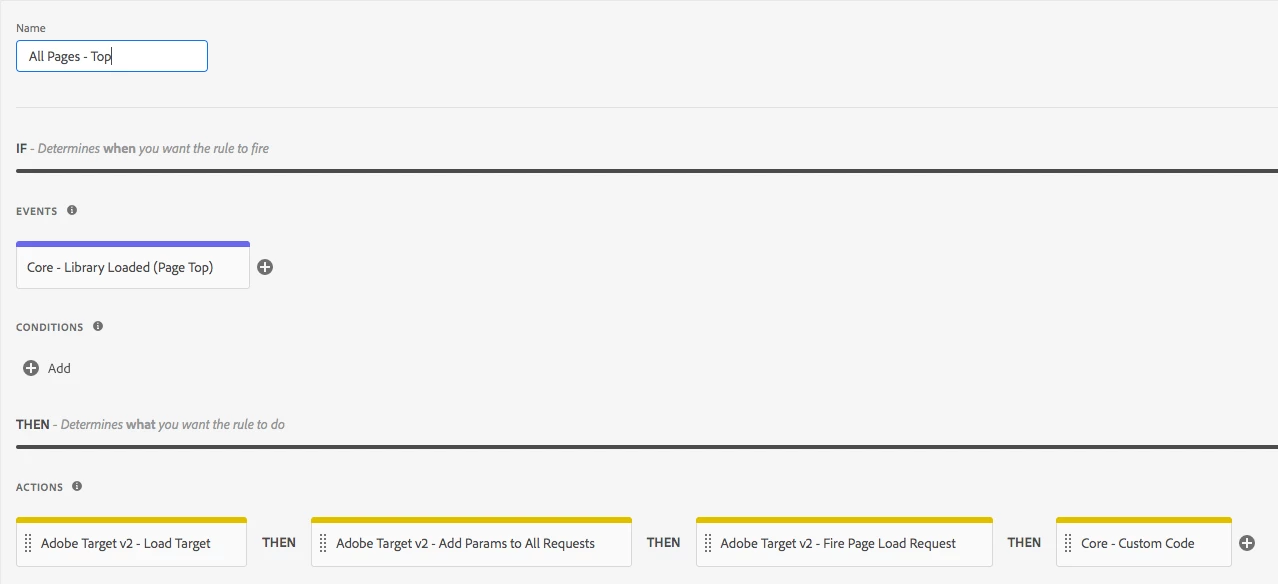
This was done following this tutorial and I added a message box at the end notifying me when the actions have run for debugging purposes: https://helpx.adobe.com/experience-manager/using/aem_adobetarget_integration.html

Integrating Adobe Experience Manager with Adobe Target using Adobe Launch

In Adobe Target, I have set-up an A/B test that is pointing at [http://localhost:4502/content/we-retail/us/en.html] and changed both Experience A and B to say "Shop Later" and "Shop Tomorrow" respectively.
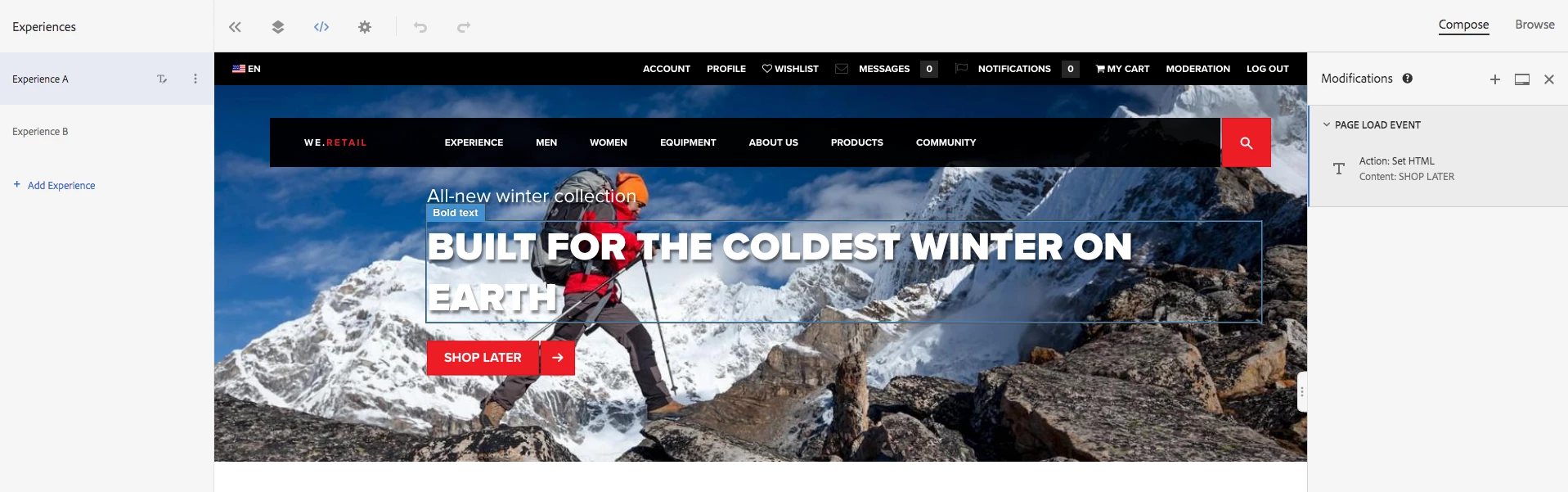
After setting this all up and integrating my local instance with Launch, I navigated to the page and the message box appears successfully as shown below but the "Shop Now" button is still there when neither of my experiences have that. Is there a step that I am missing here? I understand how AEM connects with Launch but I think the issue must be where Launch isn't connected with Target. Both Launch and Target and used within the same enterprise account. Any help or suggestions would be greatly appreciated!

This post is no longer active and is closed to new replies. Need help? Start a new post to ask your question.
Shruti_PremkumarAccepted solution
Adobe Employee
Nov 17, 2019 6:37 PM UTC

justinl40680371​Have you verified that target calls are firing on the page as expected? If you go to the network tab and filter by .tt, you should see the target call. Once you have verified that, check if the activity is delivering on the page by running the mbox trace.

Information on how to run the mbox trace can be found at Troubleshoot content delivery

15 replies

Shruti_PremkumarAdobe EmployeeAccepted solution
Adobe Employee
Nov 17, 2019 6:37 PM UTC

justinl40680371​Have you verified that target calls are firing on the page as expected? If you go to the network tab and filter by .tt, you should see the target call. Once you have verified that, check if the activity is delivering on the page by running the mbox trace.

Information on how to run the mbox trace can be found at Troubleshoot content delivery

Translate
Level 2
Nov 18, 2019 7:38 PM UTC

It does NOT make the target call. This would make sense since I am loading the target libraries but its not showing. I think this is the step I am missing: Add the Experience Cloud ID Service Currently trying the solution. Will update this discussion after.

Translate
Amelia_Waliany
Adobe Employee
Adobe Employee
Mar 11, 2020 12:18 AM UTC
How did that solution work out for you Justin? Please update the thread if you have any additional insight into the issue you were posting about here in the fall - we'd love to hear back from you!
Translate
Adobe Employee
Nov 18, 2019 7:43 PM UTC

@justinl89161741 , I don't believe that the ID service should have any impact on the target call. Are you using the Target 2.x extension or 1.X extension in Launch?

Translate
Level 2
Nov 18, 2019 7:51 PM UTC

It seems to be necessary to implement it from the docs, so I was going to give it a try. I am currently using Target 2.x but I also tried it with the 1.x as well.

Translate
Level 2
Nov 18, 2019 8:09 PM UTC

Using the Adobe Experience Cloud Debugger, It seems Target is not found. So it isn't being loaded at all.

I am looking at the Luma demo site and it seems like the ID is implemented correctly.

Translate
Adobe Employee
Nov 18, 2019 8:15 PM UTC

justinl40680371​ Is there a publicly accesible site where you have this implementation so that we can take a quick look to see what might be going on? Without that it is hard to help pin point where in the implementation the issue lies. Also I would recommend using the Launch Debug switch and examining the console statements to check if all your Launch rules are firing as expected .

Translate
Level 2
Nov 18, 2019 8:38 PM UTC

I don't. I am currently just working off of my local instance. Which is the Launch Debug switch?

Translate
Level 2
Nov 18, 2019 8:41 PM UTC

Also, interestingly enough. Launch is not found either but the Rule that I put in fires.....

Translate
Adobe Employee
Nov 18, 2019 9:08 PM UTC

You can get the same from the Chrome extensions : Launch and DTM Switch - Chrome Web Store

Translate
Level 2
Nov 18, 2019 9:35 PM UTC

So I have installed the switch, and it doesn't seem to give me anything useful. This is what I see on the we-retail site:

This menu appears so it doesn't seem like launch is triggering correctly. However, it shows the "Target Loaded" message that I added in the Custom Code in the Launch rules.

Translate