
Receiving Recommendations in HTML Format Inside JSON Response from Recommendations API | Community
Skip to main content
ZvoidZ
Level 2
December 4, 2023
Solved

Receiving Recommendations in HTML Format Inside JSON Response from Recommendations API

  • December 4, 2023
  • 1 reply
  • 2152 views

I am working with the Recommendations API as detailed in the Adobe Experience League documentation. I am encountering an issue with the format of the recommendation content within the JSON response.


https://{{CLIENTE_CODE}}.tt.omtrdc.net/rest/v1/delivery?client={{CLIENTE_CODE}}&sessionId=1234567

Initially, I was receiving a 400 status error with the message "Errors: field - [context.channel] - must not be null;". To address this, I amended my request body as follows:


{
"context": {
"channel": "web"
},
"execute": {
"mboxes": [{
"name": "api-mbox",
"index": 1
}]
}
}

This rectified the error, and I am now successfully receiving responses. However, despite having specified in the design of the recommendation within Adobe Target that the format should be JSON, the recommendation content is being returned in HTML format.This is a crucial aspect for me, as I need the recommendation content to be in JSON to align with the configurations I've set in Adobe Target.
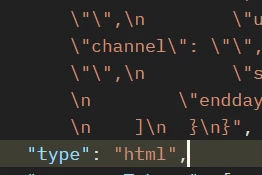
 

Could anyone advise how to ensure that the recommendation content is delivered in JSON format as per the settings in Adobe Target? I am looking for guidance on adjusting the API call or the request to meet this requirement.


Thank you in advance for your help.

This post is no longer active and is closed to new replies. Need help? Start a new post to ask your question.
Best answer by alexbishop

I have done a bit more digging - currently the responses will be html formatted (even when using a non-HTML design), when you use the delivery API. There is a ticket raised internally for this but no timeline yet, so currently there are a couple of different options:
i) Use the legacy API and ensure that contentAsJson is set to "true" in the request payload (more details here)  
ii) Continue with the delivery API and use the escaper function to handle the special characters

1 reply

alexbishop
Adobe Employee
Adobe Employee
December 4, 2023

Just to be sure, do you have the "HTML Design" option toggled off in your Recommendations design?

By default it's enabled:


ZvoidZ
ZvoidZAuthor
Level 2
December 4, 2023

Yes, I have disabled the "HTML Design" option in my Recommendations design.


Is there any other configuration or step that I might be missing to ensure the recommendation content is delivered in JSON format?


alexbishop
Adobe Employee
alexbishopAdobe EmployeeAccepted solution
Adobe Employee
December 4, 2023

I have done a bit more digging - currently the responses will be html formatted (even when using a non-HTML design), when you use the delivery API. There is a ticket raised internally for this but no timeline yet, so currently there are a couple of different options:
i) Use the legacy API and ensure that contentAsJson is set to "true" in the request payload (more details here)  
ii) Continue with the delivery API and use the escaper function to handle the special characters