
productPurchasedId does not work. Why? | Community
Skip to main content
carlosvelarde
Level 2
June 15, 2021
Solved

productPurchasedId does not work. Why?

  • June 15, 2021
  • 2 replies
  • 3717 views

We have created an MBOX for "order confirmation":
- Order ID: is a unique value
- ProductPurchaseId: is the product in the order


When we set the goals in Adobe Target:
- We can see the number of orders. We use MBOX = OrderConfirmPage
- But we CANNOT see the number of orders per product. We use MBOX = OrderConfirmPage + Audience / Targeting "ProductPurchaseID = IDProduct"


We don't know why, but the code should be well implemented and Adobe Target always gives us 0.

Any idea?

Thanks
This post is no longer active and is closed to new replies. Need help? Start a new post to ask your question.
Best answer by ryanr7

Hi @carlosvelarde,

Second attempt, hopefully this is helpful. There are 3 ways/methods to pass a conversion mbox/location with order data in it to Target. If using at.js version 1.x you can use the first 2 methods only. If using at.js version 2.x you can use all 3 methods. I personally, prefer to use the #2 method with the trackEvent() since this request is generally only to send data to Target and is not used to get content to render to the page.

  1. Call the getOffer() method, and pass the order data as custom parameters with the reserved parameter names:
    1. orderId (unique id for the order) 
    2. orderTotal (value of the order - optional)
    3. productPurchasedId (comma separated list of skus included in the order like: "sku1,sku2,sku3" - optional)
    4. Example:


adobe.target.getOffer({ "mbox": "orderConfirmation", "params": { "orderId":"ABC6789", "orderTotal":123.45, "productPurchasedId":"123,234,SLKF-123" }, "success": function(offers) { adobe.target.applyOffer( { "mbox": "orderConfirmation", "offer": offers } ); }, "error": function(status, error) { if (console && console.log) { console.log(status); console.log(error); } }, "timeout": 5000 });


  • Call the trackEvent() method and pass the order data as custom parameters with the reserved parameter names (same as getOffer() above).
    1. Example:


adobe.target.trackEvent({ mbox: 'orderConfirmation', params: { "orderId":"ABC6789", "orderTotal":123.45, "productPurchasedId":"123,234,SLKF-123" } });


  • Call the getOffers() method (only for at.js 2.x) with the order data in the orders object. Please note that parameter names are different from the methods above.
    1. Example:


adobe.target.getOffers({ request: { execute: { mboxes: [{ index: 0, name: "orderConfirmation", parameters: { "customParam": "value" }, order: { "id": "ABC6789", "total": 123.45, "purchasedProductIds": ["123","234","SLKF-123"] } }] } } }) .then(response => adobe.target.applyOffers({ response: response })) .then(() => console.log("Success")) .catch(error => console.log("Error", error));


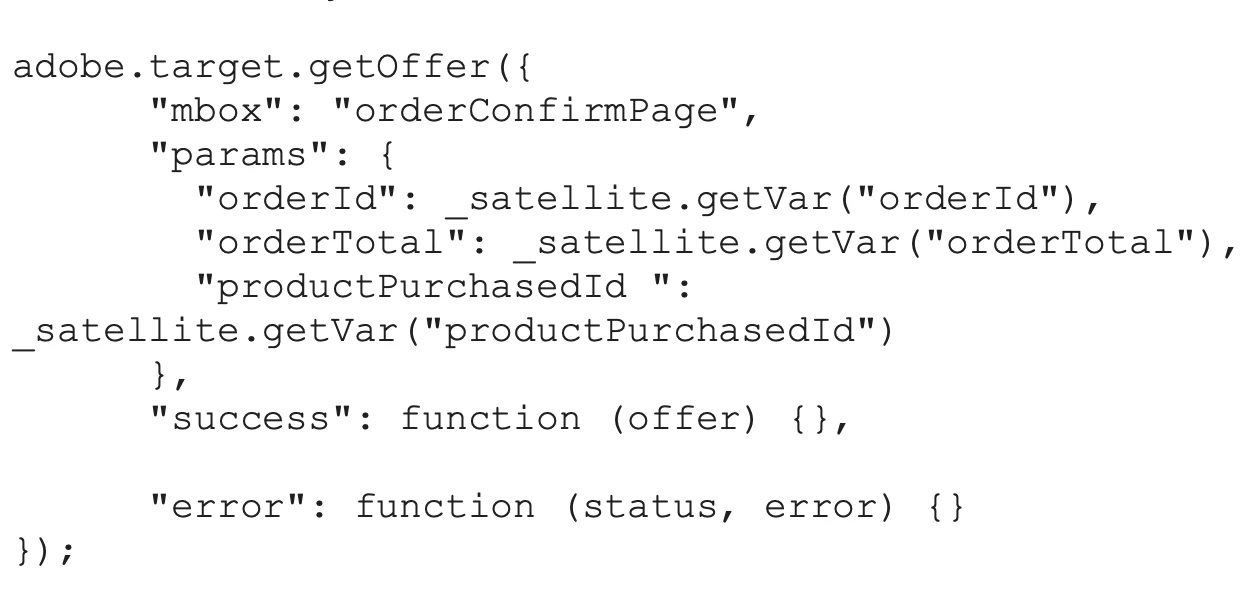
Make sure your syntax is correct depending on the method you are employing. From your screen shot you appear to be using method #1 in which case you should be passing them as custom parameters with the exact names in the examples above - no leading or trailing spaces.

Hope that helps!

2 replies

Adobe Employee
June 15, 2021

Hi @carlosvelarde,

Your implementation looks to be fine. However, the reporting it sounds like you want to do is beyond Target reports. The passing of the productPurchasedId is for 2 main purposes in Target. 1) For informing Recommendations about specific entity/products getting purchased - to enable our purchase based algorithms. 2) To provide helpful information in the order details report download. I theory, if you downloaded the order details CSV you could determine the answer you are asking: how many orders included product X. Column H of the order details CSV will have a comma separated list of the productPurchasedIds in it that you could filter off of to answer your question.

Another way to answer that question would be in Analytics Workspace Analysis. If you have Analytics for Target (A4T) as your reporting source you should be able to create a report that gives you that information.

carlosvelarde
Level 2
June 15, 2021
No, it does not work. If I download the CSV, I have the purchases received, but not what products they are for. Thanks for your help
ryanr7Adobe EmployeeAccepted solution
Adobe Employee
June 24, 2021

Hi @carlosvelarde,

Second attempt, hopefully this is helpful. There are 3 ways/methods to pass a conversion mbox/location with order data in it to Target. If using at.js version 1.x you can use the first 2 methods only. If using at.js version 2.x you can use all 3 methods. I personally, prefer to use the #2 method with the trackEvent() since this request is generally only to send data to Target and is not used to get content to render to the page.

  1. Call the getOffer() method, and pass the order data as custom parameters with the reserved parameter names:
    1. orderId (unique id for the order) 
    2. orderTotal (value of the order - optional)
    3. productPurchasedId (comma separated list of skus included in the order like: "sku1,sku2,sku3" - optional)
    4. Example:


adobe.target.getOffer({ "mbox": "orderConfirmation", "params": { "orderId":"ABC6789", "orderTotal":123.45, "productPurchasedId":"123,234,SLKF-123" }, "success": function(offers) { adobe.target.applyOffer( { "mbox": "orderConfirmation", "offer": offers } ); }, "error": function(status, error) { if (console && console.log) { console.log(status); console.log(error); } }, "timeout": 5000 });


  • Call the trackEvent() method and pass the order data as custom parameters with the reserved parameter names (same as getOffer() above).
    1. Example:


adobe.target.trackEvent({ mbox: 'orderConfirmation', params: { "orderId":"ABC6789", "orderTotal":123.45, "productPurchasedId":"123,234,SLKF-123" } });


  • Call the getOffers() method (only for at.js 2.x) with the order data in the orders object. Please note that parameter names are different from the methods above.
    1. Example:


adobe.target.getOffers({ request: { execute: { mboxes: [{ index: 0, name: "orderConfirmation", parameters: { "customParam": "value" }, order: { "id": "ABC6789", "total": 123.45, "purchasedProductIds": ["123","234","SLKF-123"] } }] } } }) .then(response => adobe.target.applyOffers({ response: response })) .then(() => console.log("Success")) .catch(error => console.log("Error", error));


Make sure your syntax is correct depending on the method you are employing. From your screen shot you appear to be using method #1 in which case you should be passing them as custom parameters with the exact names in the examples above - no leading or trailing spaces.

Hope that helps!

carlosvelarde
Level 2
July 2, 2021
Thanks Ryan for your answer. We have tried method 2 (trackEvent) and it doesn't work either.
Amelia_Waliany
Adobe Employee
Adobe Employee
February 22, 2022

Hi @carlosvelarde, hope you're doing well 🙂 Were you able to resolve this issue with the support that was provided? If so, please let us and your Target Community peers know by marking the helpful response as, "Correct Reply" - - otherwise, I'd encourage you to reach back out to your Community peers with a follow up question!


Warmly,

Amelia, your Adobe Target Community Manager
