Problem to get reports in Target, reports always are 0. | Community
Skip to main content
March 12, 2024
Solved

Problem to get reports in Target, reports always are 0.

  • March 12, 2024
  • 1 reply
  • 1408 views

Hello everyone, we are looking for what could be the cause why activity reports are not collected. We are currently launching this tag on page load using Google Tag Manager and executing the sendEvent as follows:
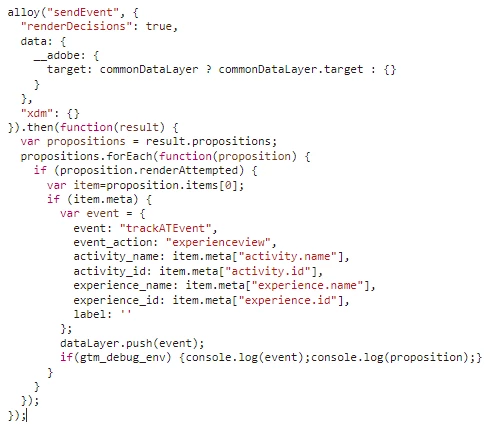
Could you help me to understand if we are missing any param or var? Why are not getting the reports?

A lot of thanks!

This post is no longer active and is closed to new replies. Need help? Start a new post to ask your question.
Best answer by JoseCarlos1

Thank you for posting your question here @jmateos! And thank you @pradnya_balvir for sharing your helpful insights! @jmateos were you able to resolve the issue? If so, please feel free to share any updates or follow up Qs here by Replying to the thread so that others who may come across the same or similar issues can refer to your approach 🙂 Thanks!


Hi! Yes, we found the problem about it. In the tool we have many environments. One environment for each team, then in our environment is setted by default other environment. To see the reports we need to filter selecting our environment. If we try to change the default environment to another one, this change will affect to all teams and will cause a big problem in the integration. (I´m Jmateos)

1 reply

pradnya_balvir
Community Advisor
Community Advisor
March 18, 2024

First check your target integration properly. Debug your page target page load image.

Check your reporting settings in Activity "Goals and settings" option.

JmateosAuthor
March 19, 2024

The strange thing is that I can see the Activity and the main Goal is "Page Views" or "Time on Site", but in the reports still in 0.

Then I have no idea if it is a problem in the 'configure' or in the 'sendEvent'.

Amelia_Waliany
Adobe Employee
Adobe Employee
May 8, 2024

Thank you for posting your question here @jmateos! And thank you @pradnya_balvir for sharing your helpful insights! @jmateos were you able to resolve the issue? If so, please feel free to share any updates or follow up Qs here by Replying to the thread so that others who may come across the same or similar issues can refer to your approach 🙂 Thanks!