Pass Parameters for Target Views Using Web Sdk | Community
Skip to main content
January 8, 2025
Solved

Pass Parameters for Target Views Using Web Sdk

  • January 8, 2025
  • 4 replies
  • 1773 views

Hi! I have implemented views on SPA using web sdk.


When I am on home page, xdm object returns view name as "index" and page name as "home".

when I proceed further and click a SPA component, xdm object returns view name as "men" and page name as "men category".


I want to run an activity on view name "men" and audience with revised page name as "men category".


Best answer by PraveshNehra

Hi @sistper ,
as mentioned by others, you can merge the call passing the viewname and page name in same call.


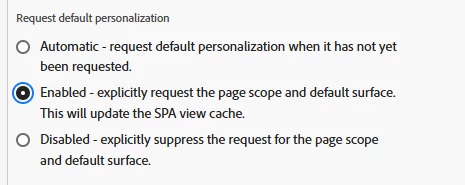
Also, you can try enabled option under request default personalization which can update your cache and make your activity qualified for the pagename mentioned(men category).


4 replies

Gaureshk_Kodag
Adobe Employee
Adobe Employee
January 8, 2025

Hi @sistper ,

You can pass the view name and page name values as mbox parameters within the "data" of the XDM object. These values can then be used in the Adobe Target audience section to create the desired audience. Have you already tried implementing this approach?

Gokul_Agiwal
Community Advisor
Community Advisor
January 8, 2025

Hi @sistper 

Yes agree with @gaureshk_kodag  you can use view name and page name values however a little correction here, 

in case if you're sending this parameter as mbox parameter then it must be passed as part of the xdm object and conform to a schema using the XDM ExperienceEvent class. 

in case if you're using as profile parameter then it must be a part of data object and prefixed with profile. to be mapped appropriately. 

Here is the example in below link 

https://experienceleague.adobe.com/en/docs/platform-learn/migrate-target-to-websdk/send-parameters#parameter-mapping-summary 

Thanks

Gaureshk_Kodag
Adobe Employee
Adobe Employee
January 8, 2025

Mbox parameters can be passed within the data object and used in Adobe Target to create audiences. However, when passed through the data object, these parameters are restricted to Adobe Target. On the other hand, if mbox parameters are passed via XDM, they are shared across multiple platforms, such as Adobe Experience Platform (AEP) and Adobe Analytics.

Page Name and View Name are standard parameters typically passed through XDM, as they are useful in both Adobe Analytics (AA) and Adobe Experience Platform (AEP).

The decision of where to pass the parameter depends entirely on your specific use case and requirements.

Additionally, Adobe may eventually transition all parameters to XDM in the future, and this scenario is documented accordingly in the help link. Hence, as @gokul_agiwal provided the document, it's good to have it under XDM to avoid future migration.

Gokul_Agiwal
Community Advisor
Community Advisor
January 8, 2025

Thank you @gaureshk_kodag 

PraveshNehraAdobe EmployeeAccepted solution
Adobe Employee
January 8, 2025

Hi @sistper ,
as mentioned by others, you can merge the call passing the viewname and page name in same call.


Also, you can try enabled option under request default personalization which can update your cache and make your activity qualified for the pagename mentioned(men category).


sistperAuthor
January 9, 2025

Hi @gokul_agiwal @gaureshk_kodag @praveshnehra  - thankyou for the response. I was able to run the activity on 'men' view with audience consisting web.page.pageDetails as "men category". Enabling the "enabled" toggle helped me target the activity with revised page name "men category".

Gaureshk_Kodag
Adobe Employee
Adobe Employee
January 9, 2025

That is great to know @sistper ! Thanks for confirming this.