How do you add authorized hosts in Target? | Community
Skip to main content
benarson
New Member
October 14, 2025
Solved

How do you add authorized hosts in Target?

  • October 14, 2025
  • 1 reply
  • 285 views

Good day all,


I'm following the documentation at What are Hosts and How Do I Use Them? | Adobe Target and the on-screen instructions, but I'm not getting expected results. 

The documentation says to place hosts on new lines, doesn't mention commas, and the error message says no new lines (says no to a lot of things). The help text says use commas, but the error says no. 

How have you entered authorized hosts?

Thanks all, -Brent

Best answer by kandersen-1

Hi @benarson ,

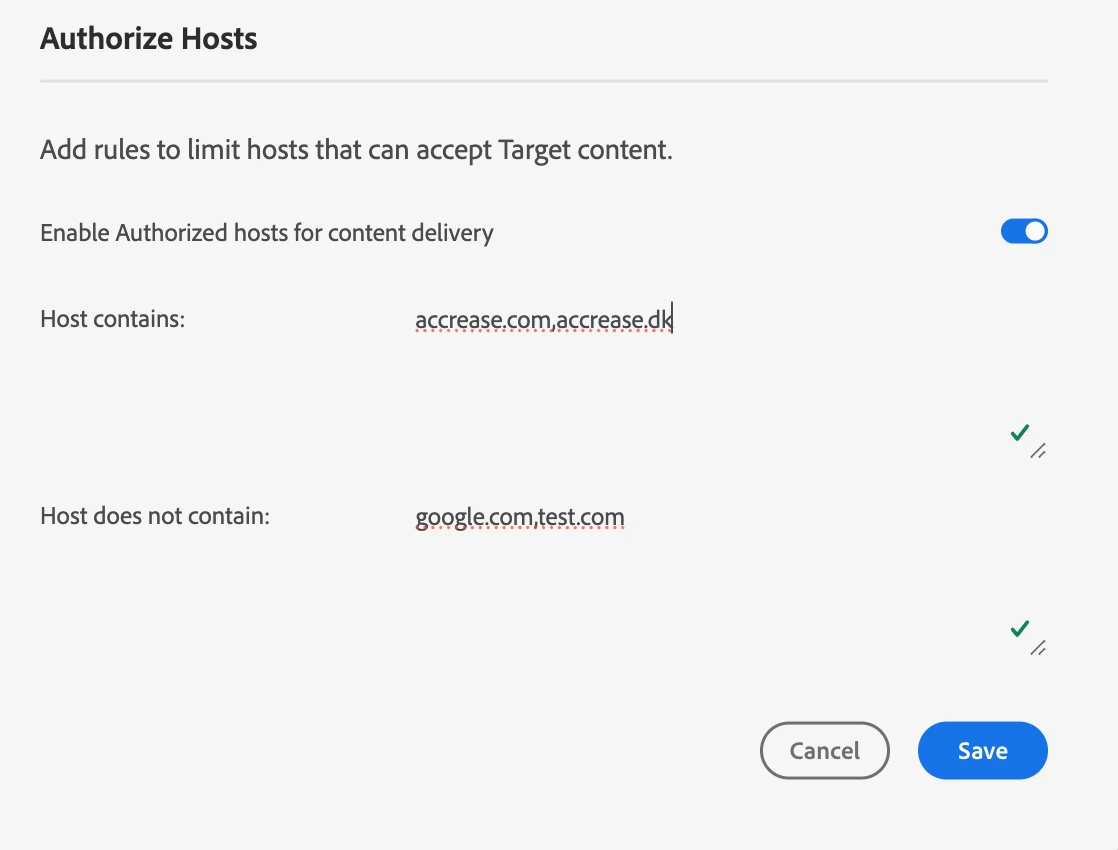
I'm not having any issues:


On your screendump it looks like you have a space after the comma. I think that's why you're getting an error. You need to comma seperate them without any spaces.

Hope this helps!


1 reply

kandersen-1
Community Advisor
kandersen-1Community AdvisorAccepted solution
Community Advisor
October 16, 2025

Hi @benarson ,

I'm not having any issues:


On your screendump it looks like you have a space after the comma. I think that's why you're getting an error. You need to comma seperate them without any spaces.

Hope this helps!


Test forum signature
benarson
benarsonAuthor
New Member
October 16, 2025

That's it! Thank you.

Adobe's documentation is incorrect, stating, "Multiple hosts can be listed, each on its own line." And I didn't try commas w/o spaces. Many thanks.