Has Adobe Target deprecated inserting multiple HTML elements with "Add Before" / "Add After" in the VEC? | Community
Skip to main content
September 11, 2025
Solved

Has Adobe Target deprecated inserting multiple HTML elements with "Add Before" / "Add After" in the VEC?

  • September 11, 2025
  • 2 replies
  • 1279 views

Hi,

I’ve run into an issue with the Visual Experience Composer (VEC). Previously, I was able to use the “Add Before” and “Add After” features to insert multiple HTML elements at once (for example, multiple HTML elements added after an element).

Recently, whenever I try this, Target throws an error saying that more than one element is being added. The only way to proceed is to split the HTML into separate insertions (one element at a time), which is tedious and error-prone.

I’ve checked the latest Adobe Target release notes, but I couldn’t find any mention of this being an intentional deprecation or limitation.

So my questions are:

  1. Has Adobe officially deprecated inserting multiple elements at once via “Add Before” / “Add After”?

  2. If yes, could you point me to the official documentation or release notes that confirm this change?

  3. If not, is this a bug in the new VEC, and should we open a support ticket?

This change is impacting our workflow, so any clarification would be very helpful.

Thanks in advance!

Best answer by Gokul_Agiwal

Hello @andresre 

CC: @cristinel @kandersen-1  


Thank you for details explanation about the issue you're facing. 


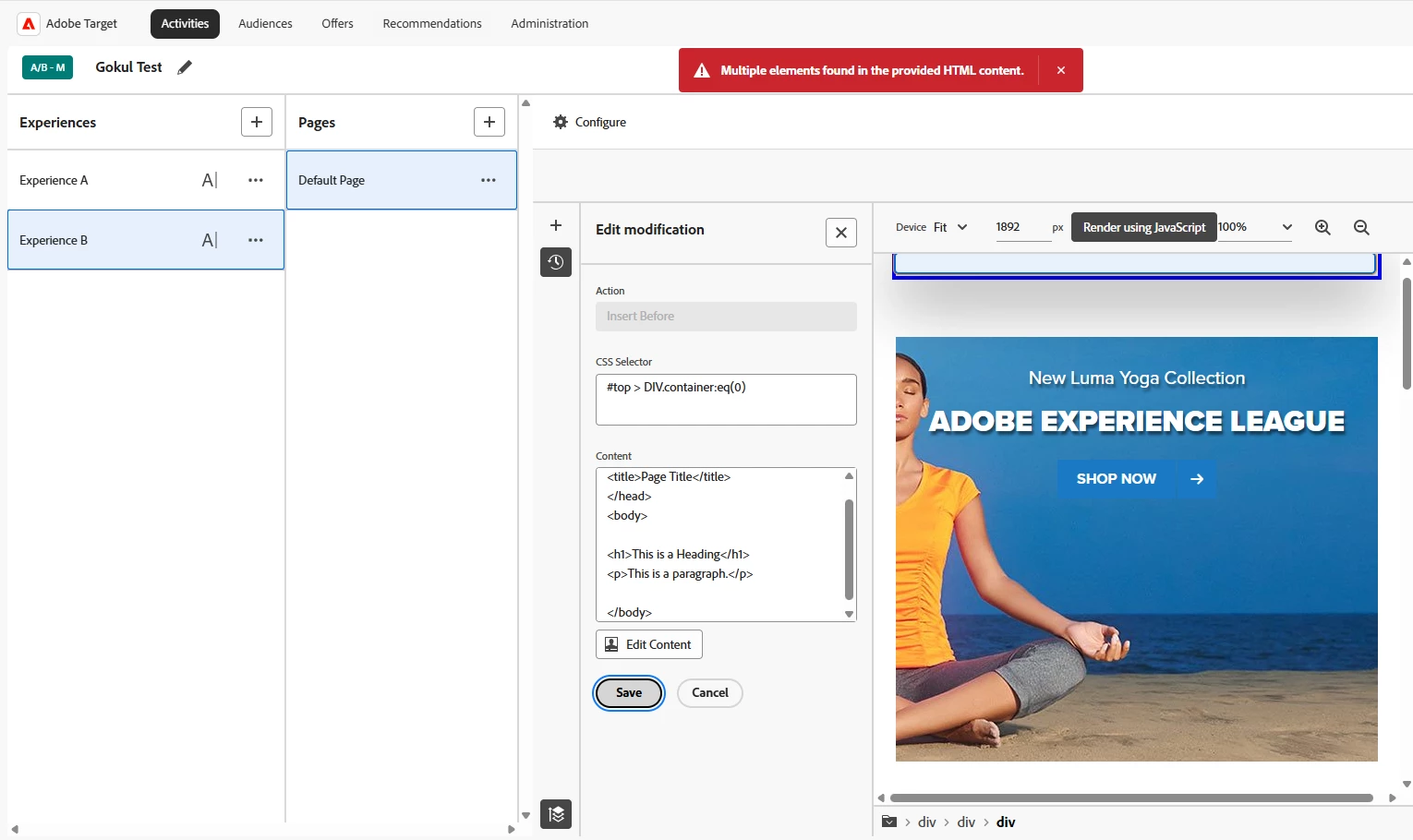
I tried to reproduce the issues at my end - see the similar screenshot below having the error called "Multiple elements found in the provided HTML content" 


After investigation - I got to know the root cause of the error.  


Ideally, Adobe Target expects the entire html content to be wrapped in a single root HTML element.
For example, if your html content includes like below :

<head> <title>Page Title</title> </head> <body> <h1>This is a Heading</h1> <p>This is a paragraph.</p> </body>

In above case you're adding elements without any parent level element which violates Target's requirement.


You can try by wrapping everything inside one parent <div> element with id as an attribute, for example like below : 

<div id="target_content"> <head> <title>Page Title</title> </head> <body> <h1>This is a Heading</h1> <p>This is a paragraph.</p> </body> </div>

This ensures the html content has exactly one HTML element at the top level, which satisfies the validation rule. 


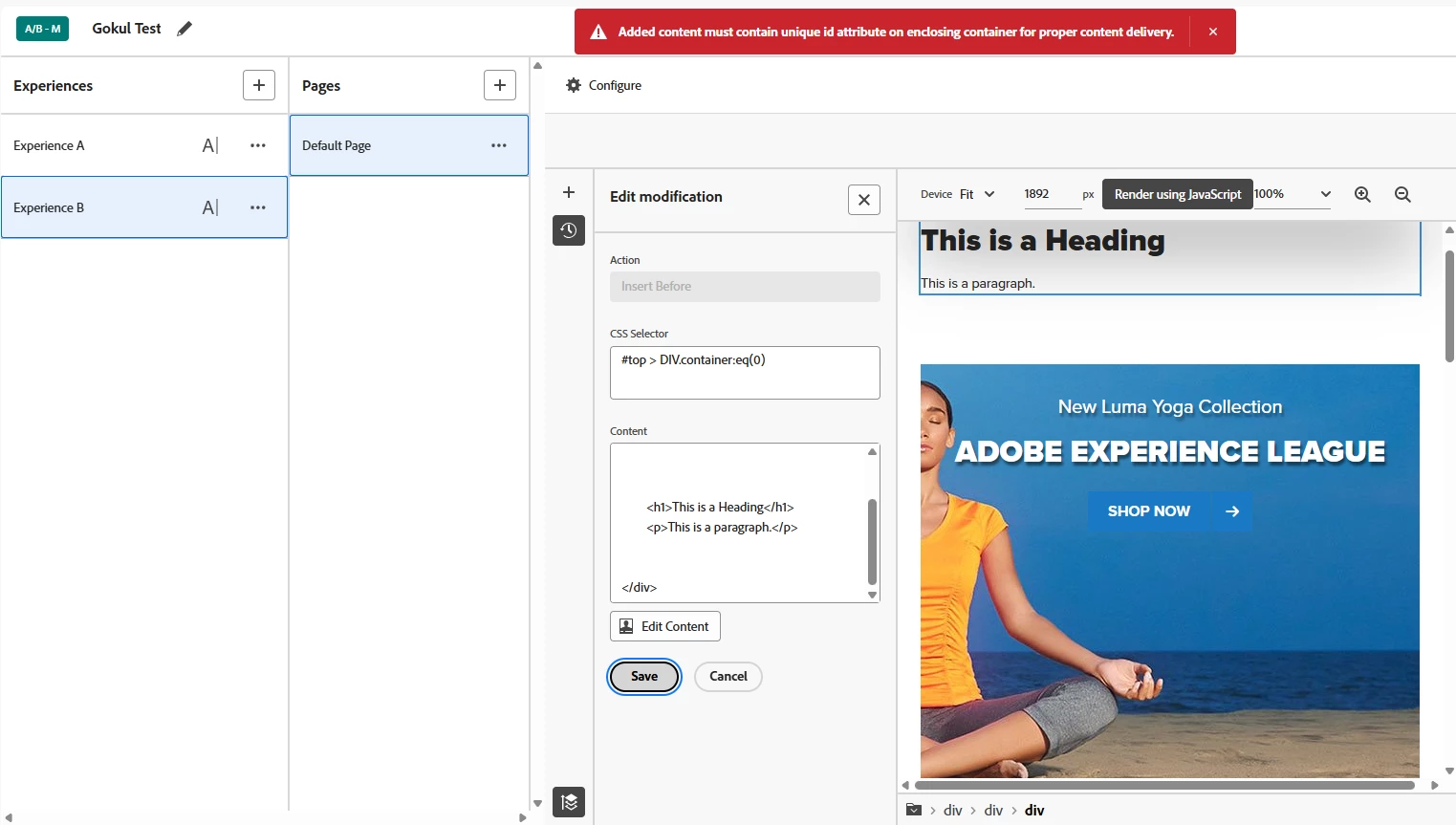
Also just fyi - In case if you missed the id attribute for the div or any other top level element, then you will see the below error 


So once you added all your HTML content into one parent element with unique id attribute then hopefully your issues get resolved. 


Hope this helps.  Feel free to post if you're seeing any other issues. 


Thank you. 

Gokul 

2 replies

kandersen-1
Community Advisor
Community Advisor
September 11, 2025

I encourage you to also post it in this thread: https://experienceleaguecommunities.adobe.com/t5/adobe-target-discussions/announcement-facing-issues-with-the-new-adobe-target-ui-you-re/td-p/762841

@gokul_agiwal is putting together a list to share with engineering and gather feedback.

Test forum signature
cristinel
Adobe Employee
Adobe Employee
September 12, 2025

Hello @kandersen-1 

The Insert Before / After option is still present in the new VEC, just that you need to select a component to insert first and than hover over the elements int he page. The VEC will display Insert Before / After button above and below the hovered element.

/Cristinel


AndresReAuthor
September 12, 2025

Hi Cristinel,

Thanks for confirming that the Insert Before / Insert After options are still present in the VEC — that part is clear to us and not in question.

The issue I’m raising is specifically about inserting multiple HTML elements at once. Previously, this was possible using the Add Before / Add After feature, but now Target throws an error if more than one element is included in the insertion.

I’ve attached a video in the original post that shows the behavior and a screenshot in this reply with the error displayed — this error didn’t exist before and only appeared very recently. Could you please review it and confirm whether:

  • This is an intentional change (deprecation), or

  • This is a new bug?

It would help a lot to know whether we should open a support ticket for this.

Thanks again for looking into it!


Gokul_Agiwal
Community Advisor
Gokul_AgiwalCommunity AdvisorAccepted solution
Community Advisor
September 14, 2025

Hello @andresre 

CC: @cristinel @kandersen-1  


Thank you for details explanation about the issue you're facing. 


I tried to reproduce the issues at my end - see the similar screenshot below having the error called "Multiple elements found in the provided HTML content" 


After investigation - I got to know the root cause of the error.  


Ideally, Adobe Target expects the entire html content to be wrapped in a single root HTML element.
For example, if your html content includes like below :

<head> <title>Page Title</title> </head> <body> <h1>This is a Heading</h1> <p>This is a paragraph.</p> </body>

In above case you're adding elements without any parent level element which violates Target's requirement.


You can try by wrapping everything inside one parent <div> element with id as an attribute, for example like below : 

<div id="target_content"> <head> <title>Page Title</title> </head> <body> <h1>This is a Heading</h1> <p>This is a paragraph.</p> </body> </div>

This ensures the html content has exactly one HTML element at the top level, which satisfies the validation rule. 


Also just fyi - In case if you missed the id attribute for the div or any other top level element, then you will see the below error 


So once you added all your HTML content into one parent element with unique id attribute then hopefully your issues get resolved. 


Hope this helps.  Feel free to post if you're seeing any other issues. 


Thank you. 

Gokul