
Green Star in Experience Targeting Activity | Community
Skip to main content
TimBo4
Level 2
October 24, 2024
Solved

Green Star in Experience Targeting Activity

  • October 24, 2024
  • 1 reply
  • 513 views

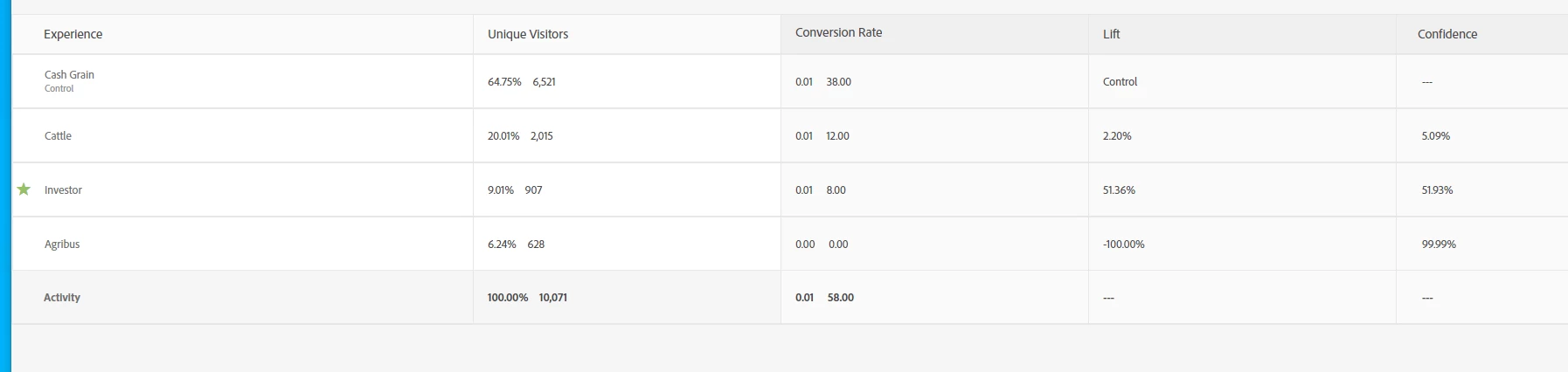
I am running an Experience Targeting activity with four different hero images based on customer industry. Does anyone know what the green star is indicating in this instance? 


This post is no longer active and is closed to new replies. Need help? Start a new post to ask your question.
Best answer by pradnya_balvir

Hi @timbo4 ,


In Adobe Target, a "green star" within an experience activity indicates that a particular experience has been identified as the "winner" in an A/B test or personalization campaign, signifying the best performing option based on set goals and metrics; essentially, it visually highlights the most successful experience within the activity.


Key points about the green star: 
  • Winner designation:
    When a green star appears next to an experience, it means the system has determined that experience to be the most effective based on collected data. 
     
  • Auto-allocation feature:
    This is particularly relevant in "Auto-Allocate" activities where the platform automatically directs more traffic towards the winning experience as the test progresses. 
     
  • Visual cue:
    The green star acts as a clear visual indicator to identify the optimal experience within an activity

1 reply

pradnya_balvir
Community Advisor
pradnya_balvirCommunity AdvisorAccepted solution
Community Advisor
October 24, 2024

Hi @timbo4 ,


In Adobe Target, a "green star" within an experience activity indicates that a particular experience has been identified as the "winner" in an A/B test or personalization campaign, signifying the best performing option based on set goals and metrics; essentially, it visually highlights the most successful experience within the activity.


Key points about the green star: 
  • Winner designation:
    When a green star appears next to an experience, it means the system has determined that experience to be the most effective based on collected data. 
     
  • Auto-allocation feature:
    This is particularly relevant in "Auto-Allocate" activities where the platform automatically directs more traffic towards the winning experience as the test progresses. 
     
  • Visual cue:
    The green star acts as a clear visual indicator to identify the optimal experience within an activity