
Jan 25, 2024 9:23 PM UTC
Solved

Desktop Authenticated Marketing Tips | Dual CTA URL in Adobe Target

We would like to add a second call to action (CTA) link into a message tip in Adobe Target. (Blue text). See the below snip. Is it possible and how do I accomplish this?

This post is no longer active and is closed to new replies. Need help? Start a new post to ask your question.
alexbishop
alexbishopAccepted solution
Adobe Employee
Jan 29, 2024 1:22 PM UTC

Yes, you can do this through the Visual Editor by selecting the paragraph/content you want to change and then choosing the Edit > Text/HTML option
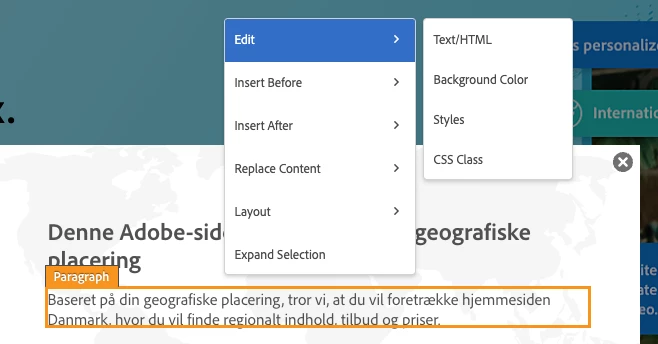
 

You can then add in the text/links etc, which I'd expect would be possible through the plain text editor as below:
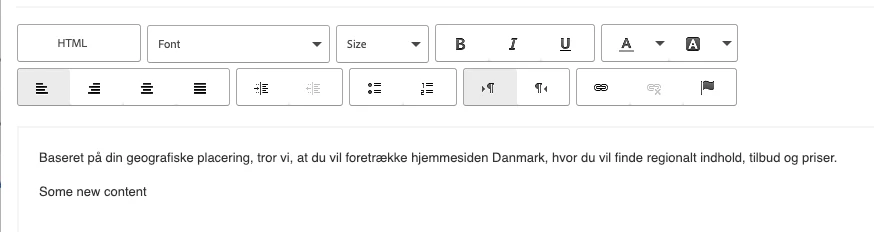
 

However, you can also click the "HTML" option and then you've got more control over formatting/alignment etc

2 replies

alexbishop
Adobe Employee
alexbishopAdobe EmployeeAccepted solution
Adobe Employee
Jan 29, 2024 1:22 PM UTC

Yes, you can do this through the Visual Editor by selecting the paragraph/content you want to change and then choosing the Edit > Text/HTML option


You can then add in the text/links etc, which I'd expect would be possible through the plain text editor as below:


However, you can also click the "HTML" option and then you've got more control over formatting/alignment etc

Translate
FerenccxAuthor
Jan 30, 2024 4:40 PM UTC

Thank You for reply. I found out 

The multiple links is not an Adobe Target limitation, it’s an internal invented limitation. When they created the data structure to support “Tips” in our authenticated space they only allow a single field for a hyperlink.


Translate