Hey @_paul_s
Adobe target doesn't directly support deploying the same activity to multiple environments ( dev, stage, uat or prod) in single process like Adobe Launch however you can streamline this process somehow like
1) Using mbox parameters or URL's to restrict activity - Create a single activity in Adobe Target and setup the environment specific conditions through page delivery options (below screenshot) based on the URL or through adding mbox parameters like (env = stage) etc.
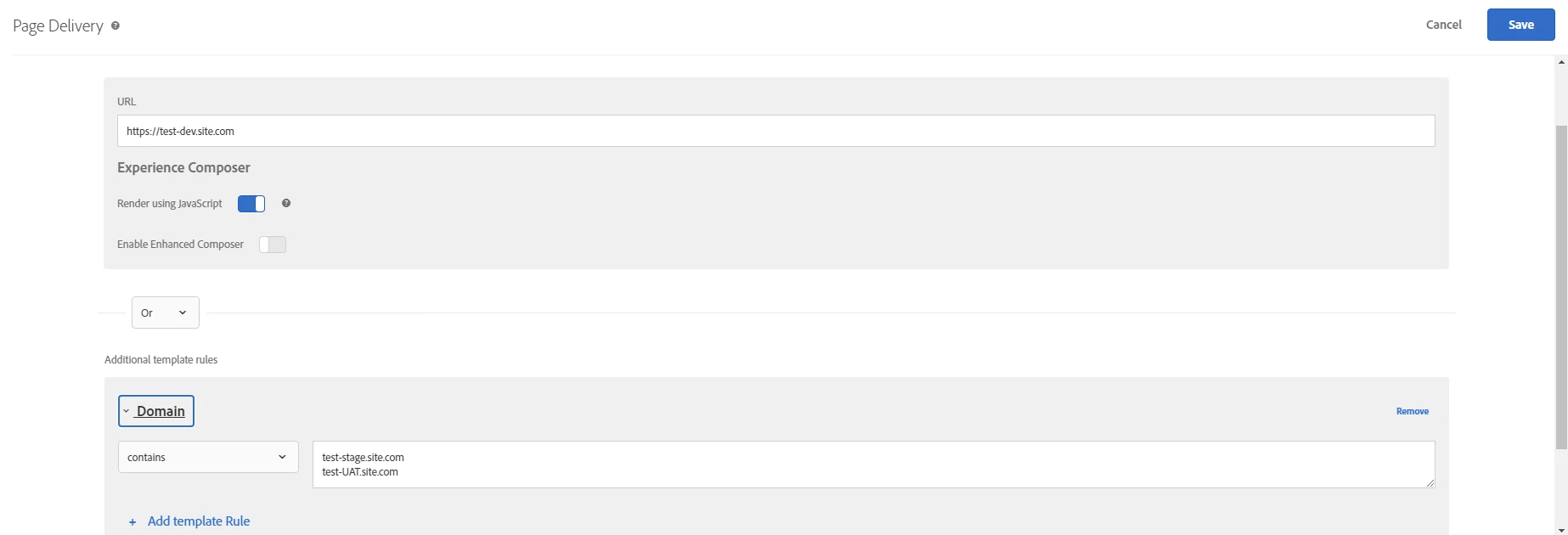
Please note - this delivers the same test across all the domains.
2) You can create activities on a specific environment by utilizing and combining Properties with Workspaces. A property is mapped to a workspace.
basically, a Property and a Workspace for each environment. When you create a property it will generate a unique id (at_property) and then implement this id into its relevant environment. For Ex: dev = id123, stage = id345, prod = id567 and while creating the activity in Adobe Target, you can assign as many properties so the test will deliver on that environment.
There is nice blog written by @vaibhav_mathur on property and workspace - you can go through it Building Safe and Secure Engaging Experiences - The Importance of Controlled Access in Experience Optimisation - Dexata and I'm sure that will help.
Hope this helps.