JyotiSharmaV
Community Advisor
Community Advisor
August 1, 2023
Solved

Conversion Rate for directed page Buttons

Hi Community, I created an experience targeting with 3 experiences in my activity and have a CTA image that navigates to a registration page. I am curious how I would evaluate the success of my registration from these 3 experiences. As far as I know, I can only select selectors from my experience pages not from the navigated registration page. Any thoughts? @alexbishop @pratheeparunraj 

This post is no longer active and is closed to new replies. Need help? Start a new post to ask your question.
alexbishop
alexbishopAccepted solution
Adobe Employee
August 3, 2023

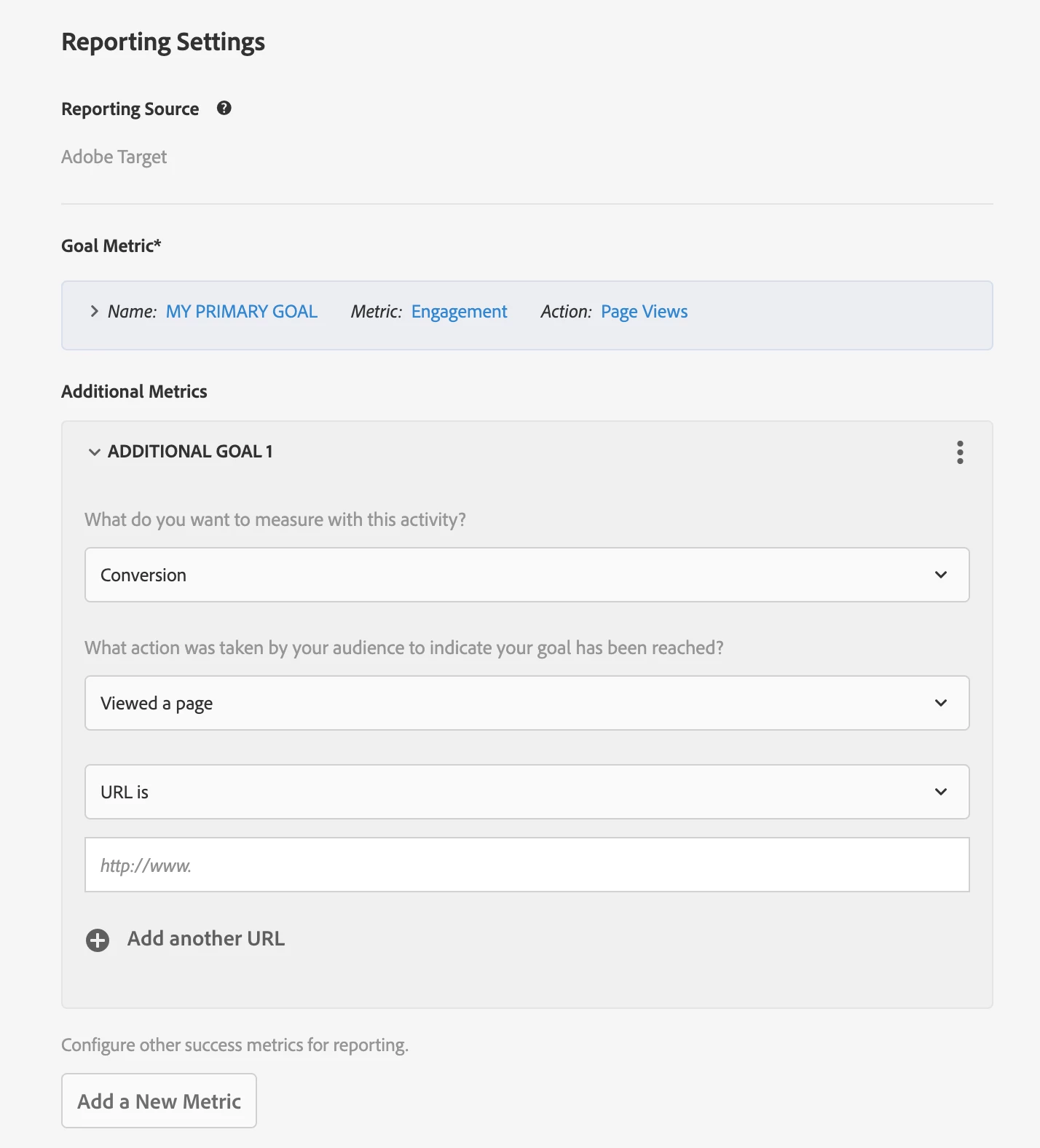
If you click the "Add a new metric" button, you can then select "Conversion", "Viewed a page", "URL is"

4 replies

alexbishop
Adobe Employee
Adobe Employee
August 2, 2023

Assuming you don't have Adobe Analytics (which would make this very easy), a couple of options are:
i) If you want to report via Target reporting, the easiest option would be to to add an additional metric in the Reporting config, where you could specify Page URL is "www.site.com/registrationcomplete"
ii) If you want to track in your analytics tool then you could add a query string parameter to each CTA link (e.g. www.regpage.com?exp=A) and then you could track in your analytics tool how many complete registration on www.regpage.com?exp=A, www.regpage.com?exp=B etc etc

Translate
JyotiSharmaV
Community Advisor
Community Advisor
August 2, 2023

@alexbishop For point 1, Can you pls elaborate or share a screenshot where I can do that if I want to? I guess I can still add an additional metric even though my activity is active and live. 

Translate
alexbishop
Adobe Employee
alexbishopAdobe EmployeeAccepted solution
Adobe Employee
August 3, 2023

If you click the "Add a new metric" button, you can then select "Conversion", "Viewed a page", "URL is"

Translate