Close button on pop up in Target Activity | Community
Skip to main content
May 20, 2022
Solved

Close button on pop up in Target Activity

  • May 20, 2022
  • 1 reply
  • 898 views

Hi,


I am trying to create a pop up using lightbox template code provided in this link : https://github.com/Adobe-Marketing-Cloud/target-experience-templates/tree/master/lightbox

I have been able to do required customizations i.e. apply CSS , change text however, i need a close button to be present at top right corner instead of closing on background click. I tried many things but none of that seem to work. Can anyone please help? I am trying to create a button with class="close" and id=att_lightbox_close but it's not working.

<button type="button" class="close" aria-label="Close">
<span aria-hidden="true">×</span>
</button>


This post is no longer active and is closed to new replies. Need help? Start a new post to ask your question.
Best answer by alexbishop

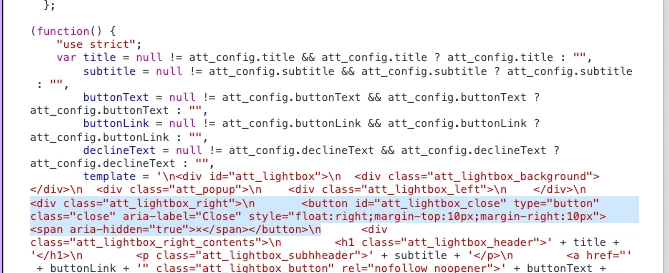
I've highlighted what can be added to the html template part of the code, in order to close the lightbox based on "Close" button click instead of background click. Note: the original "No Thanks" button is also removed

1 reply

alexbishop
Adobe Employee
alexbishopAdobe EmployeeAccepted solution
Adobe Employee
March 15, 2023

I've highlighted what can be added to the html template part of the code, in order to close the lightbox based on "Close" button click instead of background click. Note: the original "No Thanks" button is also removed