Check trackEvent() call | Community
Skip to main content
Level 2
August 14, 2023
Solved

Check trackEvent() call

  • August 14, 2023
  • 1 reply
  • 1143 views

Hello!
I'm trying to create an audience by using "activity id" as a profile attribute.

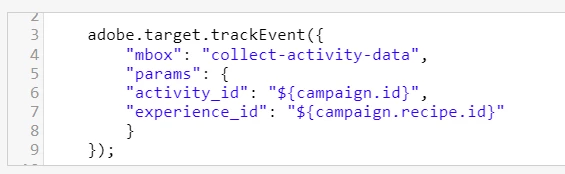
So I followed the instructions presented here and included trackEvent() as part of the experience-code: link

Now how can I check the trackEvent() call? Is there any command in browser-console I could use to see this "activity_id" trigger before using it on a profile-script? Just so we can check if it's working in fact.

Thanks.
This post is no longer active and is closed to new replies. Need help? Start a new post to ask your question.
Best answer by PratheepArunRaj

Great that AEPD worked!

Yes, the profile script and the audiences are good, however, I was checking whether we can directly consume the Activity Name and Activity ID in a profile script interface; unfortunately, there is no information available on Adobe's Doc, and hope it is not possible.

So, the implemented method is good and should work as expected.

Thank You, Pratheep Arun Raj B (Arun) | NextRow DigitalTerryn Winter Analytics

1 reply

PratheepArunRaj
Community Advisor and Adobe Champion
August 14, 2023

Dear @gabriellapa ,

Can you use Adobe Experience Platform Debugger (Chrome Extension) to validate? It should capture all the server calls sent to Adobe Target with available parameter values.

Hope you made sure that the trackEvent() call is triggered after the response tokens from Adobe Target.

Thank You, Pratheep Arun Raj B (Arun) | NextRow DigitalTerryn Winter Analytics

PS: If you don't share the activity information with other 3rd party solutions, you can use a profile script. Isn't that option not feasible for you?

Thank You, Pratheep Arun Raj B (Arun) | Xerago | Terryn Winter Analytics
Level 2
August 14, 2023

@pratheeparunraj Thanks, it worked on AEPD extension 🙂 


Yes, I've also created the profile script. 


Then I'll use it as an audience attribute, take a look:


It should work, right?!

Thank you so far 🙂

PratheepArunRaj
Community Advisor and Adobe Champion
PratheepArunRajCommunity Advisor and Adobe ChampionAccepted solution
Community Advisor and Adobe Champion
August 14, 2023

Great that AEPD worked!

Yes, the profile script and the audiences are good, however, I was checking whether we can directly consume the Activity Name and Activity ID in a profile script interface; unfortunately, there is no information available on Adobe's Doc, and hope it is not possible.

So, the implemented method is good and should work as expected.

Thank You, Pratheep Arun Raj B (Arun) | NextRow DigitalTerryn Winter Analytics

Thank You, Pratheep Arun Raj B (Arun) | Xerago | Terryn Winter Analytics