Level 2
Nov 20, 2019 10:22 PM UTC
Solved

at.js 2.x equivalent of browserWidth or mbox.param('browserWidth') ?

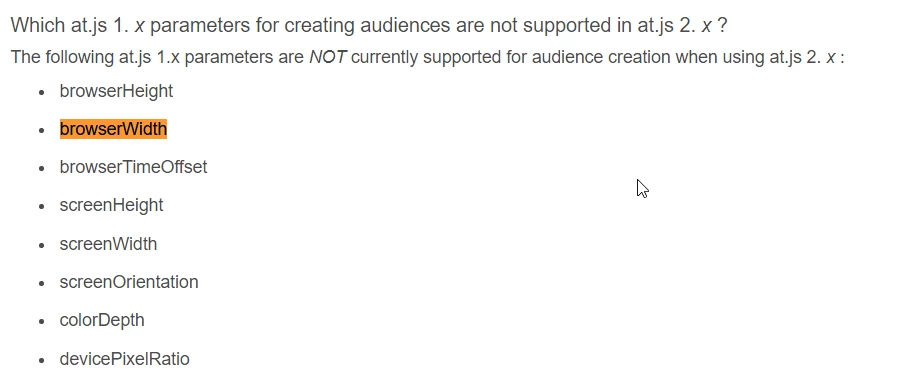
As mentioned in : Upgrading from at.js 1.x to at.js 2.x ,

There doesn't seem to be support for the following mbox parameters when upgraded to 2.x.
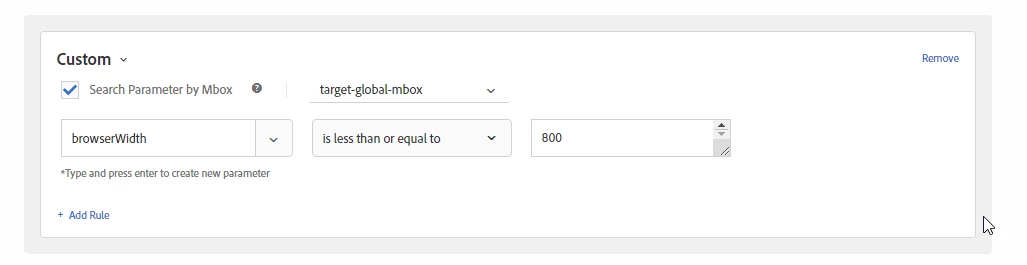
I'm currently trying to create audiences where I only want visitors whose browserWidth is greater than 800px to qualify for a specific experience in my activty. Visitors whose browserWidth is less than 799px would be allocated into another audience, and served a different experience.

I've tried implementing in this in the audience, but because the site I work on utilizes at.js 2.x, the following implementation didn't work. I've tested it.
I've also tried creating Profile scripts to retrieve the value of mbox.param('browserWidth'), but that doesn't work either.

Is there a method that I can use to grab the browser width of the visitor in at.js 2.x? I don't have access to adobe launch, so changes in there would not be an option.

This post is no longer active and is closed to new replies. Need help? Start a new post to ask your question.
Shruti_PremkumarAccepted solution
Adobe Employee
Nov 21, 2019 2:45 PM UTC

​ As mentioned above, there is an enhancement request logged for the same.

Ref: https://forums.adobe.com/ideas/11688  . Please feel free to upvote the idea so that if more users request the same it can be prioritized .

In the meantime, you could try and grab these values and pass them as custom parameters and then use them for targeting . For example, just pass a custom parameter named "browserWidth" and set it to document.body.offsetWidth . You could also use window.screen object to get the resolution of the screen (i.e. width and height of the screen).

Ref: https://www.tutorialrepublic.com/javascript-tutorial/javascript-window-screen.php

Hope this helps.

5 replies

surebee
Adobe Employee
Adobe Employee
Nov 21, 2019 12:43 AM UTC

Hi christophert87757717​,

Thank you for reaching out! As outlined in Upgrading from at.js 1.x to at.js 2.x the browserWidth can no longer be used to create an audience out of the box with at.js 2.x as it is not captured as an "mbox" parameter. We do have an enhancement request logged internally for this feature.

Translate
Shruti_PremkumarAdobe EmployeeAccepted solution
Adobe Employee
Nov 21, 2019 2:45 PM UTC

​ As mentioned above, there is an enhancement request logged for the same.

Ref: https://forums.adobe.com/ideas/11688  . Please feel free to upvote the idea so that if more users request the same it can be prioritized .

In the meantime, you could try and grab these values and pass them as custom parameters and then use them for targeting . For example, just pass a custom parameter named "browserWidth" and set it to document.body.offsetWidth . You could also use window.screen object to get the resolution of the screen (i.e. width and height of the screen).

Ref: https://www.tutorialrepublic.com/javascript-tutorial/javascript-window-screen.php

Hope this helps.

Translate
Level 2
Nov 21, 2019 4:06 PM UTC

Hi Shruthi,

Thanks for the response! I don't have access to the company code base or Adobe Launch or DTM. How would you suggest passing the parameters before at.js 2.x is loaded? I've tried document.body.offsetWidth before in a profileScript, but I would receive an error stating my syntax was invalid.

Translate
Adobe Employee
Nov 22, 2019 5:03 PM UTC

christophert87757717​ Yes passing the custom parameter would require that you call the targetpageparams() function through DTM/Launch or on the page. If you don't have the option to do that I am afraid that the above suggested approach won't be applicable to you.

Translate
Level 2
Nov 6, 2022 9:14 PM UTC

@christammm hi, how did you finally implement this?

Translate