Adobe4Target - strange results in freeform table | Community
Skip to main content
Level 2
March 31, 2026
Question

Adobe4Target - strange results in freeform table

  • March 31, 2026
  • 1 reply
  • 18 views

Hello !

We have Analytics4Target on our website, we gets the data in Analytics and we are able to pull Activity/Experience results.

But we would like to do some things that seems impossible, do you know how we can do these ?

1. Get visits/visitors that got an activity/experience that were live between specifics dates.

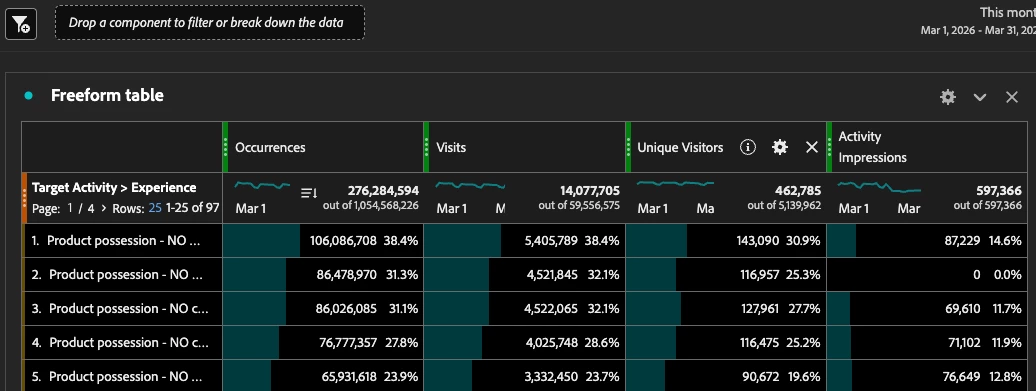
With the following dashboard, the “Activity” metric correctly show 0 for the activity that were off this month. But the other metrics are not relevant at all. Isn’t it possible to use other metrics ?
2. Link an activity/experience to a Prop

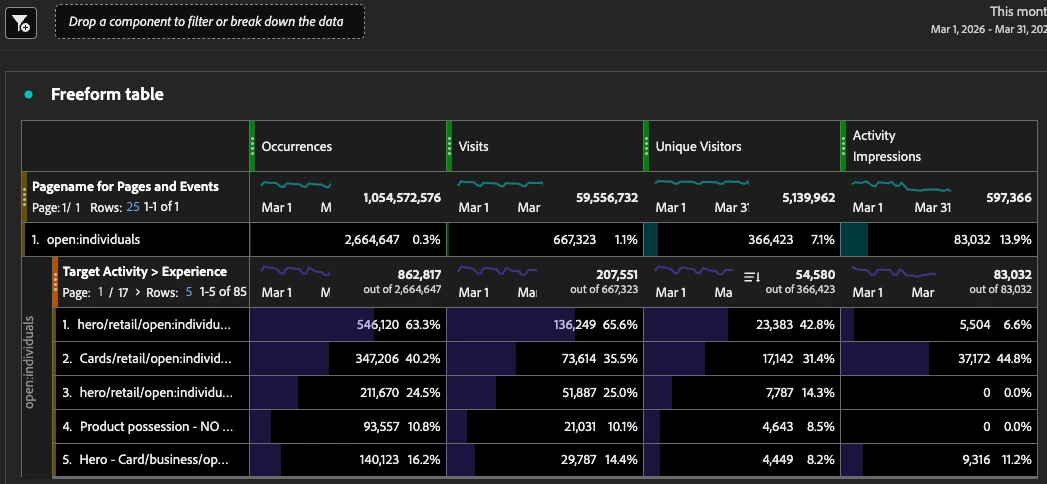
If I use a Prop that is also sent on the Adobe Target requests, I’m able to list activity linked to it when using “Activity impressions” (the activities that is are 0), but the other metrics give activities that are from other pages.
Thanks a lot,
Julien

1 reply

MandyGeorge
Community Advisor and Adobe Champion
March 31, 2026

I’m not sure if I completely understand what you’re asking, and it’s been a little while since I’ve used A4T.

For the first question, “isn’t it possible to use other metrics”. I’m assuming that you mean because they’re showing values even though the activity wasn’t live during that time period? It looks like all of those experiences came from the same Target Activity. I believe because the activity is still live, is someone was sorted into the experience, even though they aren’t seeing the experience any more, it is still tracking the user and any hits/visits that they have.

If you’re wanting to only show specific experiences in your table, you can use a “display only selected rows option.” Or, you could sort your table by the activity impressions column so the experience with 0 is at the bottom of the table. It looks like you have a lot of experiences, so you would only be seeing the ones with the top number of activity impressions.


For your second question, the way you have your table built out is you’re looking for values against the prop and then filtering to the target activity. This means that it’s going to show you occurrences/visits/visitors for all values of the prop, regardless of if it was seen at the same time as the target activity. To fix this, you can make a hit level segment limiting the hits to those that have the target experiences/activities that you want to see the prop for.


I hope this helps. If I’ve misunderstood your questions, let me know.