
Adobe Target one variant with significantly less traffic than the other: explain sample mismatch | Community
Skip to main content
isaakskinner
Level 2
June 19, 2026
Question

Adobe Target one variant with significantly less traffic than the other: explain sample mismatch

  • June 19, 2026
  • 1 reply
  • 124 views

We are running an AB test to test updated Headline copy on a landing page. We are testing 4 variants (including control) and have manually set the allocation to 25% to each. I understand that audiences will never exactly match the allocated manual distribution, however in our latest AB test one variant is seeing a significant misallocated. 

Some background:

  • Allocation manually set to 25%
  • This is an AB test for updated headline copy, no technical or component changes and no difference in how the variants were set up.
  • This is the ONLY test active on the site, there is no collision with other tests
  • There is no audience or segment applied: all users are eligible
  • The gap is present for the duration of the experiment (so its not a one time blip)
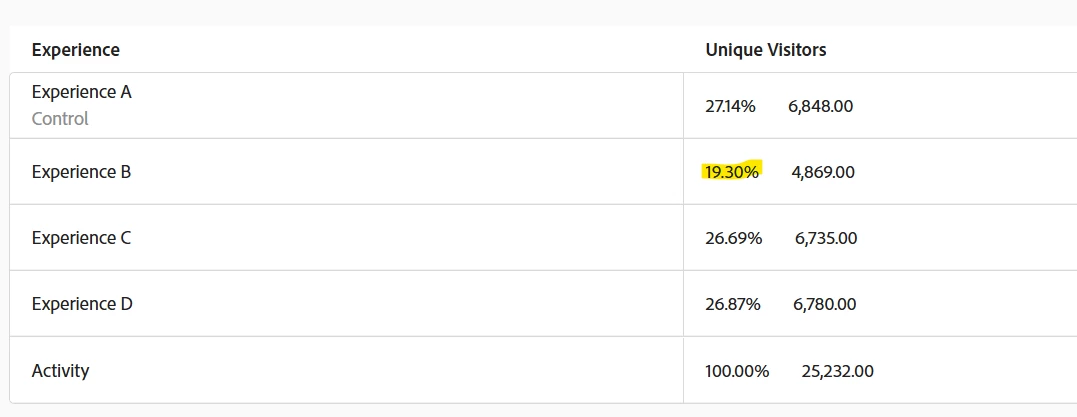
 

I am struggling to determine what would cause this and if invalidates the results of the test. 

Has anyone experienced something similar? How can we avoid in the future or prevent?

1 reply

DineshK
Level 3
June 22, 2026

Hi ​@isaakskinner
 

Looking at your data, Experience B sitting consistently at ~19% for the entire test duration isn't normal variance — that's a structural problem. If it were random fluctuation, it would even out over time. It hasn't, which means something specific is causing it.

What's most likely causing this

Target assigns every visitor to an experience on their first visit and remembers that assignment. The most common reason one variant gets consistently less traffic is returning visitors who were already bucketed from a previous test on the same page. If you ran any other test on this page before — even one that's now paused or ended — some of those visitors are coming back with a stored assignment that's interfering with your current split.

Things to check

  • Did any previous test run on this same page or mbox? Even a completed or paused activity can leave fingerprints on returning visitor profiles. This is the most likely culprit
  • Was this activity paused and restarted at any point? New visitors get re-randomised when you resume, but anyone who already visited during the first run keeps their original assignment — this can skew your distribution from the start
  • Were preview or QA sessions done in a regular browser window? If your team previewed the activity before launch in a normal browser (not incognito), those visits wrote real experience assignments to real visitor profiles. Always use incognito for QA
  • Is there any CDN caching on the page? If your CDN is caching a version of the page, some visitors could be getting a static cached experience rather than a live Target decision — this can make one variant appear to consistently under-receive traffic

Does this invalidate your test

Experiences A, C, and D are all within half a percent of each other — that's clean. Their results are reliable and comparable.

Experience B is the problem. Because it received a different type of visitor pool than the others, you can't fully trust its numbers. You can note the directional trend but shouldn't make a final decision based on Experience B's performance alone.

How to avoid this in future

  • Always create a brand new activity for each test — never duplicate or reactivate an old one on the same page
  • Use incognito/private browsing every time you QA or preview before launch — this prevents test visits from being written to real visitor profiles
  • After ending a test, give it 24-48 hours before launching a new one on the same page — lets stored visitor assignments clear out for most users
  • If you're still seeing unexplained traffic gaps after checking all of the above, raise it with Adobe Support — they can look at the activity configuration on the backend and confirm whether the visitor distribution hash is the root cause

PS: Based on my experience with similar Target implementations, here's what I'd look at first — happy to be corrected if anyone has seen something different.
