Adobe Target Error - While moving AEP audience from Default workspace to another Workspace. | Community
Skip to main content
May 13, 2025
Question

Adobe Target Error - While moving AEP audience from Default workspace to another Workspace.

  • May 13, 2025
  • 1 reply
  • 450 views

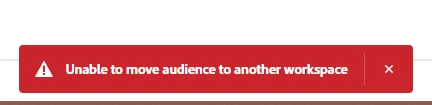
I'm trying move AEP audience from Default workspace to Another custom workspace. I was able to do that last on 5th May 2025. Suddenly since today I am getting this error 
This post is no longer active and is closed to new replies. Need help? Start a new post to ask your question.

1 reply

pradnya_balvir
Community Advisor
Community Advisor
May 14, 2025

Hi @viraj_bankar ,


Since you were successfully moving AEP audiences from the Default workspace to a custom workspace as recently as May 5, 2025, and the error suddenly started, this strongly suggests that something has changed in the environment or backend, not in your process.

Recent Changes in Adobe Admin Console / Permissions

  • Possible Cause: Admins may have updated roles or permissions (especially workspace assignments) between May 5 to May 13th.

  • Action:

    • Ask your Adobe Admin to check:

      • Whether your Target product profile assignments were changed.

      • If your workspace access or permissions were modified.

    • You should have Editor or Approver rights in both Default and destination workspaces.

2. AEP–Target Integration Bug or Outage

  • Possible Cause: A temporary issue or bug in Adobe's backend integration layer between AEP and Target.

  • Action:

    • Check Adobe Status Dashboard for any incidents affecting Adobe Target or Experience Platform.

    • If yes, this may be the root cause—wait or contact Adobe Support with impact details.

3. Audience Format or Activation Flow Changed

  • Possible Cause: AEP may have changed how audiences are shared/activated or metadata structure (either intentionally or due to a bug).

  • Action:

    • In AEP, go to Destinations > Adobe Target.

    • Verify that the audience in question shows “Succeeded” under activation.

    • If it's failing now (but previously succeeded), the structure may have changed or failed silently.

4. Workspace Configuration Regression

  • Possible Cause: If your target workspace settings or API integrations were changed, new restrictions might be preventing the move.

  • Action:

    • Check Target UI > Setup > Workspaces.

    • Confirm that:

      • Your custom workspace still exists and is active.

      • You still have the appropriate access levels.