
"Access Denied" when trying to get a Target audience via API although I can list audiences | Community
Skip to main content
DmytroPanchenk
Level 3
March 10, 2025
Solved

"Access Denied" when trying to get a Target audience via API although I can list audiences

  • March 10, 2025
  • 1 reply
  • 891 views

Hi Everyone,


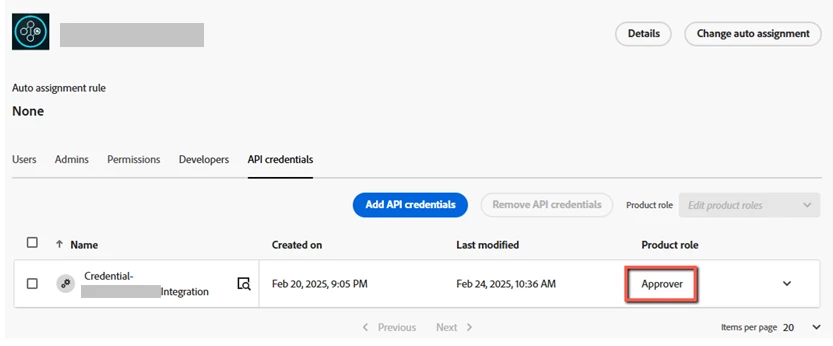
I configured Target API integration in the dev console and assigned "Approver" Target role to that integration as shown in the screenshot. I also assigned a specific product profile, and included my Target workspace into that profile.

With that integration, I was able to get the list of activities for my workspace, get a specified XT activity, and the list of audiences for the workspace.

However, when I tried to view a specific Target audience that I created in my workspace, I got the error shown below. The audience's source is "Adobe Target", and it belongs to my workspace.

Can anyone suggest how to overcome that error?

{
"httpStatus": 403,
"requestId": "l4yUApF2N6FINilzfS49EP9y5LsR1O1Y",
"requestTime": "2025-03-10T22:01:02.988262667Z",
"errors": [
{
"errorCode": "Forbidden.Resource",
"message": "Access denied. You do not have sufficient privileges in accessible workspaces to perform this operation on SEGMENT with id 3438573.",
"meta": {}
}
]
}


This post is no longer active and is closed to new replies. Need help? Start a new post to ask your question.
Best answer by VikasOhlan

Hi @dmytropanchenk ,

To resolve this, please do set the below Accept header in your API request. 

--header 'Accept: application/vnd.adobe.target.v3+json'

Given different versions of the API may expose different data models, permission checks, or resource handling rules. Without explicitly requesting v3, the default (usually v1 or v2) is used, which i guess does not have access to workspace-scoped audiences.


I tried this on my end and I'm now getting proper response. 

Regards,
Vikas Ohlan
LinkedIn Profile 

1 reply

VikasOhlan
Adobe Employee
VikasOhlanAdobe EmployeeAccepted solution
Adobe Employee
April 4, 2025

Hi @dmytropanchenk ,

To resolve this, please do set the below Accept header in your API request. 

--header 'Accept: application/vnd.adobe.target.v3+json'

Given different versions of the API may expose different data models, permission checks, or resource handling rules. Without explicitly requesting v3, the default (usually v1 or v2) is used, which i guess does not have access to workspace-scoped audiences.


I tried this on my end and I'm now getting proper response. 

Regards,
Vikas Ohlan
LinkedIn Profile 

DmytroPanchenk
Level 3
April 4, 2025

Thank you @vikasohlan , adding the header helped.